

 ScottPeterJohnson
Outlook trouble on Android
Hi, I am using Outlook on my Android for Purelymail on imap and having issues. My wifes account is having the same issues. We both use a Huawei P30 Pro running EMUI 12.0.0. I was going to provide android version but can't find it!
Issue 1 - very often the inbox (when it works) contain messages with no content. Issue 2 - very often the extensive collection of folders in both our accounts does not appear. Issue 3 - if it is working then we are unable to send emails.
Initially, the only way we can get it to work is to select the account in outlook and select 'reset account'. This no longer works and will probably have to resort to removing and adding the account. So we are both at the point where we can no longer use these accounts in Outlook. We are both Outlook user and my wife also has her work email. As you can imagine she doesn't want 2 apps for 2 accounts.
As a comparison we are moving from one.com which works as you would expect in Outlook. Unfortunately one.com is getting pricey.
I suspect it may be something to do with DNS entries but my knowledge is way too limited in this area.
So it would be great if you could recommend a quick fix.
Let me know what details you need to analyse this case.
Thanks
Richard

Okay I have progress. I had a 'corrupt' install of outlook. Every time I re-added my purelymail account details I noticed outlook defaulted to a MS Office Business 365 account of the same name. This was a left over from trialing MS as a home for my domain and email - until I understood the real pricing! So I deleted outlook from my phone and reinstalled. Currently things look okay. Some folders are slow to populate but hoping that improves. NB I could have probably just deleted all data for the app instead of reinstalling. I am just trying to send a test email and it is excruciatingly slow. I'll give it the rest of the day to get synced and see if that helps.
Further to my last entry, things have gone backwards. The new install hasn't aged very well and has reverted to the point where the inbox or folders in outlook will not update even though its offers the 'load more messages' option. In fact, having gone into the purelymail page in my browser, I have read and deleted my inbox. Outlook is still showing the same 3 emails. This suggests to that Outlook cannot even connect to purelymail using imap - or at least it does for a short period then stops.
So just to summarise; Outlook on android works for imap at one.com It doesn't work for imap at purelymail.com Any advice?
I've heard reports of similar issues before. Interesting that it works with one.com, as I assumed Outlook android was broken with IMAP in general. I'll try to set it up for myself and see if I can figure out what goes wrong.

Appreciate it. I have added the purelymail DNS settings to the one.com as per instructions. However there are more on the one.com control panel which they refer to as 'standard' settings. I do not know what impact these have, if at all. Are these settings confidential before I attach a screenshot?!?
I've heard reports of similar issues before. Interesting that it works with one.com, as I assumed Outlook android was broken with IMAP in general. I'll try to set it up for myself and see if I can figure out what goes wrong.
Hi - have you had any luck analysing this issue? If it is not a priority or is unlikely to happen please let me know so I can make other arrangements. Thanks Richard
I'm still analyzing, but I have discovered at least one major issue so far: whenever you have a draft of any messages and presumably after sending messages, Outlook tries to save the message to IMAP but hangs indefinitely, and will probably never progress beyond there ever again even if you restart the app. (Technically speaking in a command continuation response it doesn't accept "+\r\n", it requires "+ Ok\r\n"- I think the former is valid because 'Ok' is optional descriptive text meant to be human-read, i.e. wasted bandwidth.)
So I know how to fix that, but I'm still trying to figure out why it doesn't display some messages.
Hi Scott, we seem to be running better on Outlook for Android now so it's looks like you may have found the fix. Regards Richard
Edit: spoke too soon. Outlook seems to be struggling to load content for random emails.
I've just had a look through my inbox in android outlook and only a competition email and a lottand email seem to have blocked content showing no content whatsoever, as opposed to links that are blocked in emails with option to allow. This is not the case in PurelyMail where content is shown with allow option.
Today, every email in android outlook shows the subject, the sender, and the message "this message has no content". It is almost as though the app/service degrades over time, or if an email is sat in the inbox for a length of time, the content is removed.
Hi, this is confirmation from M$ that problems with MAPI on Outlook for Android is a M$ issue - which is progress! They say it is being addressed but were unable to provide a link to the case or article. The only support they could provide was to advise me to click the 'RESET ACCOUNT' shortcut. Once this is clicked this message appears 'Resetting your account will restart Outlook'. Fortunately/unfortunately that's all it appears to do!
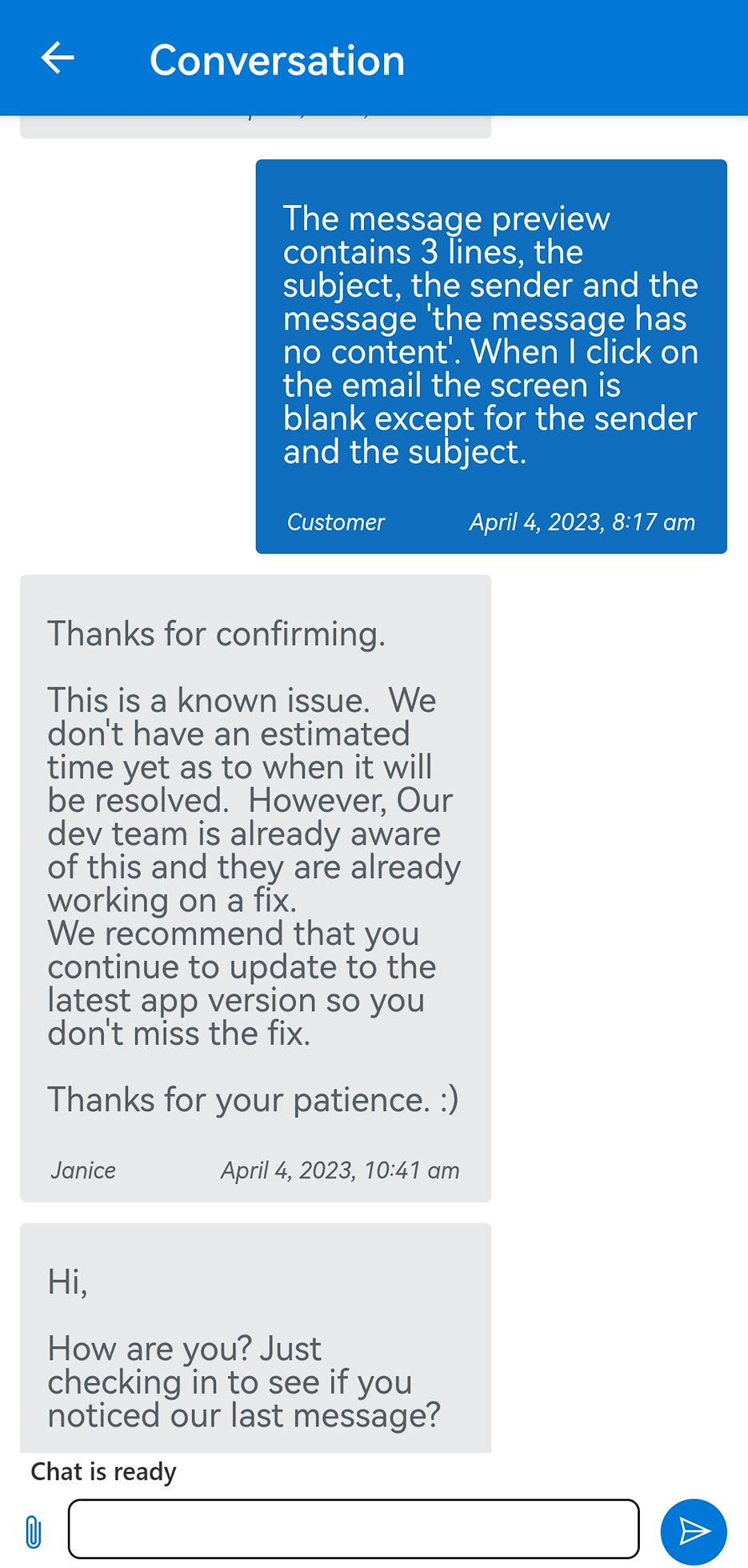
thanks & regards Richard
I was just intending to use outlook on my Samsung phone and on my laptop until I saw this post. Hope there is a solution soon.
