
sceneform-android

sceneform-android copied to clipboard
 SceneView
Color blend issue when transparent objects overlap
I have a sceneView without AR, made transparent, placed over a camera view.
A Black and white square opaque ViewRenderable is placed, and in front of it, a transparent color bars png (view renderable) is placed. The overlapping color blending is too thin (colors are somehow dimmed over the white area).
Here's the screenshot sample from app.
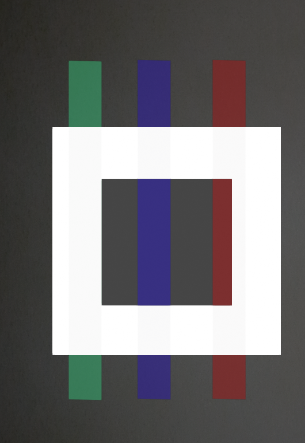
And here's the output from image editor, when both are placed over.

The issue doesn't happen, if a ViewRenderable is drawn over a normal Android Image View. Is it something related to blending mode or Filament related ?
The same kind of issues are also noted for 3d models having transparent textures.
