

 SceneView
Colors are not correct
Hi, we have met a problem about the color. We get gltf file exported from Blender. But when we try to show the model in Sceneform with Android, we found that the color are not correct. Would you give us some advise ? Thanks a lot.
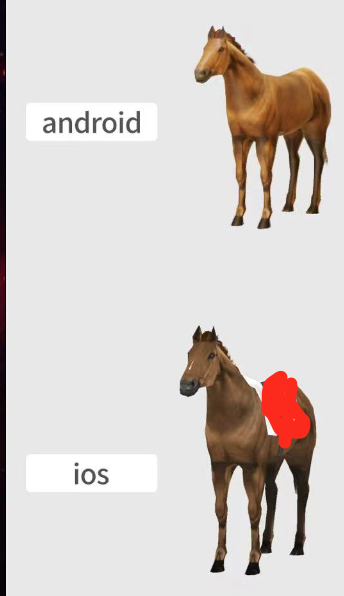
 )
)


We try to load texture like:
` private Texture loadTexture(String texturePath) { Bitmap bitmap; try { bitmap = BitmapFactory.decodeStream(this.getBaseContext().getAssets().open(texturePath)); } catch (Exception e) { return null; }
    Engine engine = EngineInstance.getEngine().getFilamentEngine();
    Texture texture = new Texture.Builder()
            .width(bitmap.getWidth())
            .height(bitmap.getHeight())
            .sampler(Texture.Sampler.SAMPLER_2D)
            .format(Texture.InternalFormat.SRGB8_A8)
            .levels(0xff)
            .build(engine);
    TextureHelper.setBitmap(engine, texture, 0, bitmap);
    texture.generateMipmaps(engine);
    return texture;
}`
then set to material like:
`Texture texture = loadTexture("chair_fabric_albedo.png"); TextureSampler textureSampler = new TextureSampler();
        material.setParameter("baseColorMap", texture, textureSampler);
        material.getMaterial().isColorWriteEnabled();`
we are think if it relate to this:
material.baseColor.rgb = inverseTonemap(material.baseColor.rgb)
but we can not find a way to set it when we are using gltf file
do you have any idea ?
Hey there, it looks like there has been no activity on this issue recently. Has the issue been fixed, or does it still require the community's attention? This issue may be closed if no further activity occurs. Thank you for your contributions.
![github-actions[bot] avatar](https://avatars.githubusercontent.com/in/15368?v=4 "Published by a pub.dev verified publisher")
Closing this issue after a prolonged period of inactivity. If this issue is still present in the latest release, please feel free to create a new issue with up-to-date information.