

 Sanster
How to use SD1.5 on M1 Mac? (CUDA not available Error)
At the end of the demo video you can see the usage of SD1.5.
When I try to start Lama with --model=SD1.5 I get the following errors regarding missing CUDA.
/Users/USER/miniconda3/lib/python3.9/site-packages/torch/amp/autocast_mode.py:198: UserWarning: User provided device_type of 'cuda', but CUDA is not available. Disabling warnings.warn('User provided device_type of \'cuda\', but CUDA is not available. Disabling') /Users/USER/miniconda3/lib/python3.9/site-packages/torch/amp/autocast_mode.py:198: UserWarning: User provided device_type of 'cuda', but CUDA is not available. Disabling warnings.warn('User provided device_type of \'cuda\', but CUDA is not available. Disabling') usage: lama-cleaner [-h] [--host HOST] [--port PORT] [--model {lama,ldm,zits,mat,fcf,sd1.5,cv2}] [--hf_access_token HF_ACCESS_TOKEN] [--sd-disable-nsfw] [--sd-cpu-textencoder] [--sd-run-local] [--device {cuda,cpu}] [--gui] [--gui-size GUI_SIZE GUI_SIZE] [--input INPUT] [--debug] lama-cleaner: error: argument --model: invalid choice: 'SD1.5' (choose from 'lama', 'ldm', 'zits', 'mat', 'fcf', 'sd1.5', 'cv2')
What can I do to get it working? I already downloaded both checkpoint versions 1.5 pruned and 1.5pruned emaonly from hugging face. Can someone explain to me the next steps?

For stable-diffusion model, you need to accepting the terms to access, and get an access token from here huggingface access token. Then start the server:
lama-cleaner --model=sd1.5 --device=cpu --hf_access_token=you_token
I haven't tested it on the m1 and not sure if it will work, good luck

lama-cleaner --model=sd1.5 --device=cpu --hf_access_token=you_token
Thank you! That helped to install everything! I can start a dream process but since it's only doing this with the CPU. One take takes about 4-5 minutes.
https://replicate.com/blog/run-stable-diffusion-on-m1-mac
Here they used a virtualenvironment. Do you have any ideas how to set it up for lama as well?
Install the virtualenvironment according to the guidelines in the blog, then you can install Lama Cleaner (pip3 install lama-cleaner) after Activate the virtualenv
I'm nut sure, which blog you mean. I tried setting up the venv like this:
cd LamaCleaner
python3 -m pip install virtualenv
python3 -m virtualenv venv
source venv/bin/activate
After that I tried
pip install lama-cleaner
and then
lama-cleaner --model=sd1.5 --device=cpu --hf_access_token=you_token
This also worked. But when I want to start it with
lama-cleaner --model=sd1.5 --device=cpu it always gives me this error
/Users/XXXXX/LamaCleaner/venv/lib/python3.9/site-packages/torch/amp/autocast_mode.py:198: UserWarning: User provided device_type of 'cuda', but CUDA is not available. Disabling
  warnings.warn('User provided device_type of \'cuda\', but CUDA is not available. Disabling')
/Users/XXXXX/LamaCleaner/venv/lib/python3.9/site-packages/torch/amp/autocast_mode.py:198: UserWarning: User provided device_type of 'cuda', but CUDA is not available. Disabling
  warnings.warn('User provided device_type of \'cuda\', but CUDA is not available. Disabling')
Sorry for the annoying log, actually you can safely ignore that CUDA warning.
After the first time you run lama-cleaner --model=sd1.5 --device=cpu --hf_access_token=you_token, you can remove --hf_access_token, and add --run-sd-local to start the server
lama-cleaner --model=sd1.5 --device=cpu --run-sd-local
Thank you. It's still giving me errors. Look at this
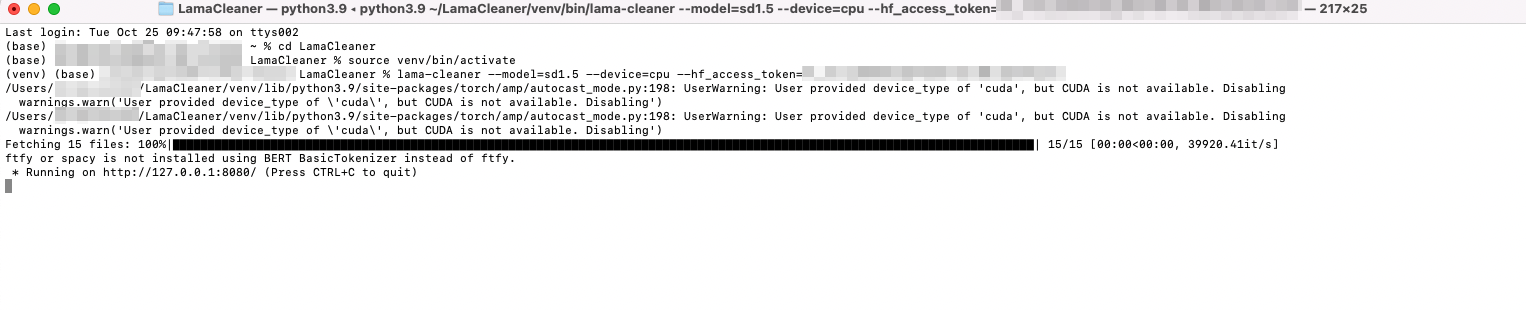
With that it runs but slowly.
After that I closed the terminal and started again with
lama-cleaner --model=sd1.5 --device=cpu --run-sd-local

Somehow it does not recognize --run-sd-local
Sorry for the annoying log, actually you can safely ignore that CUDA warning.
After the first time you run
lama-cleaner --model=sd1.5 --device=cpu --hf_access_token=you_token, you can remove--hf_access_token, and add--run-sd-localto start the serverlama-cleaner --model=sd1.5 --device=cpu --run-sd-local
I made a typo, it should be --sd-run-local. This parameter simply allows you to not pass the huggingface token, nothing to do with running speed.

You can ignore this CUDA warning, it is normal for this warning to appear on machines without NVIDIA graphics.
The real reason the model running slow is, we should use PyTorch compiled for the M1 chip, currently Lama Cleaner not support that, I will add M1 support If I could get an M1 Mac.
SIX MONTHS LATER....
Set --device=mps run fastest stable diffusion model on m1/m2 chip, on my m2 pro the speed is 1.5~2 it/s