
slub
 slub copied to clipboard
 SamirBoulil
Improve the feedback loop between pull requests authors and teams reviewers using Slack.
👋 Hey! I'm Samir, I have been building and maintaining Yeee on my free time for the last 6 years.
If you like Yeee and want to support this project or simply want to say thank you 💌
You can now Sponsor me on GitHub!


tldr;
-
If you found a bug, open an issue ticket here.
-
Put your PR to review in Slack py posting a slack message having one of the following structure:
Slub user: ... TR ... {PR link} ... Slub user: ... review ... {PR link} ... Slub user: ... PR ... {PR link} ... -
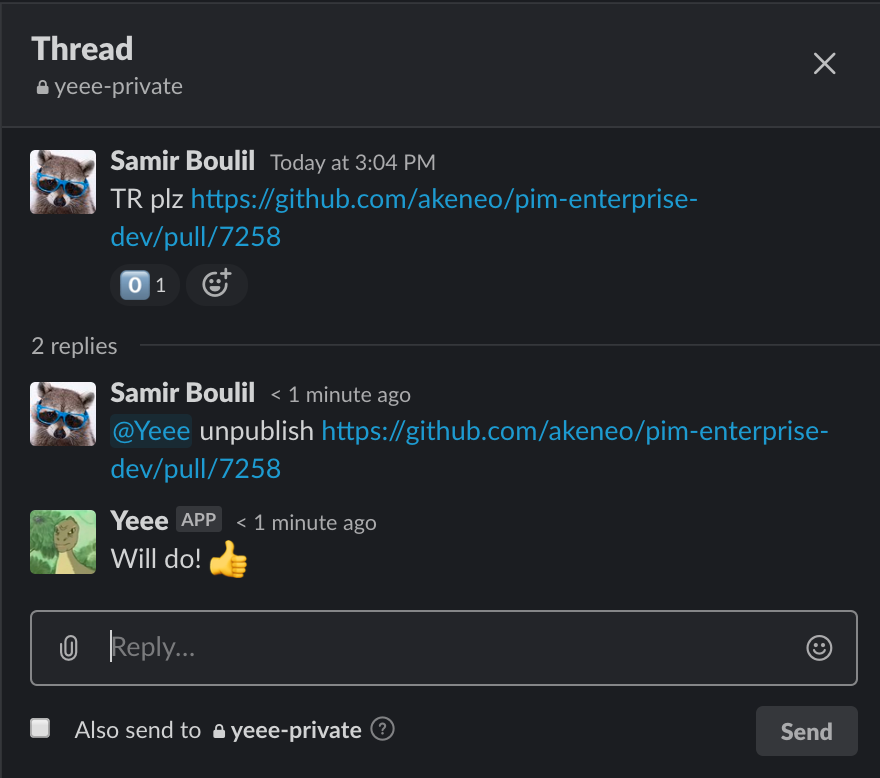
Unpublish a PR from the reminders by mentioning @Yeee:
@Yeee unpublish {Link of the Github PR}
Welcome to Slub
Slub improves the feedback loop of your pull requests (PRs) within your team.
The name Slub comes from the contraction of Slack & Github: Sl (ack+gith) ub.
Yeee is the name of the bot in your slack team.

Found a bug ?
You can open a new issue in the issue's repository section.
The project
This project has been designed and first put in production in march 2019. It is currently maintained by Samir Boulil.
Release notes
Each new version of Slub comes with a new set of features and bug fixes.
Find the published release notes below:
- April 2020, Releasing Yeee 1.2
- November 2019, Releasing Yeee 1.1
- March 2019, Releasing Yeee 1.0
Features
Slub improves the feedback loop of your PRs in multiple ways:
- it notifies the author of a pull request when a PR is reviewed by a teammate.
- ot notifies the author of a PR when the continuous integration (CI) status changes.
- it keeps the team up to date regarding the number of approvals a PR has, it's CI status, and the PR status.
- it sends daily reminders to your team regarding the PRs missing reviews.
- it notifies the author of a pull request when a PR is too large (800 Loc by default, you can change this value in the
.envwithPR_SIZE_LIMIT).
How to use
Slub listens to any PR sent to review in a slack channel which slub is configured to listen to.
Once Slub hears a PR to review, it will start keeping track of some information like:
- The number of comments (GTMS, Refused and simple comments)
- The CI status (Green, Red, or Pending)
- The PR status (open, closed, or merged)
Any message having the following structure can be tracked by @Yeee
Slub user: ... TR ... {PR link} ...
Slub user: ... review ... {PR link} ...
Slub user: ... PR ... {PR link} ...
Notifications
Whenever a new change happens to a PR, Slub will notify the author and/or the squad of the change using Slack.
Notifying the author

Author notifications such as “Your PR has been commented” will be sent to Slack in the thread where the PR link was sent (hence, only the author is notified that a new message was sent in a thread).
- The author is notified whenever a review is added to the PR
- The CI status changes
Notifying the squad
The squad is not notified per say, but it can follow the PR statuses by looking at the emojis added to the PR link.

The squad can directly see:
- The number of GTMS the PR currently has

- The CI status (pending, red or green)

- When the PR is merged

The team can then quickly see at a glance the PRs that needs review from those being already merged.
Reminders
A reminder is a synthesized list of all the PRs that are to review in a channel and that do not have 2 GTMs yet.
Remind me!
It is published once a day around 9:30 AM (GMT+1) in this form:

When available you get the following information for one PR to review:
- The author of the PR
- The title of the PR
- How many days it has been put to review
- The PR link
Unpublishing
If you have put a PR to review, had some comments back and need to rework on it. You might want to remove this PR from the daily reminder. That’s what “unpublishing a PR” is all about.
The way you unpublish a PR from the reminder is by telling Slub in the following way:
@Yeee unpublish {Link of the Github PR}
In this example, the slub bot name is @Yeee
Metadata
Owner
 SamirBoulil
Metadata
Improve the feedback loop between pull requests authors and teams reviewers using Slack.