

 SamDel
Speaker Group Does Not Work Well
Hi Sam,
You may recall (back in version 1.9.22 & later), DAS supported Groups. Since my 1st floor is an open design, I really needed a way to sync those speakers (my Kitchen Hub, Family Room, Dining Room & Study Speakers). I tried MANY times, but the Group Play was inconsistent, with multiple drop-outs that also affected speakers that were NOT in that Group...
I finally gave up when those problems persisted into versions 2.x.x
After upgrading to Version 5.0.5, I decided to try Casting to a Group again, but still have poor results: First of all, prior to trying Group Casting, I Reset Settings, then selected various individual speakers from the 2nd Floor & Basement -- all worked as expected. Then I selected the "1st Floor Speakers" Group, which has just 4 speakers: - Family Room Speakers - Kitchen Hub - Dining Room Speakers - Study Speakers
The Group played inconsistently, frequent Drop-Outs, and caused the individual Speakers on the 2nd Floor to frequently drop-out briefly & resume.
Please see attached ScreenShot with annotations that describes the activity of the 1st Floor Speakers Group.
I've also attached the Log File, which contains several days of excellent Casting. I tried the Group & encountered the above issues on the morning of Jan 25, so any related issues will be near the end of the Log File.
Long story, short, I would REALLY like to have reliable and consistent Casting to a Speaker Group.
My thanks in advance for looking into this.

PS: If it helps, the 4 Speakers in the 1st Floor Group all have Fixed IP Addresses: Family Room Speakers..............192.168.1.13 Study Speakers.............................192.168.1.19 Kitchen Hub...................................192.168.1.20 Dining Room Speakers..............192.168.1.23
ALL of my DAS Speakers have Fixed IP Addresses
I can see in the log that DAS keep trying, but every time the device sends a 'CLOSE' message after some seconds:
in [10:55:54 AM] [192.168.1.13:32222] [Playing]: {"type":"CLOSE"}
Have you tried streaming to the same group with another app (e.g. Google Chrome browser - cast tab)? I don't if we have tried before but that way we can determine if DAS is doing something wrong, or that it's because of some other reason.

I haven't ever Streamed from a Chrome Browser... I Googled it, and there was no mention of Streaming music...
How would I set it up to Stream from Chrome Browser to A Google Speaker Group?
I clicked Reset Settings in DAS, then launched Chrome & Cast Tab... I selected 1st Floor Speaker Group, and in less than 1 minute, that Group was dropped from Cast Tab....
I thought it may have been because DAS was still running (but not Casting) on my PC, so I unloaded it, and tried again, and had the same results:
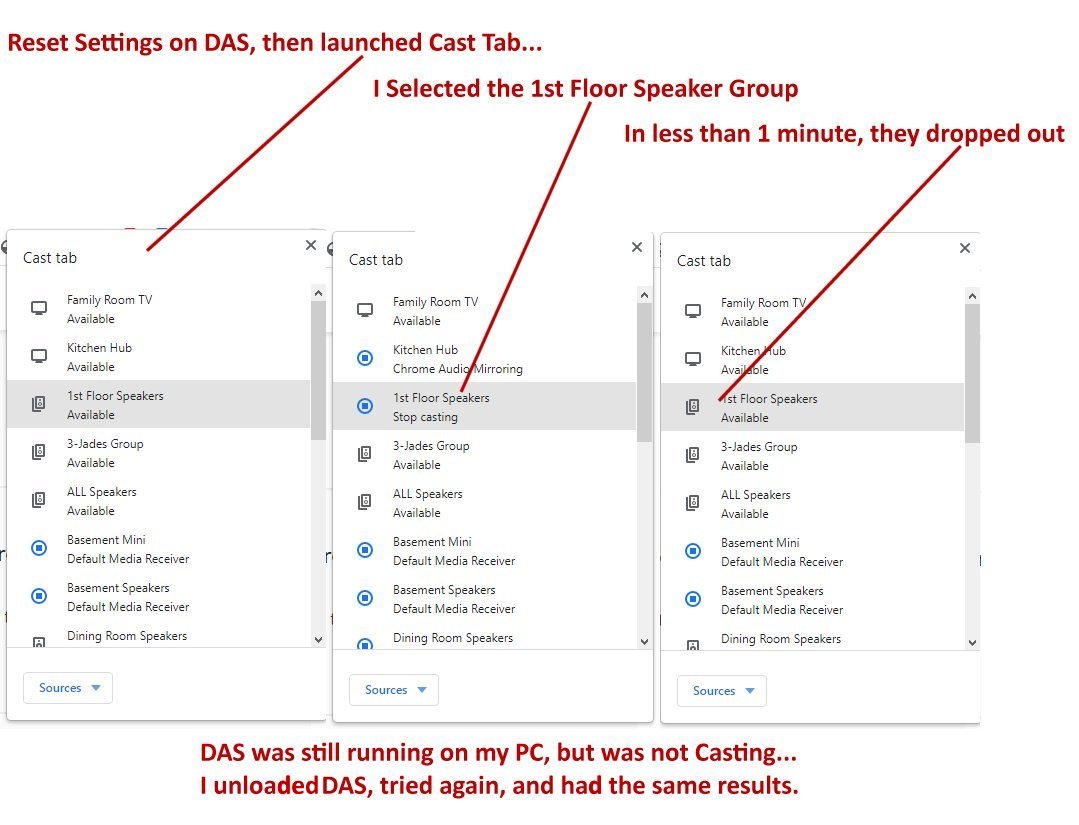
Then it isn't DAS-specific. Another test you can do is (to see if the network load is a problem):
- Create a group with two devices
- Try streaming
- Add a device to the group
- Try streaming
- etc.
I tried with 2 Speakers, and it worked OK... after a while, I tried it with 3 Speakers, and it is working OK... Since the original Group had 4 Speakers, I not going to add the 4th Speaker back... Here's how it looks now:
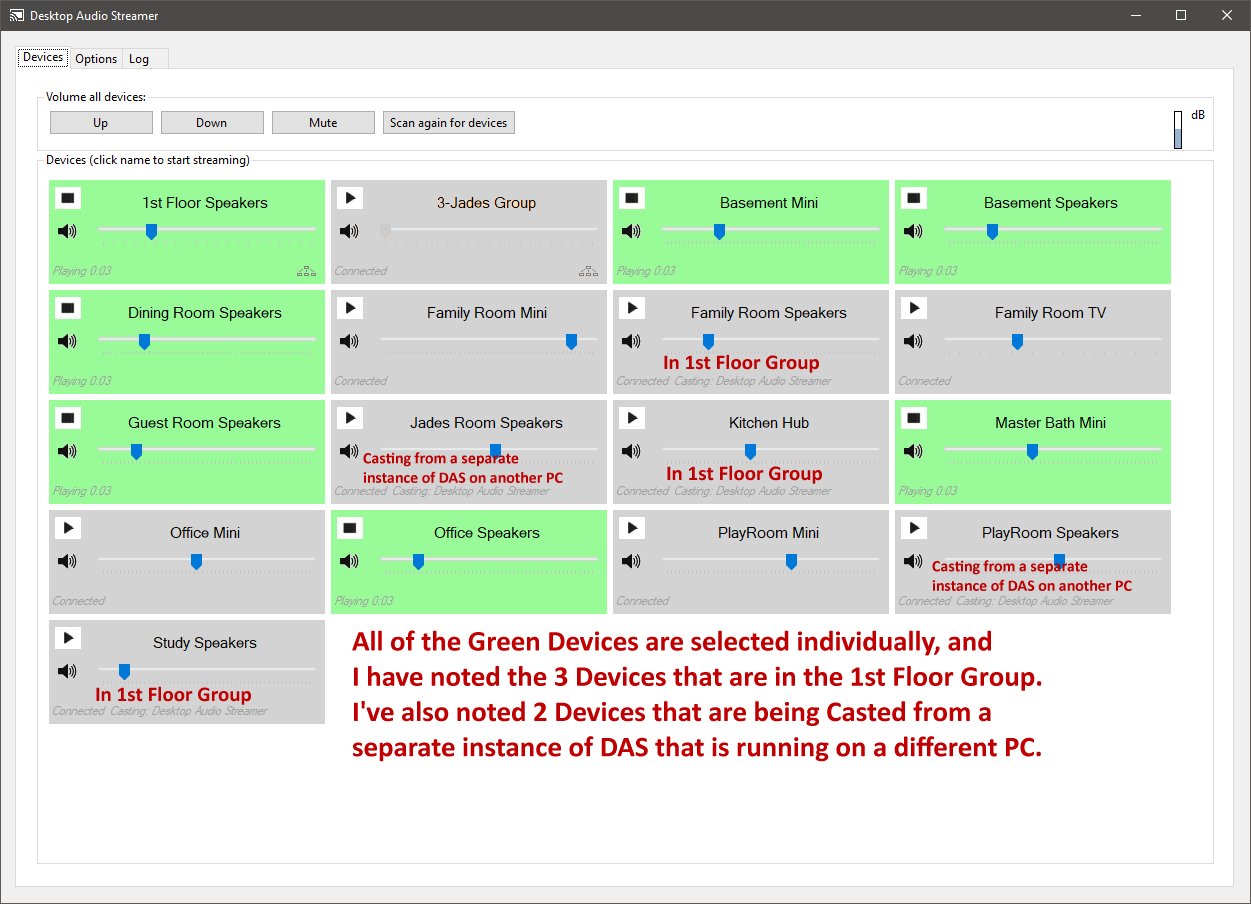
So, based on your comment, the original issue must be a "network load" issue... Is there a way to troubleshoot that to enable a 4th speaker in the 1st Floor Group?
I did a Speed Test on every 1st Flr & 2nd Flr Device that I routinely Cast to:
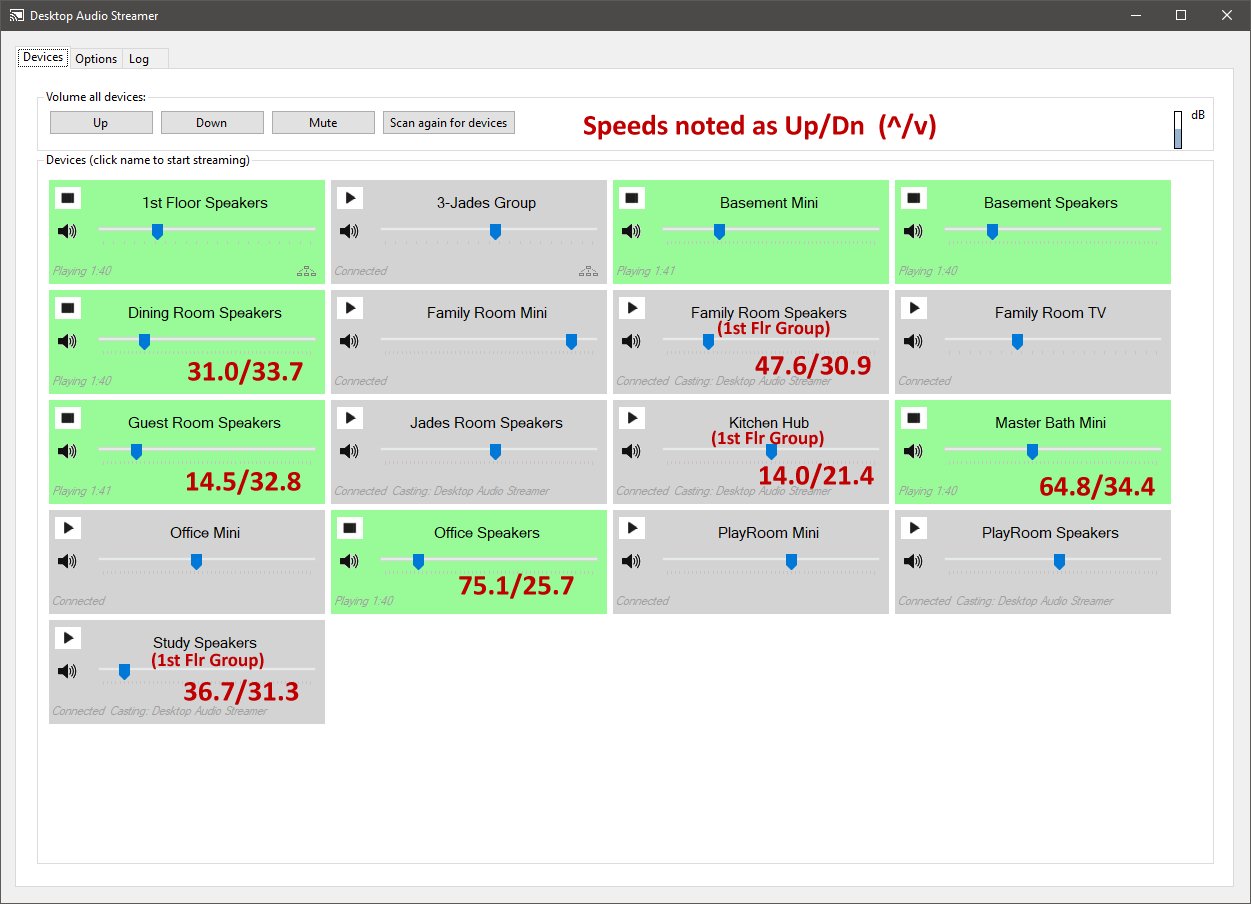
The kitchen has the slowest connection. As it is part of the first floor speakers, and all speakers have to be in sync when streaming to a group, this can affect the group behaviour.
If you can change your setup a bit, move (or add) devices/routers/switches in a way that the speed is more equal across devices, then group performance will be better I guess.
It seems to vary throughout the day... The Kitchen is now 93.6. The others are all above 130
My backups run between midnight & 4 AM; TV was not on when I ran the Speed Tests... Likely the ISP (Comcast) is inconsistent.
Can be. You're measuring the internet speed, for DAS only the home network part is important. I don't know how the Chromecasts synchronize. The slowest (internet) connection is the kitchen with 14mbps in the first test. That should be enough to synchronize a wav 16 bit (1.6 mbps) stream with 4 devices (4 * 1.6 = 6.4).
Another test you can do is lower the quality to mp3 128kbps and stream to a group with 4+ devices. If the connection still gets dropped then the network load isn't the problem.