
COMET-IME-Community-Edition

COMET-IME-Community-Edition copied to clipboard
 STARIONGROUP
Report Editor - show better information on and improve handling for multiple reports opened
Prerequisites
- [x] I have written a descriptive issue title
- [x] I have verified that I am running the latest version of the CDP4-IME
- [x] I have searched open and closed issues to ensure it has not already been reported
Description
It is possible to open multiple reporting tabs and in each of these, open a different report. This is also desirable from a process perspective, e.g. to allow users to open a mass budget and power budget next to each other.
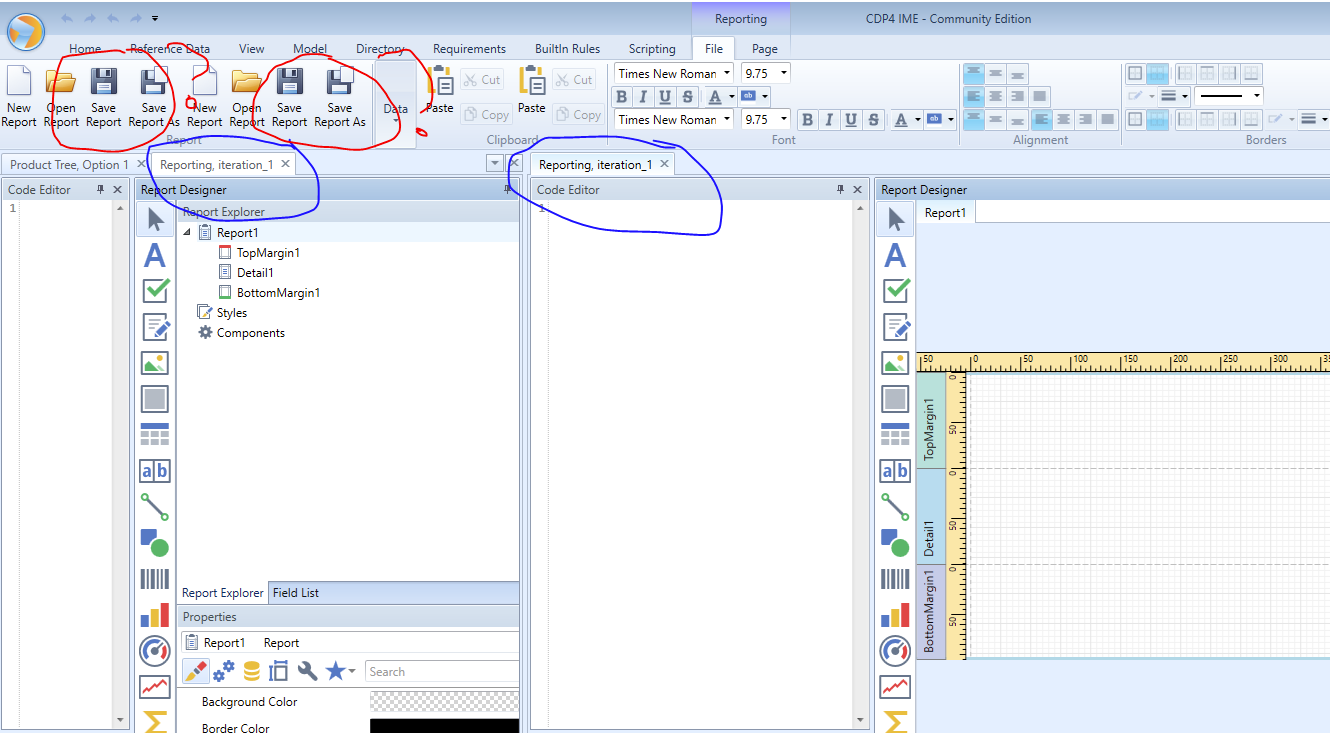
The result when opening multiple reporting tabs is differently handled depending on if the different reporting browsers are within the same (vertical/horizontal tab) groups, or in separate ones. This is different behaviour from normal browsers, since in the reporting, there are dynamic actionable buttons and controls, e.g. to open, save, edit etc. the report.
- if multiple reporting browsers are in one group, there is a single set of controls, where it may not always be clear for the user which report he is currently working in (if switching)
- if multiple reporting browsers are in separate groups, multiple sets of controls appear in the ribbon, and for these it is not obvious or clear to which report each set belongs. This seems to depend on the order of opening, and then depends on which report you actually split off in a different tab group, put left or right etc., so the connection between actual placing of report browser (variable) and the placing of the corresponding controls (fixed?) can become confusing ** this easily leads to loss of information, e.g. because you press the "wrong" save button, and changes that you made are not saved
Possible improvements:
- provide information on the name of the report that was opened (or saved) "somewhere" clearly visible in the reporting editor browser, so it is clearer to the user in which file he is working, which one he is looking at
- somehow improve the handling of the (multiple) controls for multiple open reports and/or provide information on which set of controls belongs to which reporting browser (e.g. active/selected browser)
Steps to Reproduce
open a model open 2 (/multiple) reporting browsers
- in same group tab in the browser area : single control set, but not necessarily clear to user which report he is working in (if they are quite similar in setup etc.)
- split off one of the reports to a new separate (vertical) tab group : multiple control sets
Logs
- [x] There are no logs regarding the issue
- [ ] I have attached a log file or included the relevant section in this issue
System Configuration
- CDP4 version:
- [x] CDP4-IME: 7.0.0 RC7
- [ ] Other:
- Web Services:
- [ ] CDP4 Web Services version:
- [ ] OCDT WSP version:
- Environment (Operating system, version and so on):
- [ ] Microsoft Excel (32/64 bit):
- [ ] Windows OS (32/64 bit):
- [ ] Additional information:

