
SimHub
 SimHub copied to clipboard
 SHWotever
Curving effect is too strong under ShakeIt Wind
Describe the bug We have two curving effect sliders in the app. One under the ShakeIt Wind tab, other under ShakeIt Motors > Speed with Curving effect.
Simhub version v8.0.4
To Reproduce Test both the curving effects separately.
- Make sure the Speed with Curving effect under ShakeIt Motors is disabled.
- Go to ShakeIt Wind and enable the curving effect. Test it with values 0 and 100.
- Now disable the curving effect under ShakeIt Wind and enable the one under Speed with Curving. Test it with values 0 and 100
- Notice the one under ShakeIt Wind is much stronger. Setting ShakeIt Wind curving to 0 is almost equal to setting Speed with Curving sensibility to 100. So ShakeIt Wind curving effect range is more like 100-200 instead of 0-100.
Expected behavior Two curving effects should behave the same.
Screenshots

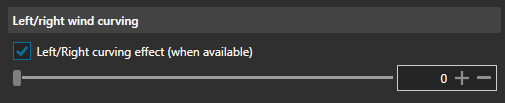

Now we only have one curving effect and it still feels like 100-200%. I have fans turning off during 200km/h corners (with the effect set to 1%) since their working range is only 67-100%. This makes the curving effect unusable for me.
Can we get a higher range to set it up? Maybe even a min value so it does not turn off fans.

@FalkF As a workaround, you can disable the curving under ShakeIt Wind and use the Speed with Curving effect under ShakeIt Motors instead.
Here are my settings:
