
CumulusCI
 CumulusCI copied to clipboard
 SFDO-Tooling
Error Occurs when Using `update_package_xml` on object with `xsi:nil="true"`
Describe the bug
Going to be honest, I don't 100% know what I'm saying but I know the steps to reproduce (below).
When using sfdx version 7.194.1 and running sfdx force:source:convert -d src for one of my objects's searchLayouts there is xsi:nil="true" present in the XML.
When using sfdx version 7.184.1 and running sfdx force:source:convert -d src for one of my objects's searchLayouts there is xsi:nil present in the XML.
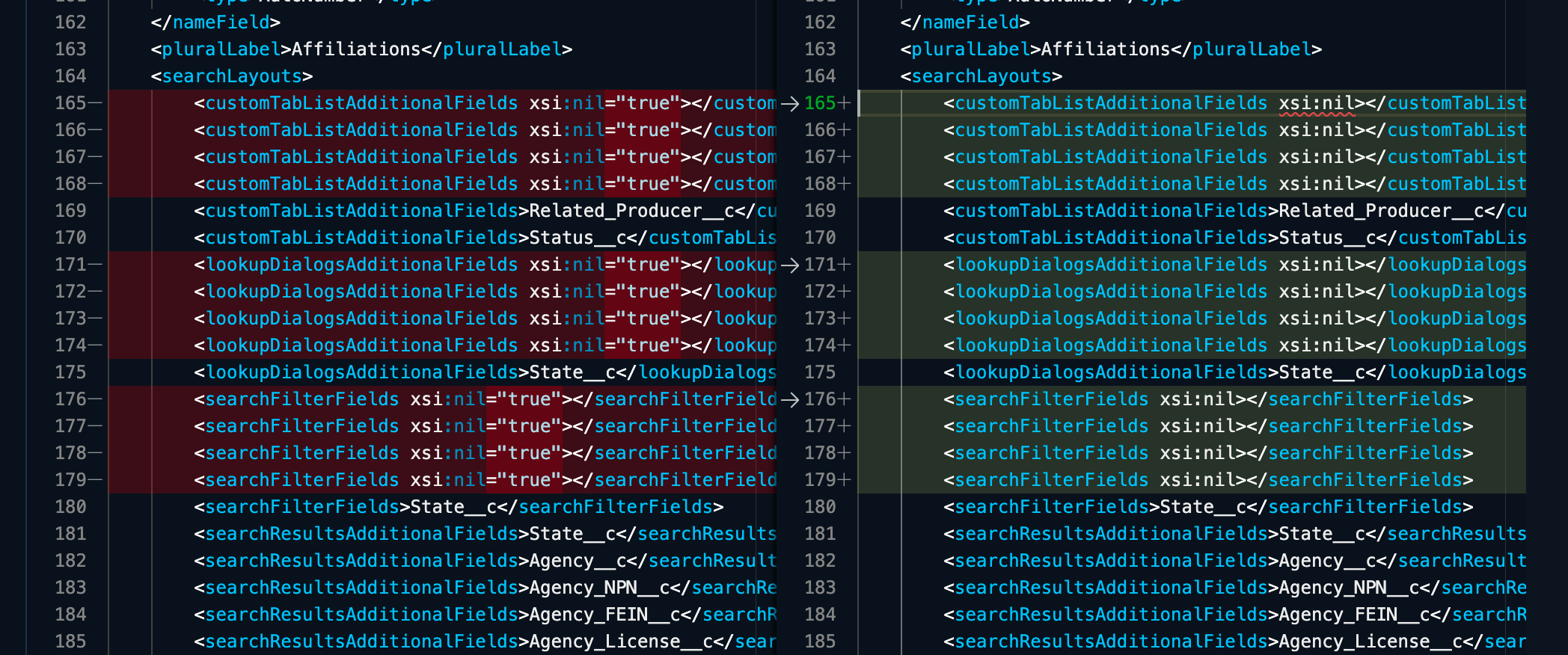
I'm not familiar with what this difference means in the XML but I do know that when "true" is present I get the following error: https://gist.github.com/Julian88Tex/c164baa10a92fba0c4dd6929525bad37
My best guess is that SFDX CLI changed how it handles conversions and CumulusCI needs to be updated to handle this potential change.
There is probably a workaround here involving us removing <customTabListAdditionalFields xsi:nil="true"/> from our sfdx formatted packaged data but I rather not have to make that change.
Reproduction steps
sfdx update- Verify you have xsi:nil="true" somewhere in your XML like this:
<searchLayouts>
       <customTabListAdditionalFields xsi:nil="true"/>
- Run
cci task run dx_convert_from - Run
cci task run update_package_xml
Result: Error that looks similar to the following: Error: not well-formed (invalid token): line 165, column 46 (Affiliation__c.object)
Expected Result: No error is presented and XML file is updated/created as expected.
Your CumulusCI and Python versions
CumulusCI version: 3.75.1 (/Users/julianjoseph/.local/bin/cci) Python version: 3.10.0 (/Users/julianjoseph/.local/pipx/venvs/cumulusci/bin/python)
Operating System
MacOS 13.3.1
Windows environment
No response
CumulusCI installation method
pipx
Error Gist
https://gist.github.com/Julian88Tex/c164baa10a92fba0c4dd6929525bad37
Additional information
To switch to a working sfdx version you can uninstall using a command like this (assuming you installed with npm): npm uninstall sfdx-cli --global and then reinstall npm install [email protected] --global
sfdx 7.184.1 is a version that happens to work but I'm not sure exactly when the sfdx version had an update that changed this behavior.
