

 SBoudrias
How to paste multiple lines?
Hi there,
First, thanks for this amazing lib!
I'm using the input prompt, and I'm asking users to type some folder names:
app
services
models
They can also drag folders from the Finder, which results in absolute paths:
/Volumes/Work/Projects/project/src/app /Volumes/Work/Projects/project/src/services /Volumes/Work/Projects/project/src/models
However, if the user decides to copy / paste from a text editor...
app
services
models
...only the first path is registered:
app
So my question is, is there any way to have entry with linebreaks processed properly?
I've tried using a transformer, but that didn't work.
With the following transform...
transformer: function (input, answers, options) {
  const output = input.trim().replace(/[\n\r]/g, ' ')
  console.log(`\n ${input} -> ${output}\n`)
  return output
},
And the following input...
a
cd
efg
...I still get only the first line:
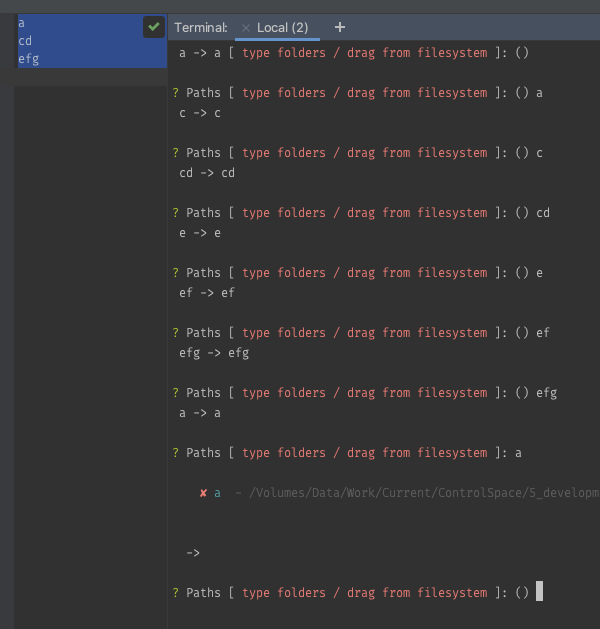
Any help or workaround would be appreciated.
Thank you.


Hello, thanks for the reply!
I did try that (briefly) but it opens the registered terminal text editor (in my case Nano) which perhaps might be an option, but it's a bit of a sledgehammer to crack a nut when the user may just want to enter a few key fragments, or one line.
Ideally I'd like not to take the user out of the Inquirer context for just that one step.
EDIT:
I understand that perhaps there are technical limitations around multiple lines, but thought I would ask in case this hasn't come up before...