
ui5-webcomponents
 ui5-webcomponents copied to clipboard
 SAP
SAP
On selecting the same Menu again, Menuitems dropdown isn't closing and also selected Menus aren't getting highlighted
Bug Description
While selecting the Menu, firstly the Menus aren't getting highlighted Secondly Upon clicking the same Menu again its not collapsing the menuItems dropdown
Expected Behavior
It should show the selected Menu and upon clicking the same menu it should collapse the MenuItems dropdown.
Steps to Reproduce
- Go to ''
- ...
- ...
Isolated Example
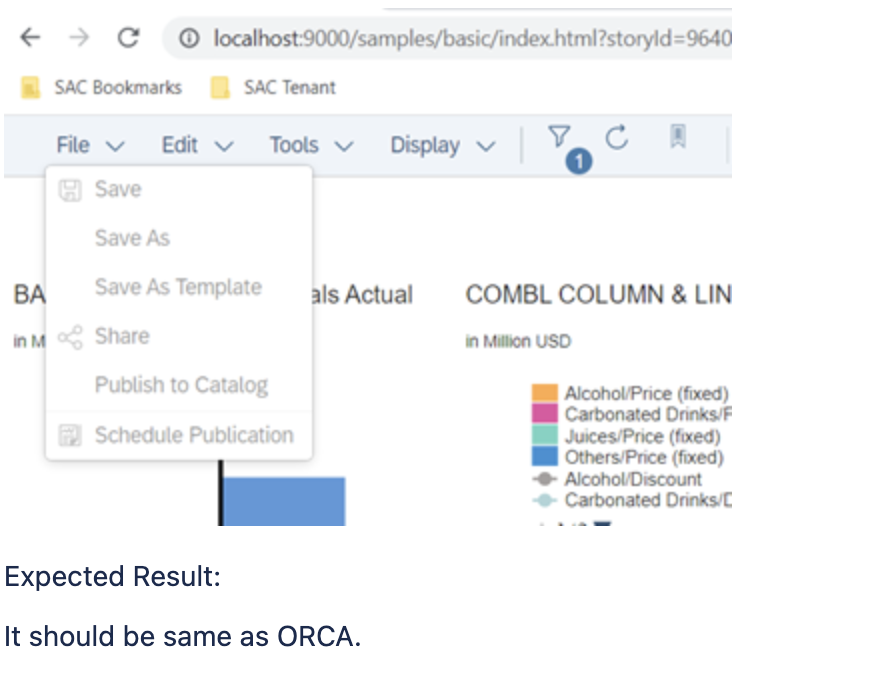
It should be highlighted like this:

Instead we are getting this:
Context
- UI5 Web Components version: {"@ui5/webcomponents-react": "^0.25.6"}
- OS/Platform: {Both MACOS and WINDOWS}
- Browser: {All (Chrome, Safari)}
- Affected component: {Menu and MenuItem}
Log Output / Stack Trace / Screenshots
{...}
Priority
- [ ] Low
- [ ] Medium
- [ ] High
- [X] Very High
The priority indicates the severity of the issue. To set the appropriate priority consider the following criteria:
- Breaks entire application or system - High or Very High
- Accessibility issue - Medium or High
- Functional issue - Medium or High
- Visual issue - Low or Medium
Note: The priority might be re-evaluated by the issue processor.
Stakeholder Info (if applicable)
- Organization: {SAP}
- Business impact: {SAC LWV}

Hello @ShivamGuptaSap , With the information you provided, we are not able to support you. Please double-check that you provided all the information required. Is the same behaviour reproducible within the samples in the playground. If possible provide a code sample in order to investigate the issue further. Best Regards, kskondov

Hello @kskondov, We are able to reproduce the same issue on the playground itself with the Basic Menu Item where in as long as menu is open it should be highlighted and also tapping the same Menu again it should collapse the MenuItems.
Hi @kskondov, as @ShivamGuptaSap mentions, you can see the behaviour in the playground, although it's not completely obvious because of the way the menu button is styled as being so standalone. @ShivamGuptaSap, maybe it would be helpful to attach a short video showing the issue in the context of our styling, where the menu button look more like a standard menu and it's more obvious what the problem is.

Hello @ShivamGuptaSap, @scameron,
I believe when you say that the 'menu' isn't staying highlighted when opened you mean that the button from which you've opened the actual menu doesn't persist its pressed state as long as the menu is being open.
However, this button is not part of the ui5-menu component itself. Moreover, the desired behavior seems to go against our official visual specifications. That means that you could technically implement this behavior on application level, but it is not recommended by the Fiori Guidelines.
For the second reported issue, if I understand it correctly - you should also do it in the application using the close method of the menu. For more information check the API reference in the component page - https://sap.github.io/ui5-webcomponents/playground/components/Menu/

Hi @ndeshev, do you have a link to the Fiori specs where that behaviour is described? We were trying tou menus from a bunch of different products and all of them behaved like that (the button stays highlighted while the menu is open), so it's surprising to hear that Fiori is specifying something different. It would be good to have something to reference when we talk to our UX team about this.
Hello, in our case, at least in the playground samples, the menu is opened from a button - this is the public Fiori Experience button guidelines - https://experience.sap.com/fiori-design-web/button/
Ok, thank you for the link. Indeed it seems that the examples all show the behaviour you describe, where the button does not stay in it's pressed state while the menu is open.
Our problem is that we either need to match the exactly behaviour in our current app, or else we need to convince UX to accept a change not only to our new viewer but to all of the existing UI as well. In the end, we might have to explore how to implement this behaviour ourselves at the app layer, at least temporarily.
If you have any suggestions for the least hacky way to do this kind of thing in the application, we'd appreciate any guidance.
Hello @scameron
I guess if you use a ToggleButton and manually switch its "pressed" state based on the Menu's state, you will get that behavior - a button that is toggled when the menu is open and а button in default state when closed. This is also perhaps a good idea to enhance our examples.
BR, UI5 Web Components Core Team

@ilhan007, thanks for the suggestion! That sounds like a really good idea. We'll give it a try and let you know how it works out.
HI @scameron, @ilhan007, There is one issue with the above mentioned approach, like we are unable to get menu's state like when it's open or close. Is there a way that we can get which menu is opened or closed? Regards, Shivam
Hello @ShivamGuptaSap I suggest creating a new issue and describe you use-case.
Hi @ilhan007,
There's no new use case, it's exactly the one described here in this issue. Shivam is trying to implement the workaround you suggested in your previous comment:
I guess if you use a ToggleButton and manually switch its "pressed" state based on the Menu's state, you will get that behavior - a button that is toggled when the menu is open and а button in default state when closed.
Did you have a specific approach in mind for getting the Menu's state in order to drive the ToggleButton "pressed" state? From what Shivam said, it doesn't seem like it's obvious how to get the state from Menu.
Thanks for your help with this!
Hello @scameron @ShivamGuptaSap You are right, the "open/closed" state of the menu is required for that to work, I somehow thought it's already there.
Unfortunately, there is no public API exposed for the moment. I found this Feature Request that's not picked up with the idea is to have declarative API to open/close the Menu the same way the Popover has "open", "opener" properties. Currently, my suggestion does not work for you.
I suggest describing your use-case in the referenced FR and get more details if there are plans to implement it or create your own Feature Request.
Besides that, you can use private API as a workaround - _popover.isOpen(), where _popover is a reference to the internal popup.
Hi @ilhan007, I guess what we actually need is not juts the state, but some even to detect that the state has changed. When the popover opens we want to set the button as pressed, and then when the popover closes we want to set the button as unpressed. But we need to somehow know when the popover state has changed.
It looks like Popover has before-open and before-close events, so I guess that's what we would need. If you agree, I'll add that as a comment to the feature request you referenced.