

 SAP
SAP
Add 'closeMenuOnClick' property to MenuItem component
Feature Request Description
The current behavior of the Menu component is that a click on a MenuItem will close the menu. This behavior isn't great for our use case, as we expect the user to want to select multiple items, meaning they would have to re-open the menu several times.
Proposed Solution
Would it be possible to add something like a property "closeMenuOnClick" to MenuItem, which would take a boolean and allow us to tell the Menu whether a click on this menu item should close the menu or not?
Priority
- [ ] Low
- [ ] Medium
- [x] High
- [ ] Very High
Stakeholder Info
- Organization: SAP
- Business impact: Confidential (please contact me for more info)

Dear @SAP/ui5-webcomponents-topic-b
The request is to prevent closing of the menu when an item is clicked.
My suggestion is to provide preventDefault option to the event instead of a new property.
Could you please have a look and evaluate if this feature request should be implemented.
Regards, Martin

Hi @MapTo0
Has there been any progress on this? Our release is creeping closer and this is a pain point for UX.
Thanks in advance!
Hi @ej612,
When do you need the feature so that you can consume it in your release?
Best regards, Petya

Hi @petyabegovska
Thanks for your response :) Our release is next month.
Best regards, ej612
Hi @ej612,
Can you show us your use case? The component doesn't support multi selection and providing prevent default of the close action I assume that will not solve your problem.
Best regards, Petya
Hi @petyabegovska
Thanks for your response. We have an AnalyticalTable, and on each row, we have a button that opens a contextual menu with options regarding what should happen when the user selects that row.
The menu looks something like this:
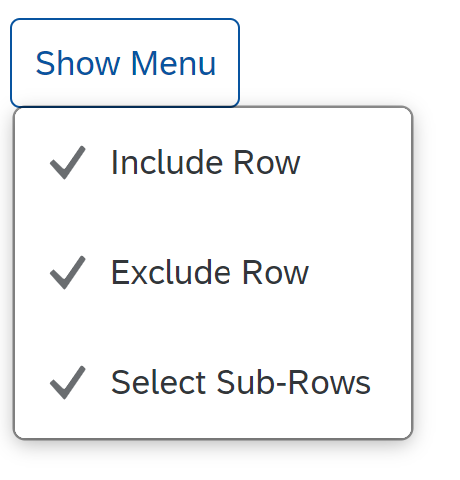
Clicking on one of the menu items will toggle the checkmark icon, indicating to the user that the option is enabled or disabled. The user is expected to want to change more than a single setting at a time, meaning having to close and re-open the menu would be annoying, also because in reality it contains nested submenus.
So my request is to provide an option for me to indicate to the menu that I don't want a click on a certain menu item to close the menu. Please let me know if you need further information. Thanks a lot in advance.
Hi,
"So my request is to provide an option for me to indicate to the menu that I don't want a click on a certain menu item to close the menu." This can be implemented but the menu doesn't have a selected state and doesn't have multiple selection, so the whole use case will not work.
You can try to use Button that opens a ResponsivePopover with List inside, see the sample: https://codesandbox.io/s/nifty-nobel-lxgfl0?file=/index.html
Best regards, Petya
Hi @petyabegovska
Thanks for your response. Please see attached a screengrab from SAC, more precisely the context menu of a widget. Clicking on an item in the top-level menu will close the menu, but clicking on an item in the sub-menu "Show/Hide" will not, because the user is expected to want to make more than one selection.
This is not currently possible with the Menu web component you provide and it would be great if it was.
https://user-images.githubusercontent.com/110408767/227540816-41619c4b-9db6-4d4f-90d8-9f02cda101ea.mov
Hi @ej612,
We will discuss this use case with the design team and will evaluate again as you don't do a multi-selection, but only put checkbox icons.
Best regards, Petya
Hi @petyabegovska
Thank you very much for your response. If need be, we can also involve our UX person.
Best regards!