
RxDataSources
 RxDataSources copied to clipboard
Published
20 hours ago •
 RxSwiftCommunity
RxSwiftCommunity
[RxTableViewSectionedAnimatedDataSource] Reload Animation was strange
Hi guys,
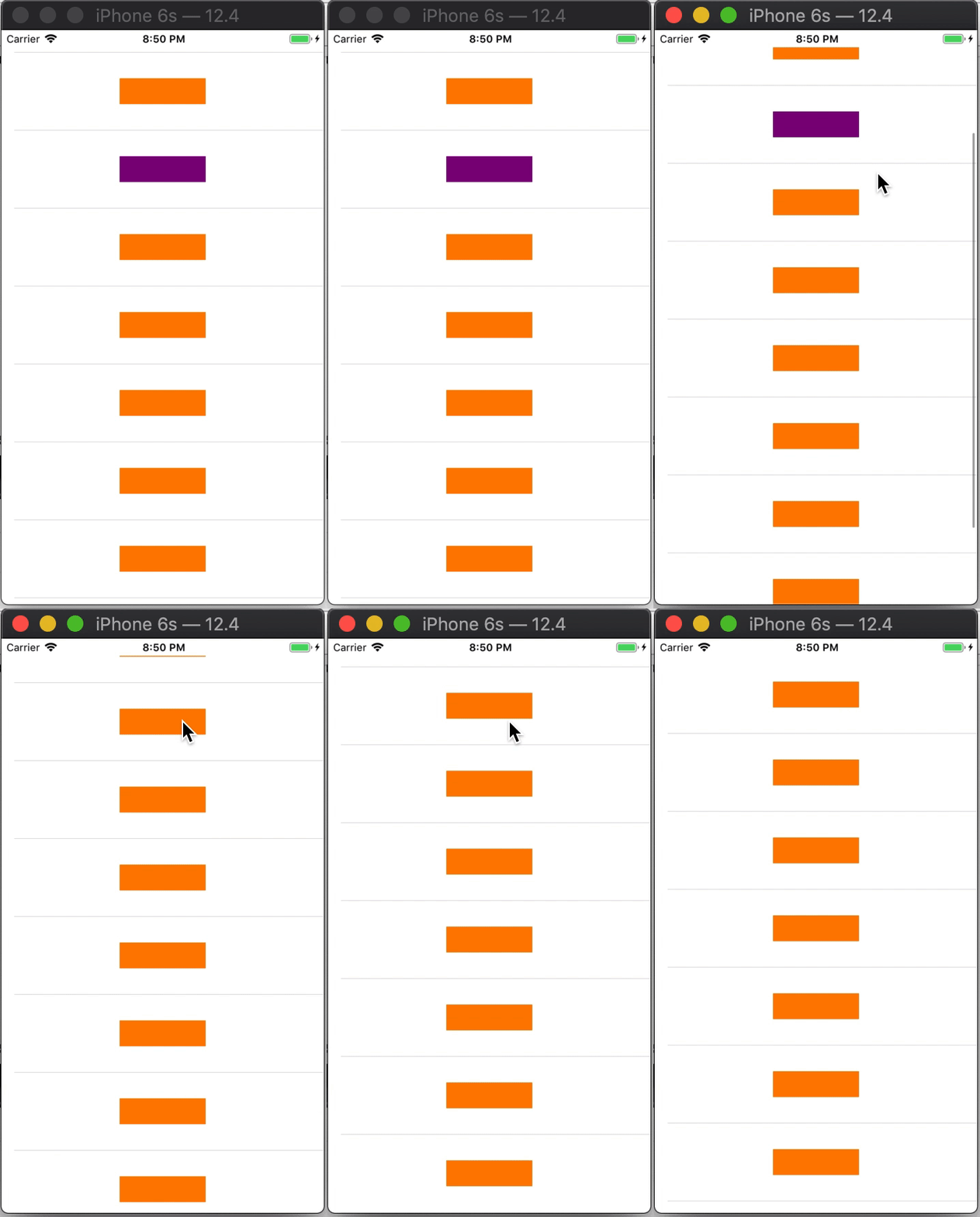
Anyone can help me on this issue, when I clicked on color button to change to another color and I reload UITableView to update datasource. But when tableview was update then appear a strange animation like gif below. I had google but can't resolve it by myself, anyone can help me on this? Thank you very much!
// ViewModel
struct MainViewModel {
    var itemsSubject = BehaviorRelay<[StatusSectionModel]>(value: [])

    func generateData() {
        let viewModels = (1...10).map { item -> StatusViewModel in
            let isSelected = item == 2 ? true : false
            return StatusViewModel(title: "item_\(item)", isSelected: isSelected)
        }
        let sections = [StatusSectionModel(header: "aaa", items: viewModels)]
        itemsSubject.accept(sections)
    }

    func updateData(indexPath: IndexPath) {
        var sections = itemsSubject.value
        var section = sections[indexPath.section]
        section.items[indexPath.row].isSelected = !(section.items[indexPath.row].isSelected)
        sections[indexPath.section] = section

        itemsSubject.accept(sections)
    }
}

struct StatusSectionModel {
    var header: String
    var items: [Item]
}

extension StatusSectionModel: AnimatableSectionModelType {
    typealias Item = StatusViewModel

    var identity: String {
        return header
    }

    init(original: StatusSectionModel, items: [Item]) {
        self = original
        self.items = items
    }
}

struct StatusViewModel: IdentifiableType, Equatable {
    var identity: String {
        return self.title
    }

    var title: String
    var isSelected: Bool

    static func==(left: StatusViewModel, right: StatusViewModel) -> Bool {
        return left.title == right.title && left.isSelected == right.isSelected
    }
}
// ViewController
class CustomViewController: UIViewController {

    @IBOutlet weak var tableView: UITableView!

    let viewModel = MainViewModel()
    let disposeBag = DisposeBag()

    override func viewDidLoad() {
        super.viewDidLoad()

        let dataSource = RxTableViewSectionedAnimatedDataSource<StatusSectionModel>(
            configureCell: { (dataSource, tableView, indexPath, viewModel) in
                print(indexPath)
                let cell = tableView.dequeueReusableCell(withIdentifier: "CustomTableViewCell", for: indexPath) as! CustomTableViewCell
                cell.selectionStyle = .none

                cell.button.backgroundColor = viewModel.isSelected ? .purple : .orange
                cell.button.rx.tap.subscribe(onNext: {[weak self] () in
                    self?.viewModel.updateData(indexPath: indexPath)
                })
                .disposed(by: cell.disposeBag)

                return cell
        })
        dataSource.animationConfiguration = AnimationConfiguration(insertAnimation: .none, reloadAnimation: .none, deleteAnimation: .none)

        self.viewModel
            .itemsSubject
            .bind(to: self.tableView.rx.items(dataSource: dataSource))
            .disposed(by: disposeBag)

        self.viewModel.generateData()
    }
}
class CustomTableViewCell: UITableViewCell {

    @IBOutlet weak var button: UIButton!

    private(set) var disposeBag = DisposeBag()

    override func awakeFromNib() {
        super.awakeFromNib()

    }

    override func prepareForReuse() {
        super.prepareForReuse()
        disposeBag = DisposeBag()
    }


    override func setSelected(_ selected: Bool, animated: Bool) {
        super.setSelected(selected, animated: animated)

        // Configure the view for the selected state
    }

}

Same happens here
    var sections = itemsSubject.value
    itemsSubject.accept([])
    var section = sections[4]
    var items = section.items
    items.append(UPIDashboardItems.bannerView)
    section.items = items
    sections[4] = section
    self.itemsSubject.accept(sections)

You need to reset that 'setSelected' state in your override func prepareForReuse() { method. The behaviour is because the cell is being re-used as-is.
Eg, you probably need to add setSelected(false, animated: false) to your prepareForReuse() method.
