

 RobinSchmidt
Starting my Chaos Arp project, just incase you were curious.
Here's a mockup of the UI.
(I will keep this image updated)
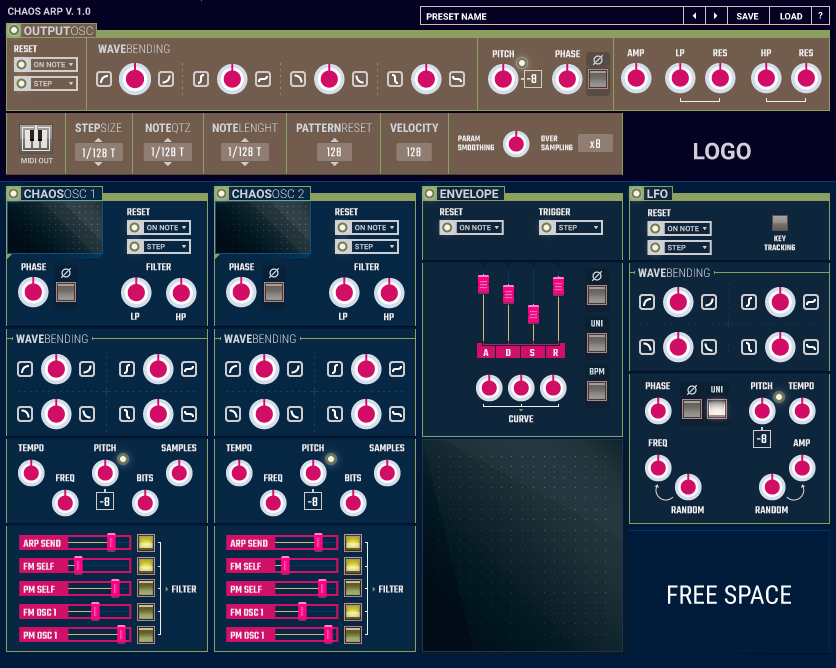
The two chaos oscillators will interact producing complex patterns to then be quantized into melodies and rhythms.. That is sent to the envelope and output oscillator. Hopefully I can also add a midi out feature. The point though is to also allow the user to experiment with audio-rate arpeggios (which cannot be output to midi).
The other benefit will be complex repeatable patterns. I'm using all TriSaw oscillators for LFO, chaos oscillator, and output oscillator. I will also be using my Flower Child FMD filter for the output filter.
Wow, I just realized this will be a marriage of Chaosfly, FMD, and... an arpeggiator.

nice - i like how you arranged the trisaw waveform parameters - two rows for upward and downward halfwave parameters. and also the icons for the shape parameters. no numeric parameter readout? i guess, you want to encourage the user to tune stuff by ear rather than by numbers. that's probably more musical/artistic than my very technical/engineering approach. i think both approaches have their place. ...i'd tone down the pink a bit, though ;-)

Of course there will be numeric readout! It will be a popup, remember I was asking about how to do it for FMD. I'll do it for tis as well. I might make it a nice big readout where LOGO is. The logo will disappear during numeric readout and reappear after a time.
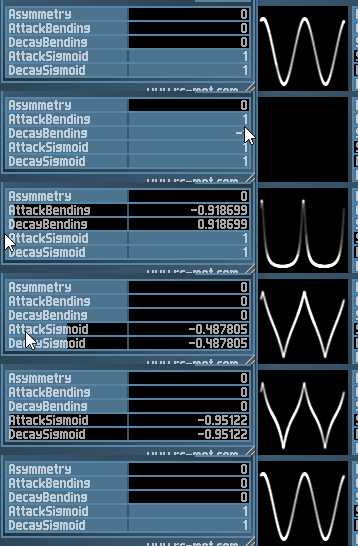
Here's the control scheme that I will use JUST for the output oscillator.
Knob 1: +Attack Bending coupled to -Decay Bending Knob 2: +Attack Sigmoid coupled to +Decay Sigmoid Knob 3: Attack/Decay Bending offset Knob 4: Attack/Decay Sigmoid offset
and s*** I just realized I forgot the asymmetry knob.
Also, I wonder if you could make 0 sigmoid be a sine and 1 sigmoid approach a square. Not sure if that will mess up your algorithm though. Hmm, another thing that feels weird is that the negative sigmoid doesn't go extreme enough, but that's ok if it's a limitation of the algorithm.
I wonder if you could make 0 sigmoid be a sine and 1 sigmoid approach a square.
hmm...did you try my sine-to-square patch in liberty?
another thing that feels weird is that the negative sigmoid doesn't go extreme enough, but that's ok if it's a limitation of the algorithm.
yes, that's true. try to extend the parameter range to -2 (or shortly below). i think -2 is the mathematical limit where the equation hits a singularity (div-by-zero stuff). not sure, just off the cuff. i didn't really know how to map from user-parameter to algorithm-parameter, so i limited the range to -1. the trisaw algorithm is still premature - at least with respect to what the user-parameters should be
you sure you pushed it?
Last commit to RS-MET presets was March 19 2018
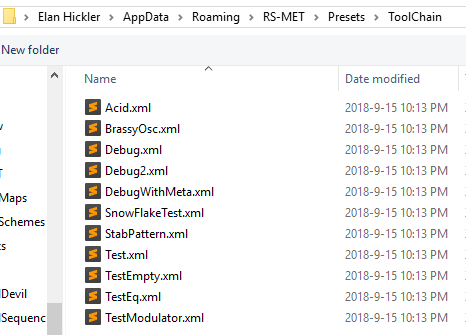
wtf...yes... i just verified...your directory is missing a lot more patches
when did you pull the last time?
where is the repository? NOT this?: https://github.com/RobinSchmidt/Presets
oh, you must be putting patches somewhere in the RS-MET main repository.
Edit: nope, no idea where you are putting presets.
oh - no - the "Presets" repo is obsolete. i have now created a new repo with all support files (presets, samples and more): https://github.com/RobinSchmidt/RS-MET-Data
as said - put it in you app-data folder and rename it appropriately (remove the "-Data" from the dir name)
ok, this boost parameter is not a proper sine to square... not that it matters, just letting you know! It's behaving like a hard clipper.
The current way to get a sine to square with your trisaw algorithm is, instead of my previously stated:
Knob 1: +Attack Bending coupled to -Decay Bending
it would be
Knob 1: +Attack Bending coupled to +Decay Bending
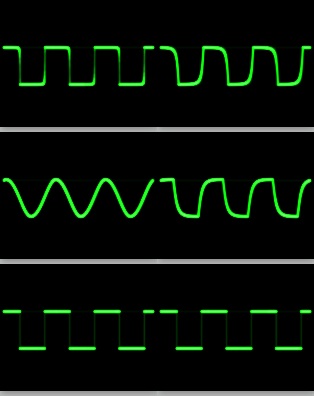
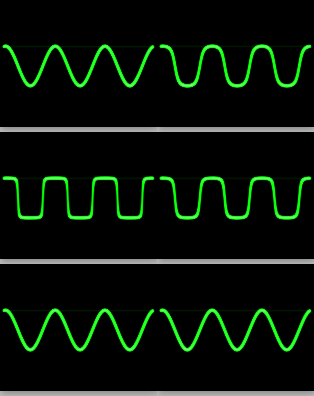
And here's the difference between TriSaw and Ellipse, one is asymmetrical, the other is symmetrical:
ok, this boost parameter is not a proper sine to square... not that it matters, just letting you know! It's behaving like a hard clipper.
actually, it squeezes the sine-segment along the x-axis and inserts a constant (+-1) when the sine hits the floor/ceiling. so the transition from low to high looks like a sinusoidal segment squeezed in x-direction (in particular, it has zero derivative when it hits the floor/ceiling - so the whole curve is 2nd order continuous). ....but maybe in practice that is not so much much different from clipping. how would you define a "proper" sine-to-square?
a proper sine to square is what I showed you in my gifs. Both perform sine to square in different ways. One symmetrical, one assymetrical.
edit: let me look at the trisaw again... maybe it's not exactly like hard clipping? that's what it felt like at first glance. or maybe it was a kind of soft clipping.
ah - so the gifs are a transition created with the ellipse (xoxos) algorithm?
(left) TriSaw / Ellipse (right)
~~edit: but you could recreate TriSaw's behavior in Ellipse as well.~~ nevermind
edit: the difference in harmonics is interesting. In terms of harmonic series, TriSaw creates a linear ramp, Ellipse creates a logarythmic ramp. Still need to see what your Boost does. From experience I'm sure it will be an ugly comb harmonic series 😄, will post images tomorrow. Too tired!
Hard Clipping (comb harmonics, generally least desirable)
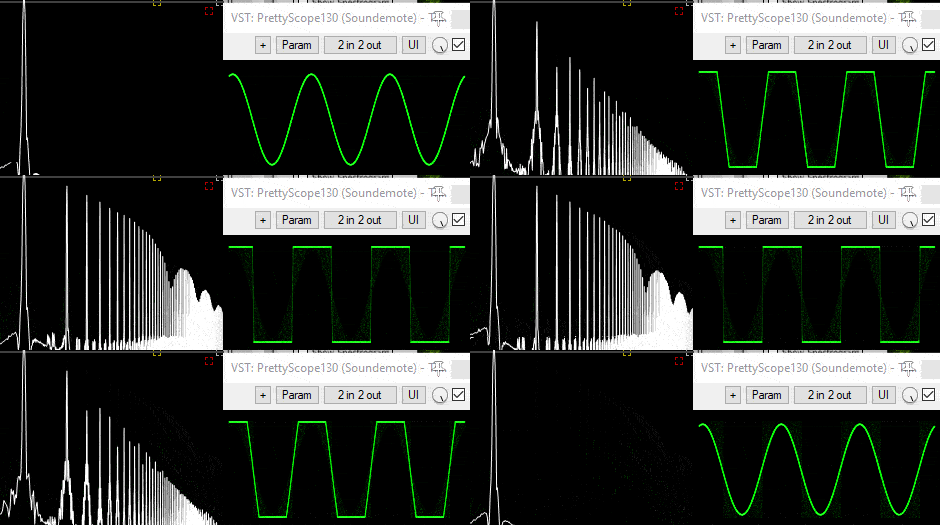
Boost (comb harmonics, like hard clipping)
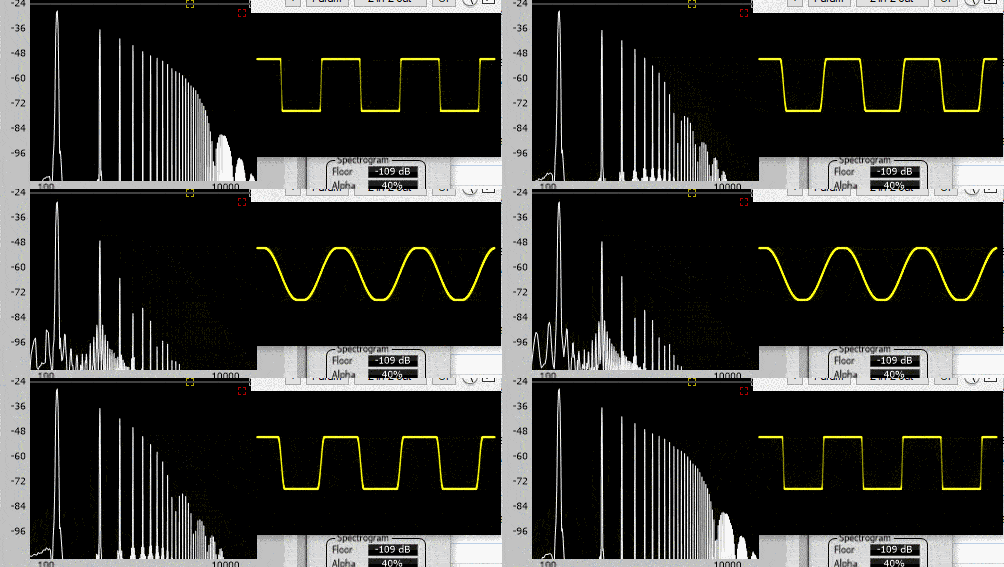
TriSaw (linear harmonics, like ???)
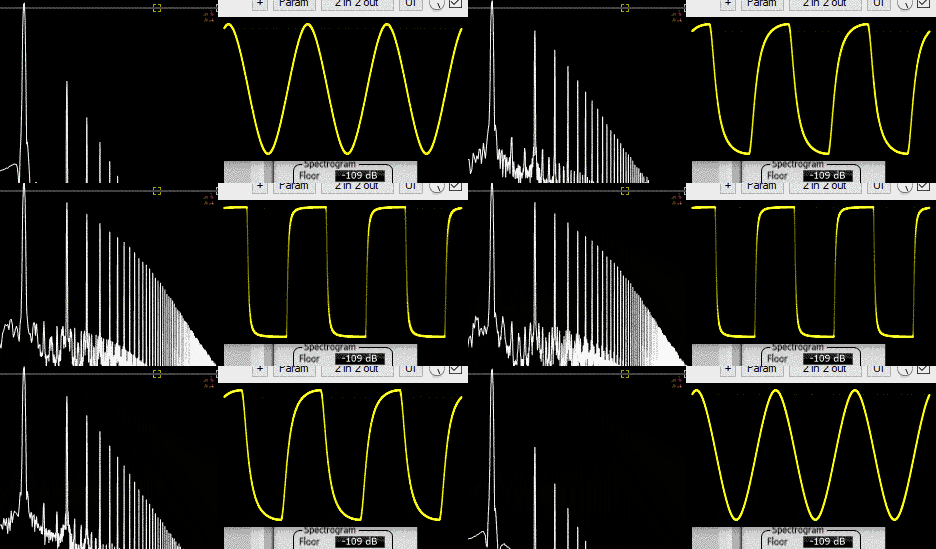
Ellipse (logarithmic harmonics, like soft clipping)
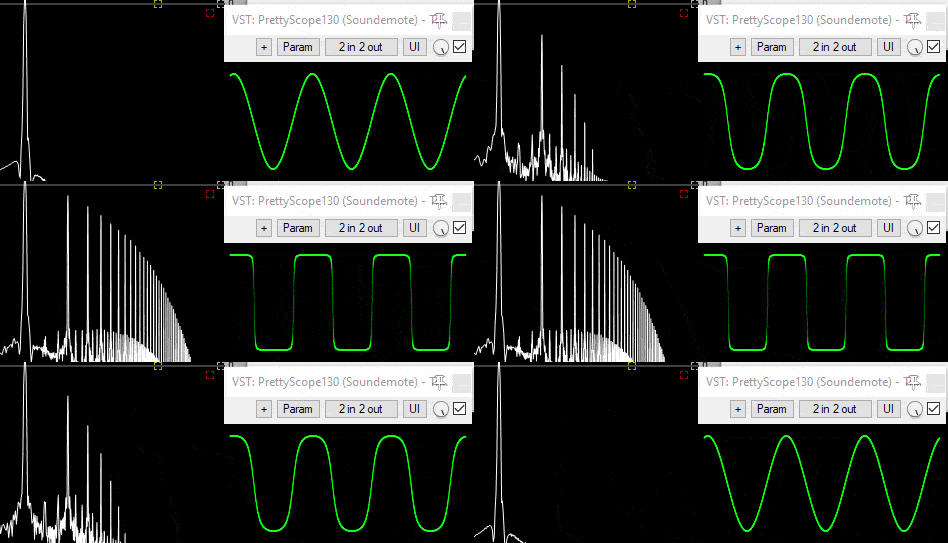
Soft Clipping (logarithmic harmonics, generally most desirable)
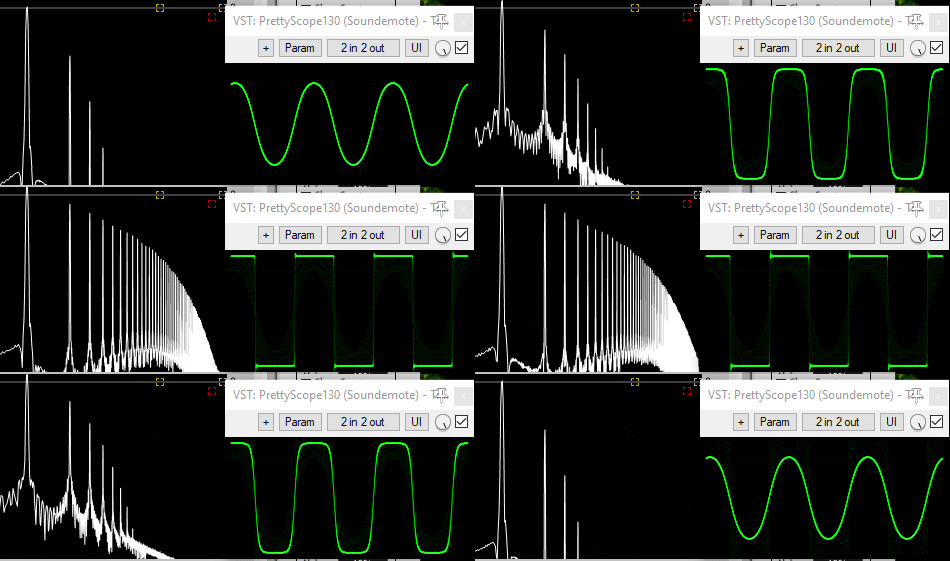
ah - i see - you are right about the comb effect. but didn't a tanh saturation give a nice development of the harmonics?
here's how it's sounding so far
http://www.elanhickler.com/_/chaosarp/chaosArp3.mp3
the portamento is an emergent behavior of the chaos: http://www.elanhickler.com/_/chaosarp/chaosArp4.mp3
next I need to add some time quantization.
aha. nice. i like how the timbre changes toward the end in the 2nd example. what osc-algorithm is that? btw - i was thinking about the tanh based sine-to-square. i think, it would benefit from an overall output scaling of the amplitude (by 1 / tanh(boost)), so the output amplitude is constant and independent from the boost (expressed as linear amplitude scaler). you could then also use factors < 1 to get (almost) rid of these 3 harmonics that are already present at the start
another thing: if you work with chaos and the exact time-domain output sequence is important (as is the case here), i think you should have a keen eye on possible occurrences of the butterfly effect, if you change some tiny bits about the algorithm that could affect rounding behavior - such as setting parentheses this way or that way. maybe the difference between (a+b)+c and a+(b+c) could potentially completely change what a patch does ...at least after running for long enough
f*** you know I'm not using a chaotic algorithm, I'm using two oscillator interactions, but a chaotic algorithm might've been easier... bahhhh
I'm only using TriSaw.
edit: but it does allow for using the oscillators as an audio source.
here's my first quantized-timed melody:
http://www.elanhickler.com/_/chaosarp/chaosArp_quantizedMelody.mp3 (I manually cut the audio to repeat a few times just as an experiment)
Is there any way to allow the user to put in the desired time divisions so that when the user modulates a time division parameter, it modulates only to the desired divisions?
it's your code, so how would i know? i guess i don't really understand the question
I guess what I could do is have a widget set with 28 enable/disable button/parameters for the 28 time lengths:
4/1, 2/1D, 4/1T, 2/1, 1/1D, 2/1T, 1/1, 1/2D, 1/1T, 1/2, 1/4D, 1/2T, 1/4, 1/8D, 1/4T, 1/8, 1/16D, 1/8T, 1/16, 1/32D, 1/16T, 1/32, 1/64D, 1/32T, 1/64, 1/128 , 1/64T, 1/128
then update a value array based on which buttons are enabled.
The question is: Not all those times are useful for a given situation, and the user will want to modulate between times. How do I allow the user to choose which ones the plugin will use?
ahhh...wait...now i'm beginning to understand. you want a sort custom quantizer that quantizes incoming values to a user-defined set of allowed values?
i would probably write a class like this:
class Quantizer
{

public:

  void addQuantizationLevel(double newLevel);
  void setLevelAllowed(int index, bool shouldBeAllowed);
  double quantizeValue(double inValue);

protected:

  std::vector<double> quantizationLevels;
  std::vector<bool> allowedLevels;

};
for the processing core. for the gui...yeah...maybe an array of buttons plus an array of (draggable) number-fields (above or below the corresponding buttons). not sure, if i would associate a parameter with each level and/or switch - only if you want these things to be automatable and/or modulatable
this is using dual lorenz attractor. I can't use my chaos oscillators because if the modulation is too high, the pattern can no longer be repeated, not sure why, samplerate issues I'm sure.
I'm actually much happier with lorenz attractors. They create better patterns. http://www.elanhickler.com/_/chaosarp/chaosArp_quantizedMelody3_lorenz.mp3
I'm not going to be working on ChaosArp right now, the original concept didn't work because the patterns were not repeatable. Instead, I'll be releasing a free experiment. Releasing these free plugins will help me prepare for a larger polished product by polishing the individual components first.
This one has something new, algorithmic rhythm. Here's what's possible with my design: http://www.elanhickler.com//chaosarp/elan_algorithmic_rhythm_clicks.ogg http://www.elanhickler.com//chaosarp/elanhickler_clock_divider_2018.ogg
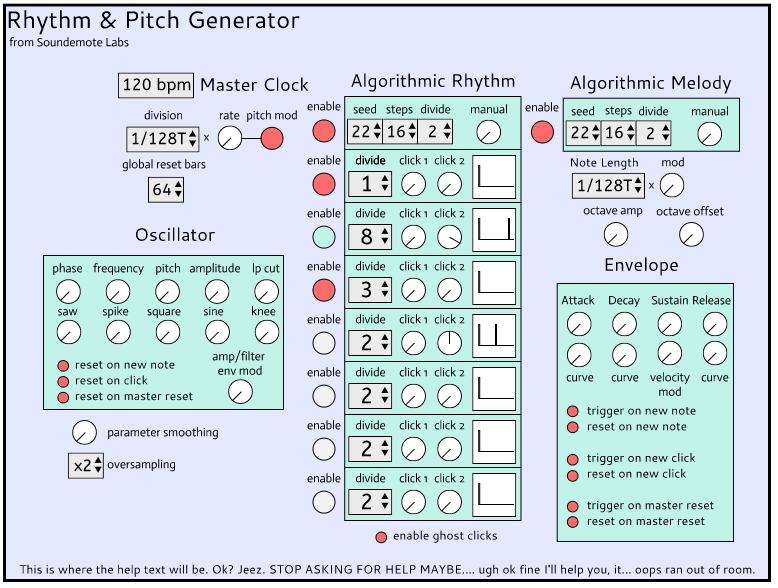
Now look near the bottom and you see a mysterious button "enable ghost clicks". It's a secret sauce I came up with for filling space rhythmically speaking. It layers/combines the other clocks to create additional events. These events will be sent at lower velocity as well.
here's a last chaosarp experiment http://www.elanhickler.com/_/chaosarp/chaosArp_OnTheRun.mp3
One thing I need help with. I'm created a custom RWidget to make a little visual display, see the trigger displays that look like ||, that is decided by click1 and click2. However in RWidget you can only assign a single parameter. Maybe I'll look at observer classes, maybe there's one for sliders.
so these widgets need to observe two parameters each? no problem: make them a ParameterObserver and register then with both parameters
hmm, but I need to know if it's click1 or click2 and parameterObserver doesn't have a way to indicate that.
Here's my code so far. I indicate click1 or click2 just by the index of the "registered click slider".
Widget
class PulseVisualizer : public RWidget
{
public:
    PulseVisualizer() = default;
    ~PulseVisualizer() = default;

    void registerSlider(RSlider * slider)
    {
        registeredSliders.push_back(slider);
    }

protected:

    void paint(Graphics & g) override
    {

        g.setColour({ 0,0,0 });
        g.drawEllipse(0, 0, getWidth(), getHeight(), 1);

        g.setColour({ 255, 255, 255 });
        for (const auto & slider : registeredSliders)
        {
            double value = slider->getNormalizedValue();
            const int margin = 2;
            int drawAreaHorizontal = getWidth() - margin;
            int drawAreaVertical = getWidth() - margin;

            int lineLocationX = margin + drawAreaHorizontal * value;
            int lineLocationY = margin + drawAreaVertical * value;

            g.drawLine(lineLocationX, margin, lineLocationX, getHeight() - margin, 1);
        }
    }

    vector<RSlider *> registeredSliders;
};
WidgetSet
class RaPG_ClockDividerWidgetSet : public WidgetSet, public jura::RSliderListener
{
public:
    RaPG_ClockDividerWidgetSet(RaPG_RhythmModule * newModuletoEdit)
    {
        addWidget(pulseDisplay = new PulseVisualizer());
        pulseDisplay->registerSlider(pulse1time_slider);
        pulseDisplay->registerSlider(pulse2time_slider);
    }

    ~RaPG_ClockDividerWidgetSet() = default;

protected:
    void rSliderValueChanged(RSlider * rSlider) override
    {
        pulseDisplay->repaint();
    }

    ModulatableSlider * pulse1time_slider;
    ModulatableSlider * pulse2time_slider;
    PulseVisualizer * pulseDisplay;
};
I need to know if it's click1 or click2 and parameterObserver doesn't have a way to indicate that.
click1 and click2 ar parameters right? so they pass a pointer to themselves to the callbacks (parameterChanged, etc)
I'm not seeing the connection.
SliderA notifies parameter observer when it changes.
parameter observer grabs the normalized value of SliderA
does parameter observer update the value for click1 or click2? we don't know!
SliderA notifies parameter observer when it changes. parameter observer grabs the normalized value of SliderA does parameter observer update the value for click1 or click2? we don't know!
what? no. i think about it like this: sliderPulse1 sets the pulseParameter1 (which should be its assigned parameter). pulseParameter1 notifies all registered observers about the change by calling parameterChanged on all observers (including sliderPulse1 itself). all these observers (typically all widgets that relate to the parameter) repaint themselves
so... this? I don't like it. It depends on having pulse1click parameter be named pulse1click.
    void parameterChanged(Parameter* parameterThatHasChanged) override
    {
        click1 = moduleToEdit->getParameterByName("pulse1click")->getValue();
        repaint();
    }
edit:
oh I could do this
moduleToEdit->getParameterByName(parameterThatHasChanged->getName())->getValue();
nope can't do that, I need to use string so I can make sure click1 gets pulse1
i was more thinking like this:
void parameterChanged(Parameter* parameterThatHasChanged) override
{
  if(parameterThatHasChanged == click1Param)
    doClick1Stuff();
  if(parameterThatHasChanged == click2Param)
    doClick2Stuff();
  // etc
}
obviously, your observer needs to keep pointers to the parameters - this can all be set up on initialization
so I need to have click1param and click2param as a member of my custom pulse drawing widget?
just pointers to them. the actual parameter objects should be owned by the AudioModule
ok, that's what I did from the beginning. Your suggestion is only to use parameter observer instead of slider listener which involes more code but it allows more to be owned by the widget in question which is good.
I couldn't figure out how to use a widgetset and add it sequentially to the editor, so i ended up making it individual child editors. Is there an easy explanation for putting the widgets directly on the parent editor instead of having them as child editors?
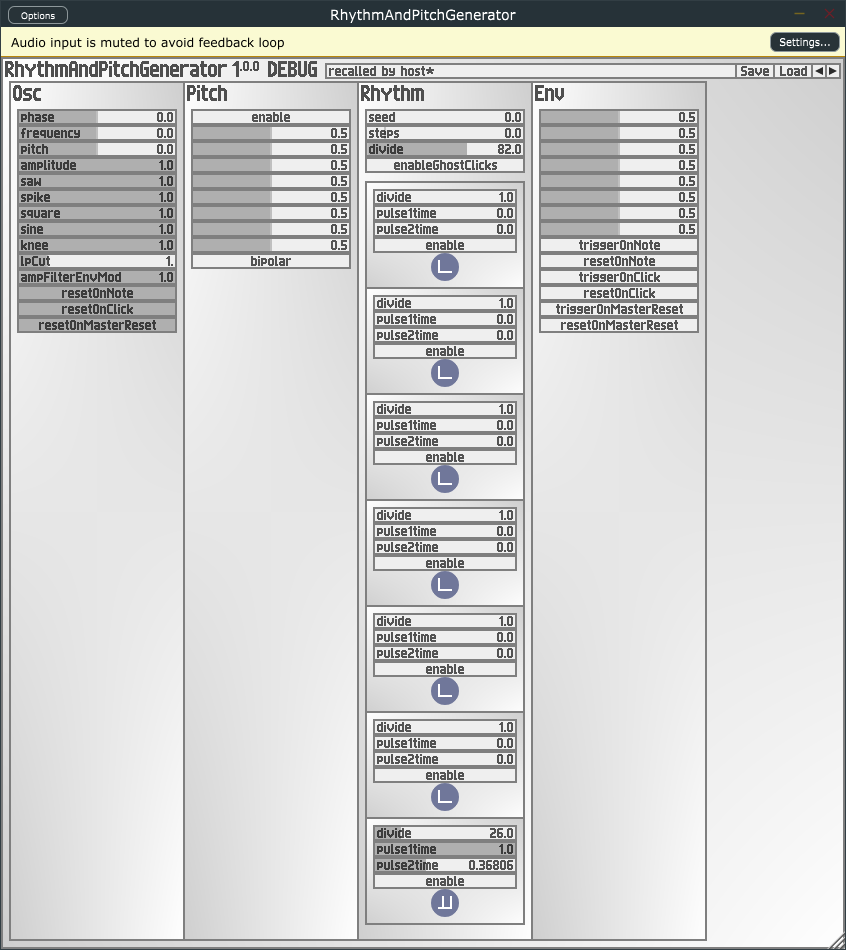
I couldn't figure out how to use a widgetset and add it sequentially to the editor,
hmm..actually, you are just supposed to create (and fill) the widget-set and then use addWidgetSet instead of addWidget for each individual widget
Is there an easy explanation for putting the widgets directly on the parent editor instead of having them as child editors?
i don't understand that question. what do you mean by having a widget as child-editor? widgets are not editors.
this is what I did
constructor
for (int i = 0; i < ClockDividerEditors.size(); ++i)
{
    ClockDividerEditors[i] = new RaPG_ClockEditor(moduleToEdit, moduleToEdit->ClockModules[i]);
    addChildEditor(ClockDividerEditors[i]);
}
resized
    for (int i = 0; i < ClockDividerEditors.size(); ++i)
    {
        ClockDividerEditors[i]->setBounds(x, y, w, h);
        y += h-2;
    }
I guess what I should have done was something like this?
for (int i = 0; i < ClockDividerEditors.size(); ++i)
{
    ClockDividerEditors[i]->widget1 = new SomeWidgetClass();
    ClockDividerEditors[i]->widget2 = new SomeWidgetClass();
    ClockDividerEditors[i]->widget3 = new SomeWidgetClass();
    ClockDividerEditors[i]->widget4 = new SomeWidgetClass();
    ClockDividerEditors[i]->widget5 = new SomeWidgetClass();
}
or maybe keep the constructor the same but change the resized
for (int i = 0; i < ClockDividerEditors.size(); ++i)
{
	ClockDividerEditors[i]->widget1->setBounds(x, y, w, h); y+=16;
	ClockDividerEditors[i]->widget2->setBounds(x, y, w, h); y+=16;
	ClockDividerEditors[i]->widget3->setBounds(x, y, w, h); y+=16;
	ClockDividerEditors[i]->widget4->setBounds(x, y, w, h); y+=16;
	ClockDividerEditors[i]->widget5->setBounds(x, y, w, h); y+=16;
}
I guess what I should have done was something like this?
for (int i = 0; i < ClockDividerEditors.size(); ++i)
{
    ClockDividerEditors[i]->widget1 = new SomeWidgetClass();
    ClockDividerEditors[i]->widget2 = new SomeWidgetClass();
    //...
}
you want to assign the pointers inside child-editor objects from outlying class? that looks wrong to me. the code in the post above looks better to me.
So, even widget set widgets are not drawn directly in the parent editor, which means widget sets cannot visually overlap (because if they overlap they cover each other, they clip other editors), right? Hmm, maybe it's just a matter of removing your background and maybe there's a clickthrough setting?
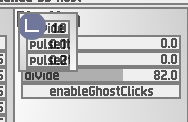
ah - yes. WidgetSet inherits the overriden paint method from ColorSchemeComponent which draws my standard bilinear gradient background. if you override it with an empty paint method, it should just draw nothing (leaving the background transparent). ..i actually currently wonder why i didn't do this empty-override myself in WidgetSet. maybe i should add it....ok done. we'll see, if this will have unintended consequences - but probably not
results so far
http://www.elanhickler.com/_/chaosarp/RaPG_moreteaking.mp3
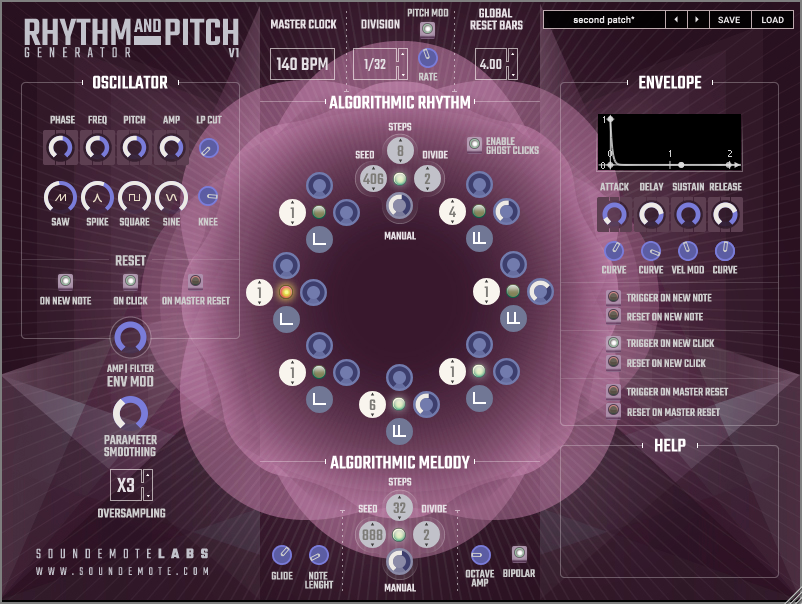
sounds really nice! what sound generator is this? is this the trisaw osc?
yes trisaw! Notice the 5 shaping knobs.
breakpoint + guassian filtering for pitch glide + trisaw + ovesampling + 6db lp filter = perfect sound.
edit: im also using the buchla lowpass gate trick of modulating amp and filter at the same time. Amp/Filter env mod allows you to adjust this effect as well.
i just stumbled upon something that might be of interest in this context: http://cgm.cs.mcgill.ca/~godfried/publications/banff.pdf
edit: oh, nice - here's an extended version of the paper: http://cgm.cs.mcgill.ca/~godfried/publications/banff-extended.pdf
http://www.groovemechanics.com/euclid/
https://vimeo.com/8228686
https://onlinesequencer.net/978454#105775
the first one is very cool - i actually wrote this reply long ago, but apparently, it disappeared