

 RobinSchmidt
How do I automate going to next preset?
Im currently working on a demo video of all presets for Torus. I really need a way to automate going to next presets.
I currently have it separated by markers
Like this: https://i.gyazo.com/1d7062600c00c49977bf47b311a6d967.png
Is there any way we can do this? :)
-Alejandro

robin, I'm having Alejandro make a request on my behalf. I need to locate the function so I can add midi functionality and call the function to go to next preset in the midi callback for next/previous preset.

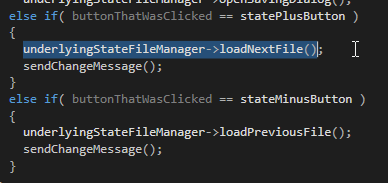
the class StateFileManager is actually a baseclass of AudioModule, so this "underlyingStateFileManager" variable probably is the audio module in this case. ...so you can probably just call loadNextFile/loadPreviousFile in the AudioModule. ...if i'm not mistaken. maybe try it

crash :)
Edit: WORKS! Crash was due to smoothing manager (trying to smooth the act of changing a preset, lol).
ok, nice. are you using a midi controller to walk through 127 files in some directory? ...maybe it can be done with program change messages and incorporated into the framework. but the problem is probably that you would have to select the proper preset folder from gui first, i guess. the currently active preset-folder (playing the role of a midi program-bank - or whatever that was called) would somehow have to be stored with the state
trying to smooth the act of changing a preset
hmmm....actually, switching a preset (potentially) changes the values of all parameters at once....sooo perhaps then a large number of smoothers would be created and we should see a preset morph instead of a crash? but maybe it's just too much cpu load to smooth all parameters at once?
i think the crash was due to trying to smooth the button / preset change, thereby causing the preset change callback to be called multiple times or something.
I' chaning via button, which I will try to automate. When value becomes 1, then preset will change once. Value must become 0 before another change can occur.

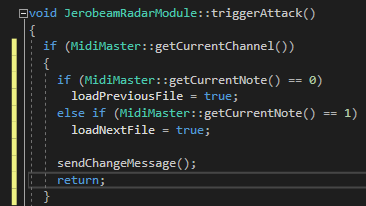
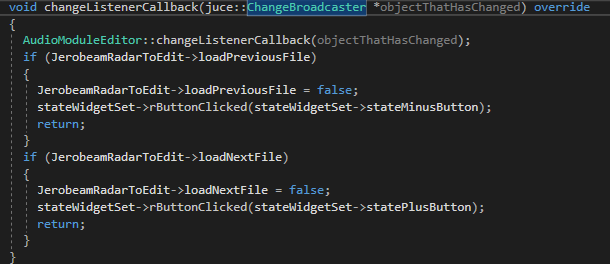
the assert message is actually quite informative. apparently, the midi preset switch happens in the audio-thread (midi events are generally handled in the audio thread)...and that preset switch causes a call to setVisible? i guess, you are making certain widgets in/visible depending on the state. ...and that's not allowed from the audio-thread in juce
it's a similar problem like the one i had with repainting and my solution was to write this ugly repaintOnMessageThread monstrosity. maybe you can write a similar setVisibleOnMessageThread function? ....but that's all pretty nasty and ugly stuff. not really elegant at all. but that's the first thing that comes to my mind
ok - although i have no idea, how your hack works...what it has to do with current note...but anyway
...if it becomes more common to trigger events from the audio thread that call gui "Component" methods, we may have to think about a more general solution for scheduling the calls on the message thread. ...but not now
Robin, it's simple, ignore the stuff about current note. All you need to see is I'm doing "sendChangeMessage()"
The GUI thread picks that up as a broadcast listener and does what I want it to do... change preset.
aaahhh - ok - i understand. i used the same mechanism before for parameters updating (and repainting) widgets, before i figured out how to do that via MessageManager::callAsync
https://juce.com/doc/classMessageManager#ac3ed7c9a9885eba962cca454552b2902
it's cleaner now because i don't need to subclass Parameter from ChangeBroadcaster and RWidget from ChangeListener anymore.
...or wait - i'm not sure anymore if i did it that way. could also be the case that i had parameter subclassed from ChangeBroadcaster and ChangeListener and sending change messages to itself - wich is a sort of weird thing to do.
but: what if there is no editor open? then the preset switch won't work, right?
if that doesn't work, you can send the change-message from the module to itself, like i described above

callAsync is undefined, Do I need to make MessageManager a subclass of module?
I don't know what you mean by sending the change message from the module, I thought I was doing that already.
actually, this looks right to me. could the problem be that you have a bool flag "loadNextFile" - with the same name as the function loadNextFile? i guess the compiler is confused by that name-clash. you cannot call a bool! ;-)