

 RickStrahl
[Feature Request] Publish to a site over an SFTP/SCP connection
Intro
This feature is missing just for me personally, but it would make Markdown Monster pretty much the perfect Markdown editor for me.
Rationale
I am publishing my Markdown content on a (self-hosted) Markdown-based Grav flat file CMS. Publishing content directly from Markdown Monster would make it the perfect local editor for content on such a type of site.
Another use case I have is publishing generated HTML (based on Markdown) to a standard web server like Apache.
Feature
This could be either a "launch external tool" function being able to launch one's personal favorite SFTP/SCP client.
Better would be an integrated client with functionality outlined here:
- Manage multiple connections (profiles) with protocol, host, port, remote path, login, password (and maybe CSS file/image folder path for HTML file upload) in a list
- Connect on click and prompt for a password, if none is saved with the connection profile, disconnect automatically after some configurable idle time, also by click
- Allow for a choice to upload the Markdown file or a generated HMTL file based on it (maybe with a custom CSS link and image folder stored in the connection profile), if desired with navigation of remote folders, if desired
This feature can show in Markdown Monster either as a sidebar tab, a dialog launched from the menu, or an icon with a list selection, maybe launching a dialog. UI Design thus would vary, depending on this choice.
If desired I could make a few wireframe sketches.

Agree this would be nice to have, but it adds a bit of complexity because once you start down this path people want all sorts of different ways to 'publish'.
So I think if this is added it needs to be an Addin that gets installed separately and configured separately and extends functionality.

I fully agree with you that it could open a Pandora's box of wishes, some of which even may be contradictory.
And also it is not a problem to have one's favorite SFTP/SCP client open to achieve the same without integration/automation.
Maybe it is better to reject and close this issue.
No I think it's good to leave this open and out there both for feedback and the possibility that somebody (including myself) will take a look at this.
It's something I would actually like to use myself, but part of the problem here is that there are not many good open source solutions that work licensing wise for handling FTP, SFTP and FTPS. Plus - the secure protocols all have their quirks with how you need to provide security and certificates that make this a bit more complicated. I took a look around and I'll take a look at WinSCP, which has a .NET front end that might work. No promises though.
I gave the whole idea a second thought and now I actually would favor some rather limited, but well defined functionality for the feature:
- Only offer the function upload the Markdown file(s) in the editor, maybe with a choice of the file in focus vs. all opened files.
- Only upload into a folder configured in the connection, no navigation.
- Only have one extra property in a connection dealing with image upload only (ignoring all other file type references), just like a checkbox with some tooltip description of the behavior: (a) If the checkbox is activated, also upload images referenced in the Markdown with a relative path using Markdown syntax (not when using HTML syntax) to the exact relative path on the server (if privileges allow), create the folders, if necessary. This may be even more limited to folders below the connection target folder (and this target folder of course) for example. (b) If the checkbox is not checked, do not care for any referenced files.
This would allow for a smooth Markdown workflow with well defined behavior. Uploading generated HTML with style sheets or the like might just lead to confusing behavior and should be handled externally/individually - there are just too many variations to reliably ensure consistent behavior. Still the image functionality may be sparking unrealistic wishes, so leaving it out may be an option.
So I took a first shot at an addin as a proof of concept using WinScp and for now just uploading a single file at the time.
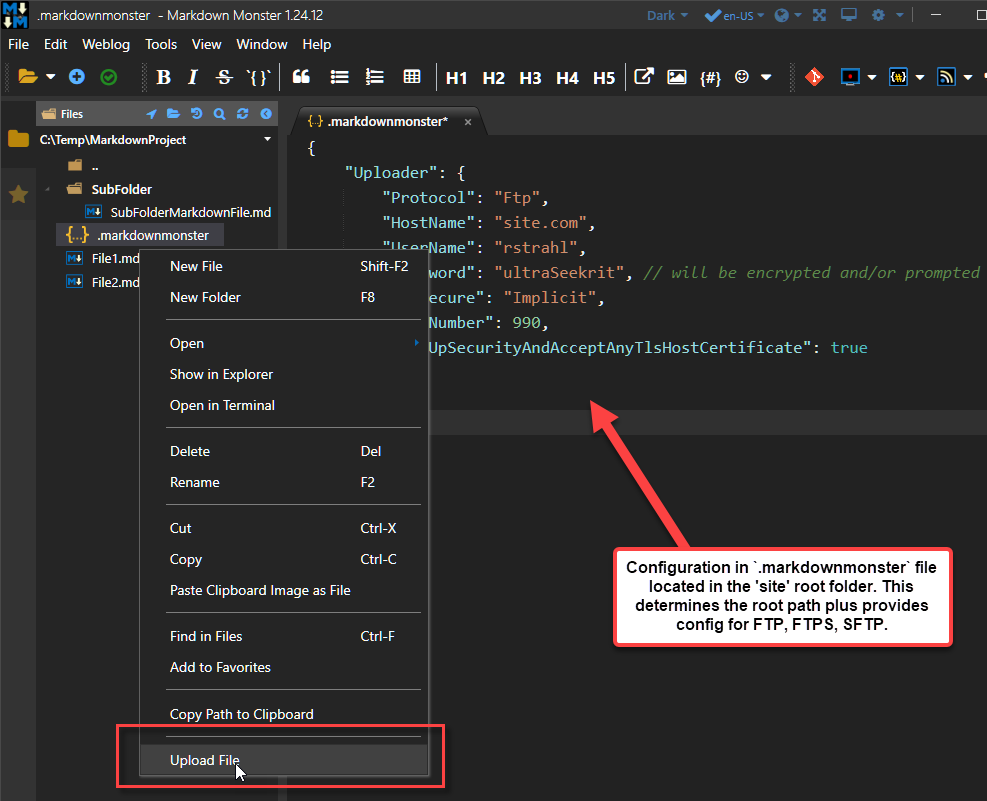
So the upload part of it should be fairly straight forward using WinSCP which is a big plus. Requires a largish binary that has to be shipped, but it's OK since it is an addin - if you explicitly need this functionality the extra size won't be a problem (but would be in main product).
Here are the key points of how I see this working:
-
Configuration will be stored in
.markdownmonsterproject file that lives in the site 'root' folder. All paths for uploading are considered relative to this..markdownmonsteris a standard file that can be used for customer configuration data that is 'site specific'. In this case it'll hold the connection information - protocol, port, auth, domain etc. (password will need encryption or prompt mechanism - not working at this point). -
Upload option will be available on the Tab Context menu or the Folder Browser context menu. For now only single file upload - mainly because the folder browser doesn't support multi-select which is an open issue that needs to be addressed separately.
-
I suppose we could also have an upload all files that have changed option.
-
Security: Passwords need to be encrypted if stored in the file, or if no password is provided the password has to be prompted for. In that case the addin has to track active domains and the password used with it so the password can be reused during the active session.
Right now this is mostly a proof of concept. I'd like to get the FTP upload going first, but it would be really nice to be able to build a semi-generic interface for this so the uploads can be sent to a variety of services: FTP, WebDeploy, Azure Blob Storage, S3 Buckets - and whatever else is available, plus potentially allow people to plug into it to add others.
This POC appears really great! I would volunteer to test once you think the POC or an implementation is in a state to be testing SFTP and SCP (the protocols which external productions sites might/should only offer).
Ideally what I'd want is to be able to select a bunch of file and upload them - I do this all the time in Visual Studio or VS Code. The problem with that is that MM does not currently support multiple selection in the tree due to the fact that control doesn't support it. To make that work I first have to fix the tree and manually implement multi-select which is actually another open issue. Not a trivial task though since there are a number of selection/unselection key combos (ctrl and shift select etc.).
That sounds great and would be a powerful feature, still at least for me the main use case might be to save and upload the file in the currently focused editor tab. I suppose my highest frequency of use would be making a small correction or change and putting it online directly (then seeing a typo and doing it over again and so on). Sure having this as a key combo would be awesome.
So I've added support for multi-file selection which should make this whole process of file transfers a lot better as you can selectively select files to send.
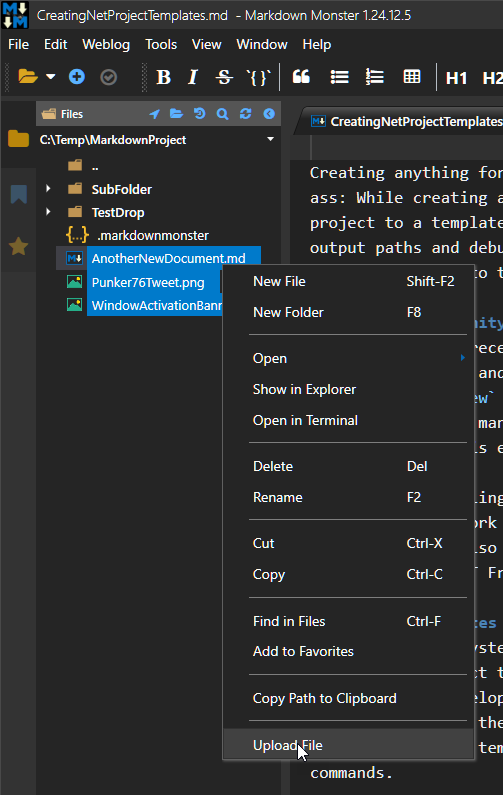
Not there yet but at least the tools are in place now to make this work.
This has been a big chunk of work, but it adds a lot of functionality to the file browser as most operations now support multi-file ops. For example, selecting and deleting multiple file, copying and drag and drop of multiple files, open multiple files in the editor or an external editor etc.
Closing - never got around to finishing this and nobody seems to care anyway :smile: