RetroPie
Added I.K.E.M.E.N GO scriptmodule
This PR adds I.K.E.M.E.N GO as a scriptmodule. See the posts on this thread on the RetroPie forums for more technical details.
I.K.E.M.E.N GO is an open-source clone of the M.U.G.E.N fighting game engine written in Golang. M.U.G.E.N has been used to create a number of full games as well as lots of content for general use, and requests to add it to RetroPie have been around for a while.
In addition to just installing I.K.E.M.E.N GO, this module also sets up the engine's content folders in /home/pi/RetroPie/roms/ports/ikemen-go to allow for easy installation of content, as well as one folder in /opt/retropie/configs/ports/ikemen-go/save so that users can edit the config.json file (I.K.E.M.E.N GO's equivalent of M.U.G.E.N's mugen.cfg) if need be. This is why there are two chown commands in the module, with the third (chown -R $user:$user "$md_inst") being there to ensure I.K.E.M.E.N GO doesn't crash due to being unable to write its Ikemen.log file.
This scriptmodule has been tested and confirmed to work at least on the Pi 4, but due to the huge amount of dependencies required to compile it on the Pi, as well as some other issues (particularly when concerning composite video output and, at the moment, inputs), I've placed it under experimental.

(continued from the review)
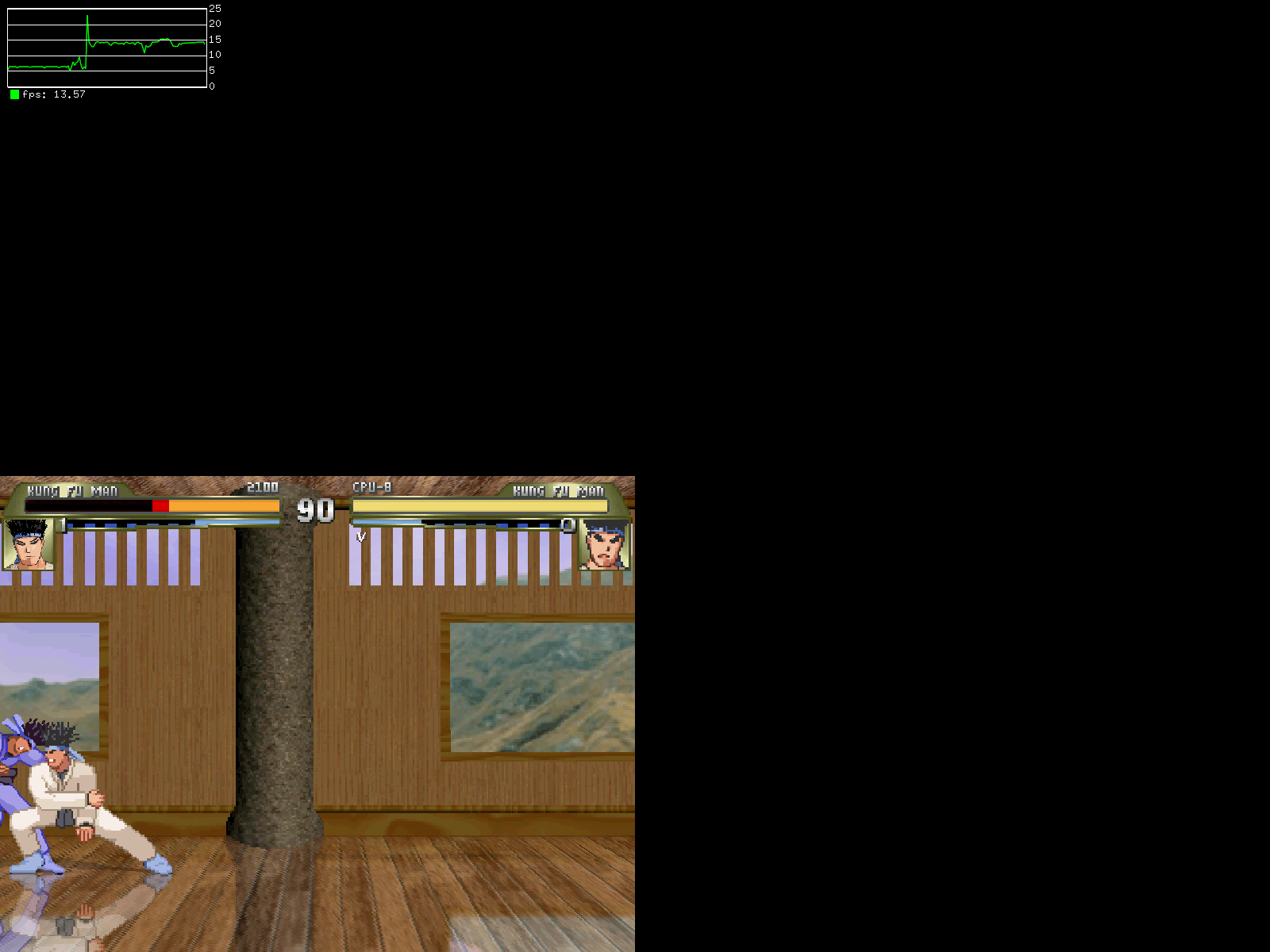
I have tested again with the initial dependencies installed (i.e. xorg-dev) and rebuilding the binary. The video still doesn't get over 22fps (in demo mode) with a modest resolution (800x600). Fullscreen is also not really fullscreen, the image is scaled in the bottom left corner of the screen. In arcade play mode it barely reaches 15 fps and the CPU is clearly the bottlenect (consuming 3 full cores or going over).
@SuperFromND is this the same experience you have or there is room for improvement ?

@cmitu That's odd; while I was getting those sorts of issues initially, eventually I was able to get IKEMEN to display centered by default, not in the bottom-left corner (the cause was something involving xorg and xorg-dev being installed simultaneously; removing xorg-dev and/or installing from a fresh RetroPie image seemed to fix it.)
I have noticed the bottom-left-corner thing crop up at certain resolutions, since it relies on changing video modes to achieve the fullscreen effect it's possible that the resolution of the Pi is changed to something higher than the resolution of the game.
Admittedly I've never tried setting a native resolution above 640x480, since that's what most characters and screenpacks are built around.
@cmitu That's odd; while I was getting those sorts of issues initially, eventually I was able to get IKEMEN to display centered by default,
It does display centered by default on the 1st run and I suppose if the resolution is left untouched will stay this way. But it also doesn't fill up the entire screen, even if I configure in the video settings to be fullscreen, that's why I tried switching the resolution. My display supports both resolutions (800x600 and 640x480), but runs in a higher resolution by default and having the game in a tiny window (centered or not) is not ideal.
It does display centered by default on the 1st run and I suppose if the resolution is left untouched will stay this way.
The way this was worded implied that something makes it default to the bottom-left corner on subsequent runs, and it made me want to see if perhaps setting a game resolution was causing a window's starting coordinate to "save" an offset, but I just tried switching the resolution to 960x720, restarted, switched it back to 640x480, restarted again, and the screen still starts in the center as I expected. Perhaps there's some sort of way to tell xinit to force a program to always start centered, but if there is a way, I don't know about it.
But it also doesn't fill up the entire screen, even if I configure in the video settings to be fullscreen, that's why I tried switching the resolution.
Odd, changing the setting should at the very least try to change the video resolution to match that of the game's resolution, or at least the nearest one that the Pi likes (which I'm guessing is what you mean by "doesn't fill the entire screen"). I tried 800x600, both windowed and in fullscreen, and that seemed to work fine for me.
It's worth noting though that fullscreen-scaling on IKEMEN has been known to be a bit wonky in general for a while, so it's possible that something will address whatever problem you're having at some point in the future.
I already posted this as a status update over on the RetroPie forums thread, but IKEMEN GO recently updated its dependencies, and as a consequence, it now requires Go 1.14 or later to compile. Unfortunately, current RetroPie images based on Debian Buster only supply Go 1.11, and as far as I can tell there's no precedent for manually installing something like Go in any of RetroPie's script modules.
There's a few ways to go about correcting this:
- Wait until Bullseye-based images get released, since those upgrade the available Go package to 1.15.
- Somehow manually install Go as part of the scriptmodule.
- Fork a slightly older version of IKEMEN GO that is known to compile on the Raspberry Pi under Buster.
I'll leave it up to the maintainers to decide what the best course of action should be.
Unfortunately, current RetroPie images based on Debian Buster only supply Go 1.11, and as far as I can tell there's no precedent for manually installing something like Go in any of RetroPie's script modules.
Actually, there is - see the golang scriptmodule, created for scraper.
Okay, I just updated the module with a notably large change: this commit now adds a secondary module, golang-1.17, as a dependency. This is required for IKEMEN GO to compile as one of its dependencies requires Go 1.14 or later, and current Debian Buster only supplies up to 1.11 via apt-get. I chose 1.17 as it's the latest version and should be future-proofed with future IKEMEN GO dependency updates for the forseeable future.
I didn't modify the other golang script that's included in supplementary, though it probably would be a smart idea to modify that one to reflect its version number (1.8).
Fullscreen is also not really fullscreen, the image is scaled in the bottom left corner of the screen.
Okay, I finally figured out why this happens! It turns out if you have any specific video mode set in /boot/config.txt (whether manually or with raspi-config), IKEMEN will not scale itself fullscreen. The reason is that IKEMEN relies on changing the video mode of the monitor to handle fullscreen (you can't just maximize it like with most other programs, you either get a window or a video mode-based fullscreen).
The workaround is, on top of leaving the video mode in /boot/config.txt as default (in other words, if there's any active hdmi_group or hdmi_mode parameters, comment them out), to use RetroPie's runcommand video mode settings to force 640x480 resolution (or whatever resolution you set IKEMEN to run in). Not ideal, but at least it works?
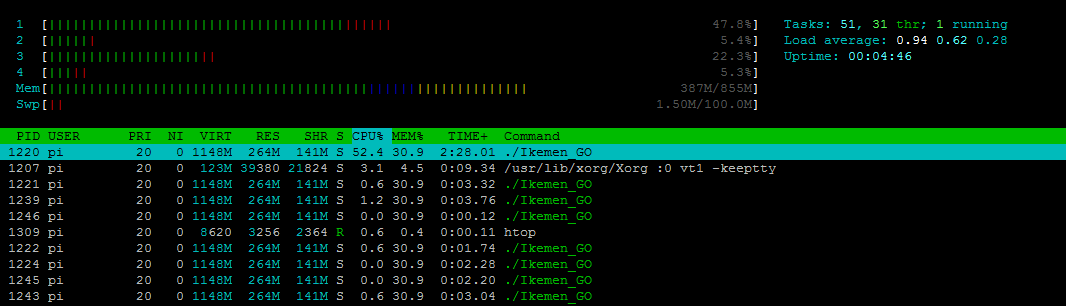
No idea why you're getting such bad performance though; I'm getting fullspeed with only one core getting substantial usage (though quite a lot of memory usage, as to be expected since I have a decent amount of custom content loaded):