
UnityPlugin-AVProMovieCapture
 UnityPlugin-AVProMovieCapture copied to clipboard
 RenderHeads
Support for multiple audio inputs
Quite a lot of users have asked for support to record from Unity and microphone simultaneously


I also need to be able to record Unity audio and the microphone simultaneously. Currently looking into combining the two sources manually.

Hi @WikkidEdd,
Did you have some news about it ? I would like to do the same: recording video (from Unity audio) and the microphone simultaneously ..
Thanks in advance, Eric

Yup, I got it working.
The basic idea is to use the OnAudioFilterRead callback from multiple sources and then forward them on to custom UnityAudioCapture and combine the two.
I've stuck the scripts I use in a gist. https://gist.github.com/WikkidEdd/35fea92260b95135d6837188006919dc
I put one forwarder on the main AudioListener and one on the microphone playback source.
Hopefully that is helpful
Oh ! Looks great ! I need it for iOS, I will check it !
Thanks a lot !
I tried it, but I have a huge larsen effect (and at best an echo effect): loop between AudioListener and the microphone AudioSource ..
You need to set the mute behavior of the microphone OnAudioFilterReadForwarder to MuteAfter. This basically lets you capture the mic audio, but prevents it from being used by anything else aka the AudioListener.
Thank you for the MuteAfter property, indeed, the larsen effect is fixed !
But trying to record an audio Video (Unity audio mode) and the microphone seems to not work .. The final audio is still choppy. I might be doing something wrong but I dont know what ..
You may have a complete Unity sample which shows this kind of record ?

Hello to All
can you confim if this script does work at 100% into unity 2020.3 ?
im really annoyed . i have tried many times . but no succcess . and i must present my app very soon but now , I am completely blocked with this possibility to capture multiple source issue .
EricBeetsofficiel seems to have a problem too and nobody answer him .
Im reallly desesperate . I must present my app and i cannot due to mic feedback . its become to be urgent . have you got a working sample/example? im on 2020.3 .Building app for windows .
Help please ! I will be really grateful from your help. i m ready to pay for any help. Thank you very much

hello at All It s me again !;)
I have tried again your scripts ( Support formultiple audio inputs revision script ) .
here i described my architecture . Could you tell me if i do mistakes .
I have : the camera :
- with audiolistener
- capture Audio( from Audiolistener listener )
- On audio Filter REad forwarder ( with no mute behaviour )
the mic Object :
- with my Microcphone input script
- On audio filter Read forwarder component
- the mute behaviour setupped with "After" muting .
and capture object
- with the AVcapture from camera . audiosource is setupped on Unity
- CApture Audio from Multiple SOurces component and i had the both on audio filter forwarder elements. ( from Mic and camera )
Of course i deactivate the line into the capturebase.cs as described
Great I succeed to capture video from camera with all sounds ( audio listener and mic ) BUT there is the terrific feedabck from mic .
Unfortunnally and it is my huge problem : when i applied the "after" muting into Audio filter read from Mic object . the mic is not captured ( i have only the sound fromlistener )
i m completely lost and i become to believe this "on Audio Filter read forwarder " is simply buggy . ? and i lose many time on it
please could someone tell me if i do big mistake ?
its very very important for me .
Thannk you very much for any help
GiO
Did you do this step mentioned in the gist?
Remove this line in CaptureBase.cs

removeComponent = !(_unityAudioCapture is CaptureAudioFromAudioListener);
hello wikkiEdd thank you for your reply
Yes : i add the // before "removeComponent = !(_unityAudioCapture is CaptureAudioFromAudioListener);" to bring it into comment
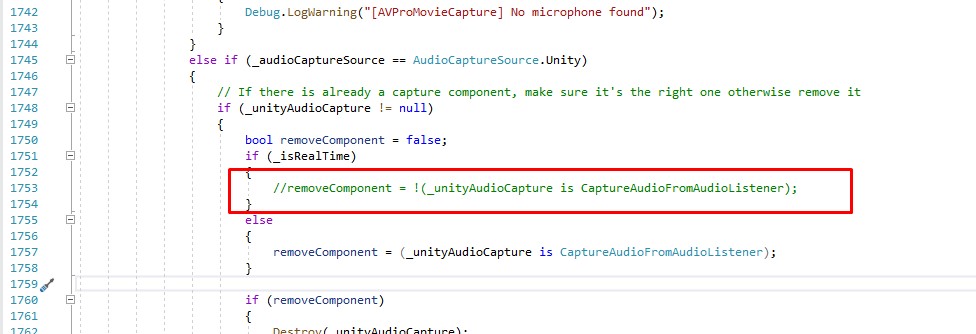
I'll double check that my setup matches you and get back you.
What platform are you running? Can you confirm in editor that those components are correctly on the objects?
i run on windows .
I know im not an Ace development but i have succeed to do evrey time i want . It is the first time i am so blocked . :)
i try to described as better i could my architecture :
I have : the camera :
- with audiolistener
- with capture Audio( from Audiolistener listener ) component
- with your On audio Filter REad forwarder component ( with no mute behaviour selected )
the mic Object :
- with my Microcphone input script
- with the "On audio filter Read forwarder" component
- the mute behaviour setupped with the "After" muting .
and my capture object
- with the AVcapture from camera . audiosource is setupped on Unity (of course i have selected the "capture Audio" from the camera
- with CApture Audio from Multiple SOurces component and i have added the both "on audio filter forwarder" elements. ( from Mic and camera object )
Of course i deactivate the line into the capturebase.cs as described in you r gist
I used your revision script .
thank you for your comfirmation . !
i bought AVpro capture on november 2021 . i have checked if there is new major upgrade but it seems ok
Ah, one thing you should check is that you have the CaptureAudioFromMultipleSources component hooked up in the avpro script underneath where you select the audio source to be "Unity"
It looks like if you don't have that set to something, then it will automatically add a CaptureAudioFromAudioListener script and use that instead.
ooh my god . that is the solution. simply that .
thats work pretty nice now .!!
ooh many many thanks MrWikkiEdd .! for this great help and your components !
Great. Glad it worked, sorry for missing that from the instructions.
CC: @EricBeetsOfficial-Opuscope, this should fix your problem too
That will help many buddy like me to keep their hair , yes :)
have the best Mr WikkiEdd !
Great. Glad it worked, sorry for missing that from the instructions.
CC: @EricBeetsOfficial-Opuscope, this should fix your problem too
It's not work for ios and aos unlike windows app.😢 Mic sound is recorded so~~~ small.

Using the CaptureAudioFromMultipleSources component it drops to 3 frames. How should I solve it?


Yup, I got it working.
The basic idea is to use the OnAudioFilterRead callback from multiple sources and then forward them on to custom UnityAudioCapture and combine the two.
I've stuck the scripts I use in a gist. https://gist.github.com/WikkidEdd/35fea92260b95135d6837188006919dc
I put one forwarder on the main AudioListener and one on the microphone playback source.
Hopefully that is helpful
is there a chance this could work on android?

Using the CaptureAudioFromMultipleSources component it drops to 3 frames. How should I solve it?
Hi,
Have you find out the reason?

Yup, tôi đã làm cho nó hoạt động.
Ý tưởng cơ bản là sử dụng lệnh gọi lại OnAudioFilterRead từ nhiều nguồn, sau đó chuyển chúng tới tùy chỉnh UnityAudioCapture và kết hợp cả hai.
Tôi đã truy vấn các tập lệnh mà tôi sử dụng trong một ý chính. https://Gist.github.com/WikkidEdd/35fea92260b95135d6837188006919dc
Tôi đặt một bộ chuyển tiếp trên AudioListener chính và một trên nguồn phát lại trống.
Hy vọng rằng đó là hữu ích
Hello @WikkidEdd, I import your script into my project And I get the errors Can you help me?

This issue has been automatically marked as stale because it has not had recent activity. It will be closed if no further activity occurs. Thank you for your contributions.
![stale[bot] avatar](https://avatars.githubusercontent.com/in/1724?v=4 "Published by a pub.dev verified publisher")
Hello, I'm having trouble with the microphone playback part. My current script :
using UnityEngine; using System.Collections;
public class MicrophonePlayback : MonoBehaviour { private AudioSource audioSource;
void Start()
{
    StartCoroutine(CaptureMic());
}

IEnumerator CaptureMic()
{
    if (audioSource == null) audioSource = GetComponent<AudioSource>();
    audioSource.clip = Microphone.Start(null, true, 1, AudioSettings.outputSampleRate);
    audioSource.loop = true;
    while (!(Microphone.GetPosition(null) > 0)) { }
    Debug.Log("Start Mic(pos): " + Microphone.GetPosition(null));
    audioSource.Play();

    yield return null;
}
}
My script is working fine in the editor, on mobile devices, and on the Oculus Quest 3, but on the Quest 2, the audio isn’t clear and there’s an echo. I've set the MuteBehaviour to "After" for the microphone object and I confirm I have done other things mentioned here, I think the issue is related to my playback script. Any ideas on what might be causing this? Link to the original script : https://stackoverflow.com/questions/58951537/oculus-go-unity-microphone-real-time-playback
Edit: I would like to mention that this issue only happens with the microphone audio, the other audio from the listener is completely fine.
