

 Rem0o
Rem0o
The software ignores the minimum and maximum values for fan controls
My GPU reports the range of the fan controls as [30, 100] as in ISensor.Control.MinSoftwareValue is 30 and ISensor.Control.MaxSoftwareValue is 100. The FanControl program should rescale the values in this case but unfortunately it seems to have a hardcoded range of [0, 100]. What could be done instead is something like this
UIToHW = (UIValue / 100) * (HWMax - HWMin) + HWMin
HWToUI = (HWValue - HWMin) / (HWMax - HWMin) * 100

I'm not sure to understand the benefit here. Your fan (here an Nvidia card I believe) being limited to 30% means it can't be manually be set to below 30%, but it's full technical range is still 0-100, it's just software/driver limited. I don't think hiding that detail/state benefits the user in any way.

I've a Zotac RTX3070. It's not exactly limited at %30, the range really does appear to be [30,100] as the fans don't spin at %30 and they spin at about 200RPM at %34. The driver could've also reported a range that has a maximum value above 100 so assuming the range for the control is not a future-proof approach.
Ah! What you describe then is the start %. It is already being handled with the start% field in the control card. The % shown is the roughly percentage of power ( here 12V with PWM) being applied to the fan. RPM/Power is NOT a linear relation, that's expected. Your fan needs 30% to cross the physical threshold required to start spinning. Set a value a bit above that, like the 34 you described in that field. The effect is that any fan curve % below that threshold will "snap" to 0 for that control, so you don't feed power to the fan without them spinning, which will cause heat and can damage the fan long term.
 I hope this clears the confusion.
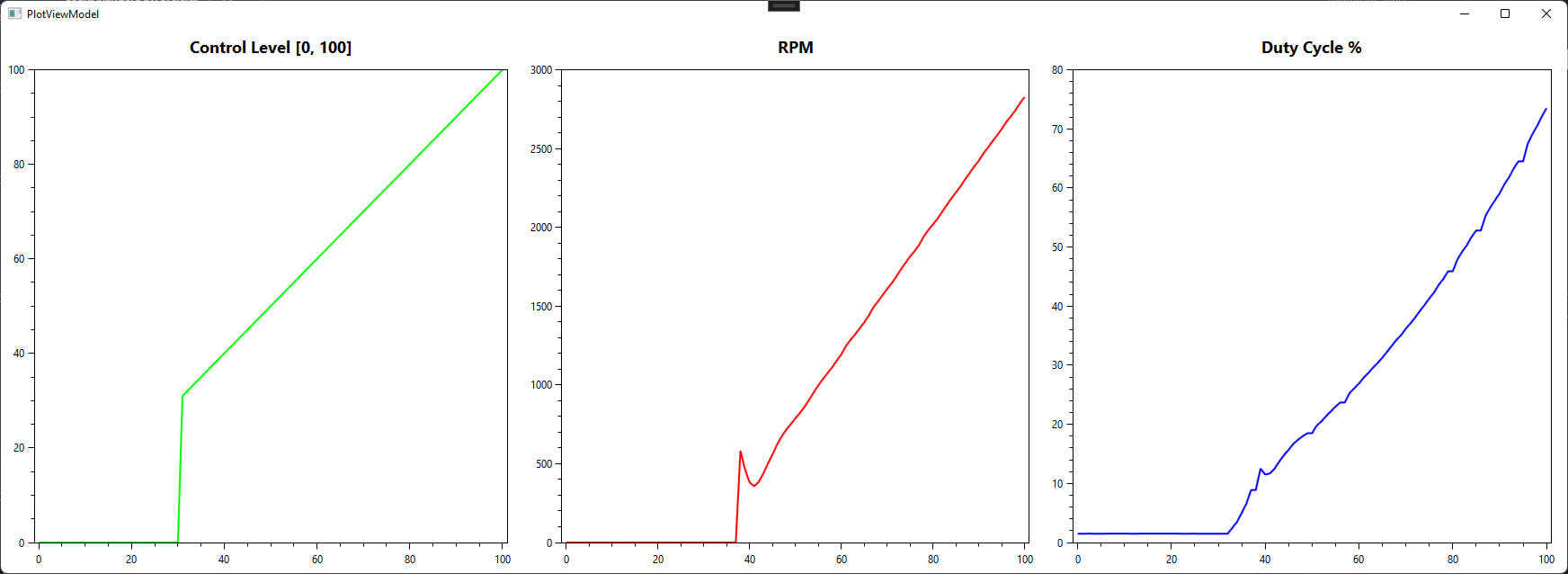
The GPUs range really is [30, 100]. Setting the control to %30 does not increase the duty cycle at all.
Leftmost graph is the control level reported by the NVIDIA driver and the X axis on all graphs is the level that the software sets the fans to.
I hope this clears the confusion.
The GPUs range really is [30, 100]. Setting the control to %30 does not increase the duty cycle at all.
Leftmost graph is the control level reported by the NVIDIA driver and the X axis on all graphs is the level that the software sets the fans to.