

 Rem0o
Rem0o
Visual bug when editing fan curve

Hi! First of all, I love your program, it's absolutely amazing. I have been using it for months now without issues, until the release of version 90. I really hope you can take a look at this. I will donate a generous amount as soon as I'm able too, because you really deserve it!
So here's the problem,
When editing a graph fan curve, this visual bug occurs (see print screen) and I'm unable to click ok, as the button isn't showing. It does not work clicking where the button should be.
Dragging the mouse cursor across the screen makes small pieces of the fan curve pop-up become visible, but only to a certain degree (no more than you can see in the print screen). The program itself is behaving almost like it's frozen, but not entirely.. I have tried everything, minimize the window, maximize it again, dragging the window around, changing size... nothing helps. The app can now only be closed by right clicking the system tray icon, clicking exit.
When closed, it remains visible as a tray icon, and can be opened again. But now the edit buttons on the graph fan curves do not work at all, doesn't happen anything when clicking them. There is no way resolving this error but to restart the PC, and the bug always come back maybe a few minutes after opening the program. I have the app autostarting, and minimized at startup.
System info (not overclocked): Motherboard: ASUS ROG Z-490F CPU: Intel i5-10600K RAM: 32gb @ 3600MHz GPU: RTX 3080

Seems like a pretty severe render glitch. This doesn't happen AFAIK on all systems, since I never seen that behavior on mine, and nobody reported a similar issue so far.
So there has to be something in your system messing with it. Could be anything really, driver, some kind of other program with an overlay, anything.
The UI library I'm using has over 40 issues linked to the dialog component ( https://github.com/MaterialDesignInXAML/MaterialDesignInXamlToolkit/issues?q=is%3Aissue+is%3Aopen+dialog ), and I'm not using the latest version of it, since it broke some other stuff I'm using and found no alternative yet.
There is no way resolving this error but to restart the PC
Even if you kill from the task manager?

I think this may be related to something I have experienced before. I don't know if the same fix would apply here, but you could try updating your Intel graphics driver.

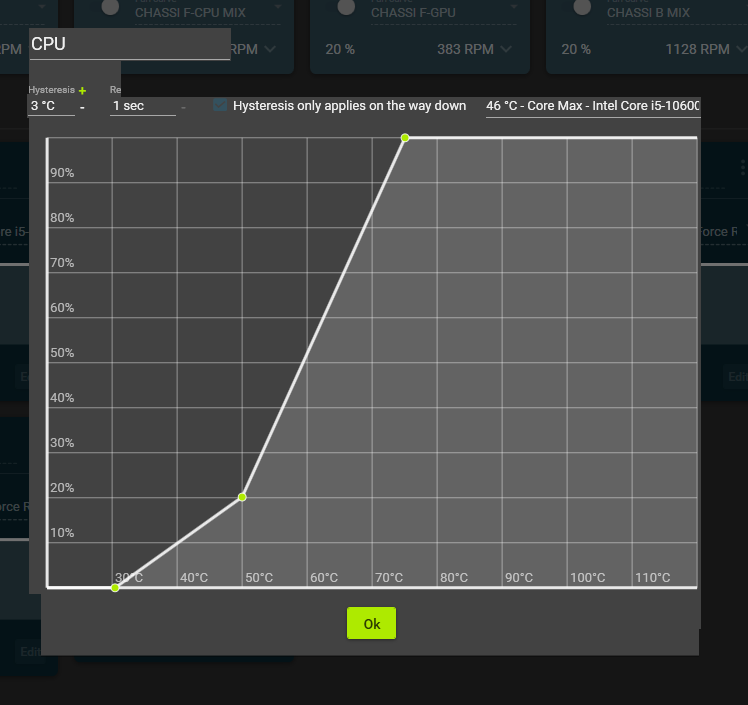
I have found a little fix! When the bug comes out to play, if I then click on the graph editor, creating a new node (the one at 0%/30*C), holding it, and then dragging it all the way down beyond the window edge it renders the pop-up so the ok button becomes visible again. Very strange, but helpful! I'm done editing my fan curves for now so you know, you don't have to get back to me on this. Thank you for your time
The render issue happens to me fairly regularly but minimising then maximising usually re-renders

I'm having the same problem, it doesn't appear as long as the window is not maximized.
