

 Rem0o
Rem0o
Fan Control not appearing in system tray
Hello.
I have problem about fan control not appearing in system tray. The program itself is running in the background, when I check from task manager. Only way to get in system tray is end task from task manager and reopen program, then it pops up.
Fan control settings

From task manager
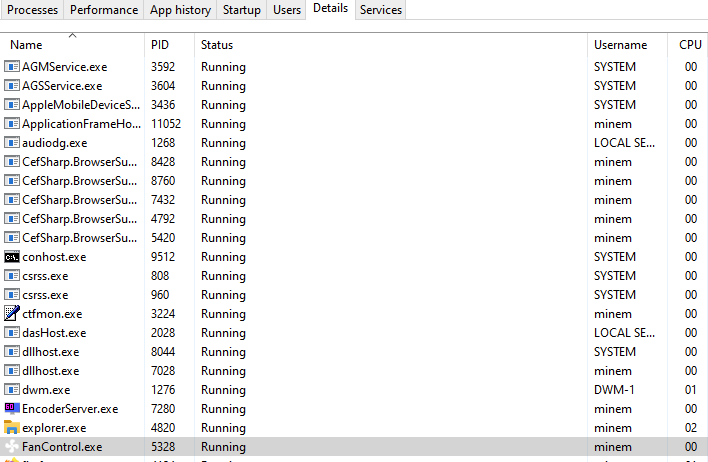
From task scheduler


When you log on, do you have explorer.exe running? Are you running any kind of headless setup?

When you log on, do you have explorer.exe running? Are you running any kind of headless setup?
Under processes, it shows Windows explorer running, if that's what you meant. By "headless setup" you mean what exactly, what programs start when boot up?
FanControl will try to start when you log into your user session. If you log in remotely or in any fancy headless fashion, there will be no explorer.exe at the time FanControl starts, so no UI will be shown.
FanControl will try to start when you log into your user session. If you log in remotely or in any fancy headless fashion, there will be no explorer.exe at the time FanControl starts, so no UI will be shown.
I have automatic login on desktop (no password), maybe this interferes with it?
I have a similar problem. Everything worked fine until it stopped randomly a few weeks ago. The program starts, but the icon does not appear in the system tray.
Having autostart programs populate the system tray seems to be broken in Windows. Other software I use had similar issues when manually configuring them to start when logging in.

I have a similar problem. Everything worked fine until it stopped randomly a few weeks ago. The program starts, but the icon does not appear in the system tray.
Having autostart programs populate the system tray seems to be broken in Windows. Other software I use had similar issues when manually configuring them to start when logging in.
Glad to see I'm not the only one with this kind of problem. My issue got solved when I installed fresh Windows 11, and now it shows an icon in system tray.
@NiceSk1ll3r any log.txt?
I don't have any logs to provide, because it's working like it should now (after fresh install of Windows 11). :)
@NiceSk1ll3r any log.txt?
My logs only show NvAPI errors from almost two weeks ago. Nothing that would suggest an error, occuring daily with FanControl itself.
Wanted to add that this happens to me from time to time. From what I can tell FanControl is running, and controlling the fans, but the icon for FanControl is not in the system tray. When I manually try to open the program with the .exe nothing appears to happen.
Seem to be able to fix it by killing the process in Task Manager and give it a sec before I try to open the program again - Then it usually works and shows up in the system tray. On rare occasions I have to reboot, but very rarely.
Nothing of note in the log file next to the .exe

Ha I'm a dork, thought mine wasn't working also but the icon is the temperature of my cpu which IS the Fan Control icon.
