

 RedisInsight
[Bug]: Redis Sentinel - Request Timeout. POST /api/instance/sentinel-masters
I'm having issues when trying to connect to Redis Sentinel for the first time.
Preconditions (Any important steps we need to know)
- RedisInsight-v2 2.8.0 installed on main (Windows 10) machine, trying to connect to Redis Sentinel inside virtual machine (no firewall), which is setup with docker compose v2.
- Configuration of 1 master, 2 slaves and 3 sentinels.
Steps to reproduce (How to reproduce what you found step by step)
With docker compose I've setup a configuration consisting of 1 master, 2 slaves and 3 sentinels. Here's my partial configuration for docker-compose.yml
version: '3.9'

x-restart: &restart-stopped
  restart: unless-stopped

x-redis-build: &redis-build
  build:
    context: ./data/redis
    dockerfile: Dockerfile
    args:
      REDIS_IMAGE_VERSION: ${REDIS_IMAGE_VERSION}

x-redis-volume: &redis-volume
  volumes:
    - redis:/data
    - redis_config:/usr/local/etc/redis

x-sentinel-volume: &sentinel-volume
  volumes:
    - redis_sentinel_config:/usr/local/etc/sentinel

x-sentinel-build: &sentinel-build
  build:
    context: ./data/sentinel
    dockerfile: Dockerfile
    args:
      REDIS_IMAGE_VERSION: ${REDIS_IMAGE_VERSION}
      REDIS_MASTER_NAME: ${REDIS_MASTER_NAME:-redismaster}
      REDIS_PASSWORD: ${REDIS_PASSWORD}
      REDISCLI_AUTH: ${REDIS_PASSWORD}
      REDIS_SENTINEL_QUORUM: ${REDIS_SENTINEL_QUOROM:-1}
      REDIS_SENTINEL_DOWN_AFTER: ${REDIS_SENTINEL_DOWN_AFTER:-3000}
      REDIS_SENTINEL_FAILOVER: ${REDIS_SENTINEL_FAILOVER:-6000}

x-redis-sentinel-environment: &redis-sentinel-environment
  environment:
    REDISCLI_AUTH: ${REDIS_PASSWORD}

x-redis-sentinel-network: &redis-sentinel-network
  networks:
    - redis-sentinel

x-redis-depends-master: &redis-depends-master
  depends_on:
    - redis-master

services:
  redis-master:
    <<: *redis-build
    command: redis-server /usr/local/etc/redis/redis.conf --requirepass ${REDIS_PASSWORD}
    <<: *restart-stopped
    <<: *redis-sentinel-environment
    ports:
      - "6380:6379"
    <<: *redis-volume
    <<: *redis-sentinel-network

  redis-slave:
    <<: *redis-build
    command: redis-server /usr/local/etc/redis/redis.conf --slaveof redis-master 6379 --masterauth ${REDIS_PASSWORD}
    <<: *restart-stopped
    <<: *redis-depends-master
    <<: *redis-sentinel-environment
    ports:
      - "6381-6382:6379"
    <<: *redis-volume
    <<: *redis-sentinel-network

  redis-sentinel:
    <<: *sentinel-build
    <<: *restart-stopped
    <<: *redis-depends-master
    <<: *redis-sentinel-environment
    <<: *sentinel-volume
    <<: *redis-sentinel-network
    ports:
      - "26380-26382:26379"

  wait:
    image: waisbrot/wait
    environment:
      TARGETS: redis-master:6379 redis-slave:6379 redis-sentinel:26379
      TIMEOUT: 60
    networks:
      - redis-sentinel

volumes:
  redis:
    driver: local
  redis_config:
    driver: local
  redis_sentinel_config:
    driver: local

networks:
  redis-sentinel:
    driver: bridge
The following ports are open to outside: master port 6380; slaves ports 6381, 6382; sentinels ports 26380, 26381, 26382. I can access them just fine from outside (either with redis-cli or master/slaves with RedisInsight).
For the sentinel I'm using a custom Dockerfile which basically just replaces some placeholder variables names I had in the config.
ARG REDIS_IMAGE_VERSION=${REDIS_IMAGE_VERSION}

FROM redis:${REDIS_IMAGE_VERSION}

ARG REDIS_MASTER_NAME=${REDIS_MASTER_NAME}
ARG REDIS_PASSWORD=${REDIS_PASSWORD}
ARG REDIS_SENTINEL_QUORUM=${REDIS_SENTINEL_QUORUM}
ARG REDIS_SENTINEL_DOWN_AFTER=${REDIS_SENTINEL_DOWN_AFTER}
ARG REDIS_SENTINEL_FAILOVER=${REDIS_SENTINEL_FAILOVER}

COPY --chown=redis:redis ./config/sentinel.conf /usr/local/etc/sentinel/sentinel.conf

RUN sed -i -e "s:\$REDIS_MASTER_NAME:$REDIS_MASTER_NAME:g" \
    -e "s:\$REDIS_PASSWORD:$REDIS_PASSWORD:g" \
    -e "s:\$SENTINEL_QUORUM:$REDIS_SENTINEL_QUORUM:g" \
    -e "s:\$SENTINEL_DOWN_AFTER:$REDIS_SENTINEL_DOWN_AFTER:g" \
    -e "s:\$SENTINEL_FAILOVER:$REDIS_SENTINEL_FAILOVER:g" \
    /usr/local/etc/sentinel/sentinel.conf

EXPOSE 26379

CMD ["redis-server", "/usr/local/etc/sentinel/sentinel.conf", "--sentinel"]
This will create the following (parsed) sentinel.conf:
port 26379
dir /tmp
requirepass <redacted>
sentinel resolve-hostnames yes
sentinel monitor redismaster redis-master 6379 1
sentinel auth-pass redismaster <redacted>
sentinel down-after-milliseconds redismaster 2000
sentinel parallel-syncs redismaster 1
sentinel failover-timeout redismaster 4000
sentinel deny-scripts-reconfig yes
syslog-enabled yes
protected-mode no
For the master/slaves, I have a custom Dockerfile which just copies the config to the container.
ARG REDIS_IMAGE_VERSION=${REDIS_IMAGE_VERSION}

FROM redis:${REDIS_IMAGE_VERSION}

ARG REDIS_PASSWORD=${REDIS_PASSWORD}

COPY --chown=redis:redis ./config/redis.conf /usr/local/etc/redis/redis.conf

EXPOSE 6379
And my redis.conf for master/slave:
appendonly yes
maxmemory 100mb
maxmemory-policy allkeys-lru
enable-debug-command yes
Example of environment variables used (available from .env file):
###> Image versions ###
REDIS_IMAGE_VERSION="7.0-alpine"
###< Image versions ###

###> Redis sentinel ###
REDIS_MASTER_NAME="redismaster"
REDIS_PASSWORD="<redacted>"
REDIS_SENTINEL_QUOROM="1"
REDIS_SENTINEL_DOWN_AFTER="2000"
REDIS_SENTINEL_FAILOVER="4000"
###< Redis sentinel ###
Actual behavior (A short description of what you found)
Wanted to add my Sentinel to RedisInsight.
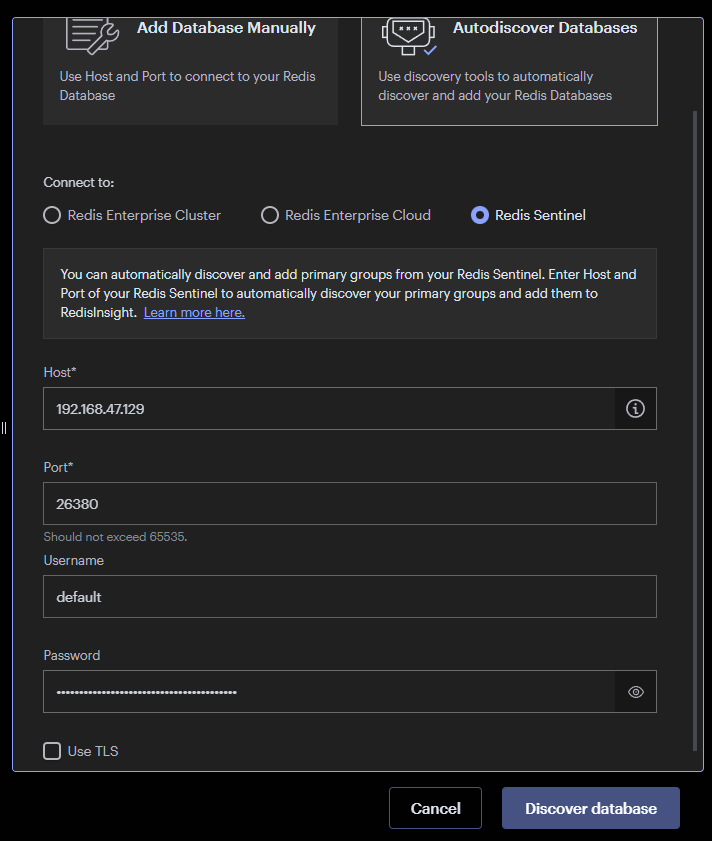
- Click the "Add Redis Database"
- Select "Autodiscover Databases"
- Choose connect to "Redis Sentinel" and fill in the needed details
- Click on "Discover database"
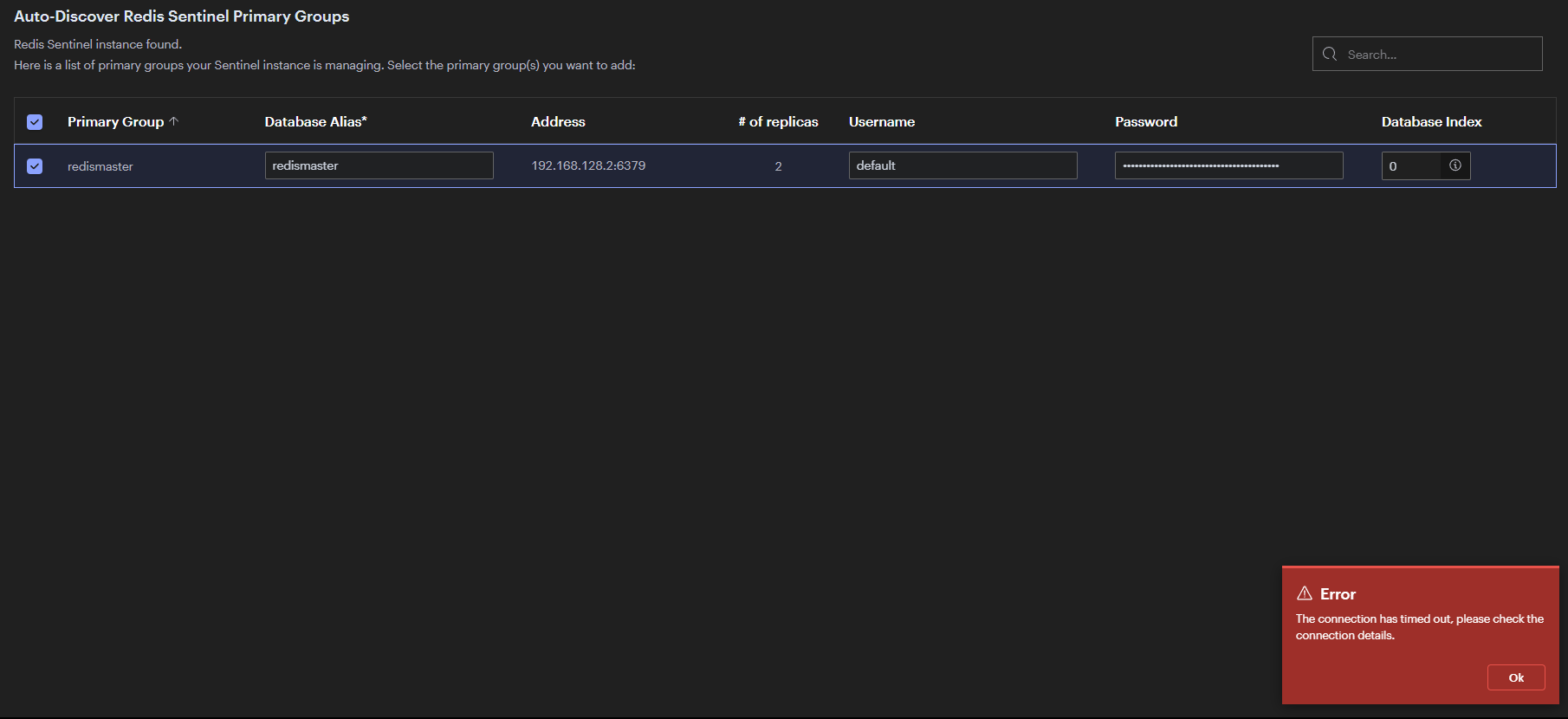
- Now seeing a list of primary groups, I see my group
redismaster. - I select the primary group
redismasterand fill in the details. - I click on the "Add Primary Group".
- Error message:
The connection has timed out, please check the connection details.
Expected behavior (A short description of what you expected to find)
Succesfully connecting to the database.
Screenshots (Paste or drag-and-drop a screenshot or a link to a recording)
Discover works
Adding primary group fails
Additional context (Operating system, version of RedisInsight, Redis database version, Redis module version, database type, connection type, logs, or any other information)
Logs
26/08/2022, 19:24:37 | INFO | InstancesBusinessService | Adding Sentinel masters. | {"stack":[]}
26/08/2022, 19:24:37 | INFO | RedisService | Successfully connected to the redis database | {"stack":[]}
26/08/2022, 19:24:37 | INFO | InstancesBusinessService | Adding oss sentinel. | {"stack":[]}
26/08/2022, 19:24:37 | INFO | RedisSentinelBusinessService | Getting sentinel masters. | {"stack":[]}
26/08/2022, 19:24:37 | INFO | RedisSentinelBusinessService | Getting a list of sentinel instances for master. | {"stack":[]}
26/08/2022, 19:24:37 | INFO | RedisSentinelBusinessService | Succeed to get a list of sentinel instances for master. | {"stack":[]}
26/08/2022, 19:24:37 | INFO | RedisSentinelBusinessService | Succeed to get sentinel masters. | {"stack":[]}
26/08/2022, 19:24:47 | ERROR | TimeoutInterceptor | Request Timeout. POST /api/instance/sentinel-masters | {"stack":[{}]}
26/08/2022, 19:24:47 | ERROR | RedisService | Failed connection to the redis oss sentinel | {"stack":[{"message":"connect ETIMEDOUT"}]}
26/08/2022, 19:24:47 | ERROR | InstancesBusinessService | Failed to add oss sentinel. | {"stack":[{"message":"connect ETIMEDOUT"}]}
26/08/2022, 19:24:47 | INFO | SettingsOnPremiseService | Getting application settings. | {"stack":[]}
26/08/2022, 19:24:47 | INFO | SettingsOnPremiseService | Succeed to get application settings. | {"stack":[]}
OS Windows 10
RedisInsight-v2 2.8.0
Redis version 7.0-alpine (docker image; docker compose v2.10.0)

I was running into this same error and realized it was because the IP detected by sentinel for the master (looks like 192.168.128.2:6379 in your screenshot) was not accessible. Are you able to hit that from outside redisinsight and outside containers in your docker network?

@ccarbonellbh
The following ports are open to outside: master port 6380; slaves ports 6381, 6382; sentinels ports 26380, 26381, 26382. I can access them just fine from outside (either with redis-cli or master/slaves with RedisInsight).
So yes, I can access them to the ports mapped to host machine. I'm still not sure if it's either a misconfiguration on my part or a bug in RedisInsight.
Hey @ToshY,
Would it be possible to share the complete compose file with sensitive details removed? This will help us to quickly reproduce and test the setup.

Hey @GnaneshKunal
I've updated the question with the complete docker compose config, redis and sentinel config, and (example) environment variables.
Hey @ToshY,
I have tried your setup. If I'm not wrong, this is your following setup:
       	       +-------------------------+     			  +------------------------+
	       |	    PC 	       	 |     	       	       	  |    	     VM		   |
	       |	       	 	 |     			  |	       		   |
       	       |       	RedisInsight   	 |     	       	       	  |   Redis + Sentinel	   |
       	       |       	       	       	 |<---------------------->|    	       	      	   |
	       |    pc network interface | 			  |   VM network interface |
	       |	192.168.x	 | 			  |       192.168.x        |
	       +-------------------------+ 			  +------------------------+
The sentinel monitors redis using the IP that is bounded to VM. In your case, if I'm not wrong, the 192.168.47.129 is an IP that is attached to the PC (via VM's port mapping interface). So basically that IP is just a proxy to the IP that is present inside the VM. So we have used this proxy IP to add Sentinel (which runs in the VM) to RedisInsight (which runs in the PC). Now when RedisInsight requests for the redis master information, the IP returned by the Sentinel is attached to the VM network interface and not PC network interface.
RedisInsight running on PC can connect to the Redis pointed by Sentinel only when Sentinel returns an IP that the PC can access. If the Sentinel returns the IP that was mapped by the VM on the system, then RedisInsight can connect to the redis.
You can read more about it here: https://redis.io/docs/manual/sentinel/#sentinel-docker-nat-and-possible-issues
I would suggest you to try using hostnames so that sentinel returns hostname instead of IP. After enabling hostname, in your local PC entry, map the hostname to the redis' VM interface that was mapped. This will help.
So I wouldn't call this a RedisInsight issue but a networking setup issue.
Adding the hostname in linux for example would be to add an entry like the following to /etc/hosts:
# ip-of-vm hostname-of-redis
192.x.x.x <redis-hostname>
@ccarbonellbh
192.168.47.129 is the IP assigned to my VM. Yes, this is added to my hosts file in Windows. I can access the master/slaves just fine from Redis Insight when connecting to 192.168.47.129:6380 (master).
After reading through your reply, I've tried a couple of things with the information you referenced in the links provided.
I've tried was adding the annouce-hostnames yes, I was able to continue to the 3rd screen:

But now it's giving another connectivity error:

Note: 192.168.47.129:26380 is available from the PC
(base) PS C:\Users\xxx> Test-NetConnection 192.168.47.129 -p 26380
ComputerName     : 192.168.47.129
RemoteAddress    : 192.168.47.129
RemotePort       : 26380
InterfaceAlias   : VMware Network Adapter VMnet8
SourceAddress    : 192.168.47.1
TcpTestSucceeded : True
However, the Redis Insight logging shows a different message
02/10/2022, 17:43:29 | ERROR | RedisService | Failed connection to the redis oss sentinel | {"stack":[{"message":"getaddrinfo ENOTFOUND redis-master"}]}
02/10/2022, 17:43:29 | ERROR | InstancesBusinessService | Failed to add oss sentinel. | {"stack":[{"message":"getaddrinfo ENOTFOUND redis-master"}]}
Okay, so disregarding the fact that the GUI shows a different error message in contrast to the logging, I can work with that.
I can understand that Redis Insight on the PC does not know anything about redis-master, which was defined in the sentinel.conf, used in the sentinel container inside the VM, only available inside the docker network redis-sentinel.
I'm taking a wild guess that Redis Insight takes the configuration from doing a SENTINEL master <mastername>, which would correctly return redis-master and 6379. I would think if I was able to manually edit the (master) address in the GUI so instead of redis-master:6379 changing it to 192.168.47.129:6380 (which is the accessible master node), it should be able to connect correctly (?)