

 RealRaven2000
Feature request - multiple condition groups (combined "ANY" and "ALL" search)
When setting up a filter, you can choose match "all of the following" (and) or "any of the following" (or), which is somewhat inflexible. In my case, I want to filter out certain emails. They always come from the same email address so I always want to match that, but the subject lines vary. But there's no way to express this in a single filter without getting creative with regex. And I don't want to filter out all emails from this sender in this case.
So what I am asking for is the ability to create some kind of condition groups ANDed together. Could be a premium feature. Hope that's understandable.

When setting up a filter, you can choose match "all of the following" (and) or "any of the following" (or), which is somewhat inflexible. In my case, I want to filter out certain emails. They always come from the same email address so I always want to match that, but the subject lines vary. But there's no way to express this in a single filter without getting creative with regex. And I don't want to filter out all emails from this sender in this case.
You need to ask the core group to support this. The difficulty is in modifying the Filter editor in a meaningful way. Here is the mozilla bug that deals with this issue:
https://bugzilla.mozilla.org/show_bug.cgi?id=297852
One of my suggestions was to make filters "nestable" that is make one filter a condition for another, this way they could combine the different types without having to build a completely new UI

As a workaround, you could split the filter into 2 - use tags to create a result for the first condition query (it A and B and C tag email ABC), then query that in the 2nd filter (if tag=ABC or D ...). This is basically my low tech way of creating "nested" filters.
I would also like to support this feature.
If I may in my head it would make sense to have logical operations in filters, which wouldn't require a new UI, only a new column which would be the "filter tag".
Let me exemplify this. In my case I have a filter to act only on my Inbox, that would filter two different emails to another folder. My idea was to do something like (where the first column is the filter tag):
Filter conditions:
A - Folder name - is - Inbox
B - To or CC - is - [email protected]
C - To or CC - is - [email protected]

Perform these actions:
Move Message to - examplefolder
And then you would add new a line which would perform the logical operation:
Filter trigger:
(C ∨ B) ∧ A
So if either C or B is true, and A is true, then the whole expression is true, and the filter is activated.
Right now I'm not sure how I can solve this issue without creating a different filter for each e-mail, which is far from ideal, because adding a tag will raise the same issue as the folder.

Let me exemplify this. In my case I have a filter to act only on my Inbox, that would filter two different emails to another folder. My idea was to do something like (where the first column is the filter tag):
If you want to avoid filters running outside of your inbox, there may be a simple workaround. I assume you are running filters on other folders manually, and you want to avoid this by restricing the running to the inbox only. Under "Apply Filter When" you could just uncheck [ ] manually run and enable [ ] getting new mail.
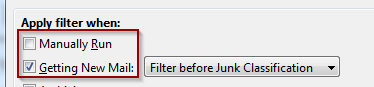
And then you would add new a line which would perform the logical operation:
that's not a practical solution, because of the way the conditions work - they really do not know of each other so you cannot create a new condition type that "looks at previous conditions". One would have to rewrite the whole filtering mechanism which is not something an Add-on can do - I think it runs in C++ for performance reasons. The only way this could work would be by the suggestion I made in bug 297852 - to have a filter condition that uses the result of another filter.
But internally all the nuts + bolts are there - every search condition has these 3 boolean properties:
booleanAnd = basically ∧ vs ∨
beginsGrouping = (
endsGrouping = )
the hard thing - that Thunderbird didn't manage in 16 years - is building a meaningful, easy to use, new UI to access these without making mistakes. (e.g. setting an open parenthesis and forgetting to close it).
@mlysle There is currently development work done on this area in the Thunderbird Clone Betterbird:
https://github.com/Betterbird/thunderbird-patches/issues/35
it is very likely that they might ship this with their next version BB102. It might also end upstream (in Thunderbird), but also likely that it's not going to be shipped this year there but only next year! We should definitely install Betterbird and see if might actually be superior in this and other areas; it is the most up-to-date fork for Thunderbird that I know of!
Here is a little preview (the blue operators were added by me as a suggestion for clarity)
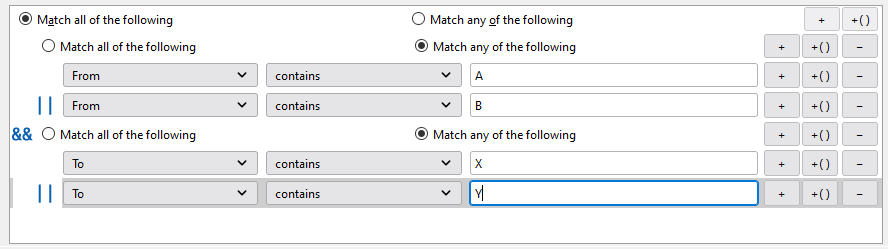
I am already testing a Betterbird beta from @Betterbird :
https://bugzilla.mozilla.org/show_bug.cgi?id=297852#c67

(Sorry, for my last post, I posted it at the Betterbird repository instead! No need to answer this here)

(Sorry, for my last post, I posted it at the Betterbird repository instead! No need to answer this here)
don't worry about it. I think an uplift of this patch to Thunderbird is possible but may take a while due to them being busy working on the big merge for ESR 102. Jörg has to fix stuff for saving the filters correctly and also even that wasn't the case opening the filters with an unpatched Thunderbird Filter Editor would definitely fail. I will do some more testing this week to see whether you can Backup and restore the new filter formats with quickFilters without modifications, I will definitely implement it on my end.
Huh, it's all working in the latest build, https://www.betterbird.eu/downloads/get.php?os=win&lang=en-US&version=latest Of course you need to keep https://github.com/Betterbird/thunderbird-patches/issues/35#issuecomment-1104040730 in mind.

New build with more compatibility now available, see https://github.com/Betterbird/thunderbird-patches/issues/35#issuecomment-1105503663.
Here is the current UI of Filter Editor from Betterbird (trying to host the screenshot here so I can share on Bugzilla):
The screenshot is not visible at https://bugzilla.mozilla.org/show_bug.cgi?id=297852#c84
The screenshot is not visible at https://bugzilla.mozilla.org/show_bug.cgi?id=297852#c84
yeah I did try imgur as well, but apparently the Markdown documentation they link to isn't 100% correct for Bugzilla. I remember when there was an interface for adding attachments....
Any reason why this group only has one member:
Therefore you don't need it.
Any reason why this group only has one member:
Therefore you don't need it.

yeah I know, was just a stupid example to show off the graphics... Also probably should have been a "Match any" in that group...
We have a picture here: https://www.betterbird.eu/media/img/complex-search-terms.png which shows the thing in action.