

 ReactiveDrop
[UI] Keyboard language doesn't display in chat
In computers with multiple keyboard languages installed, is possible to change the default keyboard language in-game by pressing CTRL+SHIFT. But in Alien Swarm doesn't display the language text only a bar "|" instead.
Example:
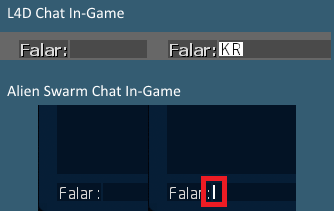
Left = Using default keyboard setting Right = After pressing CTRL+SHIFT (changing the keyboard)

Chinese has the similar problem and maybe even worse. When inputting Chinese, one can not see the character selection Ui. So We has to guess which character or word should be selected. Moreover, when not in chat mode and one can see a increasing wasd string when playing, blocking part of the game screen.
i personally think it is especially hard to deal with. It is a common problem in many games. Maybe It is engine related. But portal2 doesn't have the issue(not quite sure, it's been a long time since my last play)

https://steamcommunity.com/sharedfiles/filedetails/?id=921573337&searchtext=chat
this addon has it fixed

this addon has it fixed
I'm guessing it's something that's wrong in a keyvalues file, then. Has anyone checked what the actual code changes are in that addon?

this addon has it fixed
I'm guessing it's something that's wrong in a keyvalues file, then. Has anyone checked what the actual code changes are in that addon?
The related change might be replacing the Neo Sans fonts by something else.
CustomFontFiles
{
"1"	"resource/HALFLIFE2.ttf"
"2"	"resource/HL2EP2.ttf"
}
In the file, the fonts Verdana and Marlett are also mentioned often.

I always thought that white line is a separator between the word "say:" and the input box. So I removed the colon at some point in time.
I'll revert that when the lang-shortcut is fixed :)

@BenLubar this appears to have been fixed in the beta.
If affirmative, you may close this issue.
Not in my beta:
I'm not subscribed to that add-on btw. @Mart-User the font in your fixed-screenshot looks like you're using that one
Edit: I created a draft which brings back the chat colon