RcppCore
Namespace load failed
I've tried to get rid of this by removing R from Windows and doing a complete reinstall, but nothing seems to be working. Even installing an older version fails. I've attached an image of the popup and here is the error text in R.
library(RcppParallel) Error: package or namespace load failed for ‘RcppParallel’: .onLoad failed in loadNamespace() for 'RcppParallel', details: call: inDL(x, as.logical(local), as.logical(now), ...) error: unable to load shared object 'C:/Users/John/Documents/R/win-library/4.1/RcppParallel/libs/x64/RcppParallel.dll': LoadLibrary failure: The specified procedure could not be found.
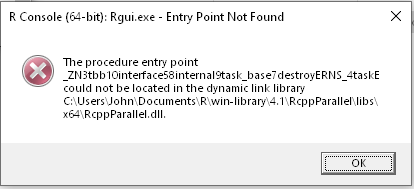
I am using: R version 4.1.2 (2021-11-01) -- "Bird Hippie" Platform: x86_64-w64-mingw32/x64 (64-bit)
But since the error first occurred it fails with reinstalling older installs as well, although it was previously working in those older versions.
Thanks for any guidance on how to solve this problem.

Just to confirm, have you tried uninstalling and reinstalling RcppParallel as well? (Note that R packages are installed in a different directory from R itself, so uninstalling and reinstalling R wouldn't suffice to reinstall any requisite R packages.)
For what it's worth, things appear to be fine on my Windows VM:
> library(RcppParallel)
> sessionInfo()
R version 4.1.2 (2021-11-01)
Platform: i386-w64-mingw32/i386 (32-bit)
Running under: Windows 10 x64 (build 22533)

Matrix products: default

locale:
[1] LC_COLLATE=English_United States.1252  LC_CTYPE=English_United States.1252    LC_MONETARY=English_United States.1252
[4] LC_NUMERIC=C                           LC_TIME=English_United States.1252
system code page: 65001

attached base packages:
[1] stats     graphics  grDevices utils     datasets  methods   base

other attached packages:
[1] RcppParallel_5.1.5

loaded via a namespace (and not attached):
[1] compiler_4.1.2 tools_4.1.2

Yes, I did the removal both by uninstalling and by deleting the "R" directory in Program Files and under Documents/R/win-library. I have a machine at home also running 4.1.2 and it works OK there, so I don't think the problem is a common one.
I am also seeing some very inconsistent results on this troublesome machine. I've opened the R console 10 times in the last few minutes and about 1/2 the time the package loaded fine. The other half failed. It occurred to me that it might be related to restoration of a bad "previously saved workspace". So once the library(RcppParallel) worked, I saved a new copy of the workspace. Since I did that, it has been loading fine. This suggests that there was something in that workspace that was lousing things up.
So feel free to close this issue. If it pops up again, I'll let you know. Definitely Murphy's law in action. Its just that the error message was so cryptic I was completely at sea!
Please do not hijack a Windows installation issue ticket if you are on CentOS.
Instead do use the search functionality to look at all (open and closed) issues for CentOS. It is basically always the same: your compiler is old. See here for that search.