

 RaiMan
findText() / find("some text") do not work as expected
workaround: Try to solve your problem with findWord, findWords, findLine and findLines features

@RaiMan Hi, Professor! Not sure if this is the right place, since the problem I got is more related to a feature rather than a bug. The thing is, as you've mentioned in the documentation here, I downloaded the Simplified Chinese tessdata from tesseract-ocr and changed the default OCR language setting. The readText() function works fine but findText() keeps throwing an exception:
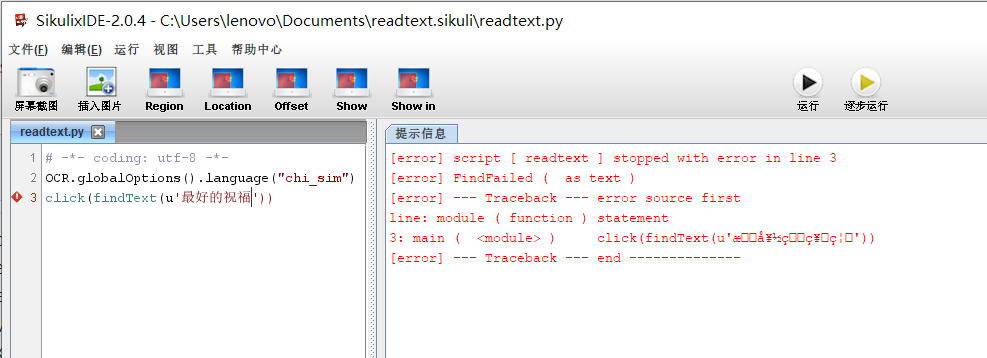 At this scenario I can still pass English strings to click elements on the interface but doesn't work in Chinese no matter how. Does it mean I can't pass Chinese characters to the interpreter due to coding problem for now? Is there any bypass for me to implement?
Thanks in advance!
At this scenario I can still pass English strings to click elements on the interface but doesn't work in Chinese no matter how. Does it mean I can't pass Chinese characters to the interpreter due to coding problem for now? Is there any bypass for me to implement?
Thanks in advance!

@gpdeepblue Thanks for the information.
I will test the revised findText-feature accordingly.
Please try the above mentioned workaround.
findLine works in my environment. findWord work not very well! thank you, RaiMan!

以下代码可用无乱码 OCR.globalOptions().language("eng") OCR.globalOptions().language("chi_sim") text2 = u"一" textElement = findText(text2)
