

 RaiMan
Sending keystrokes and mouse events to remote system using network packets
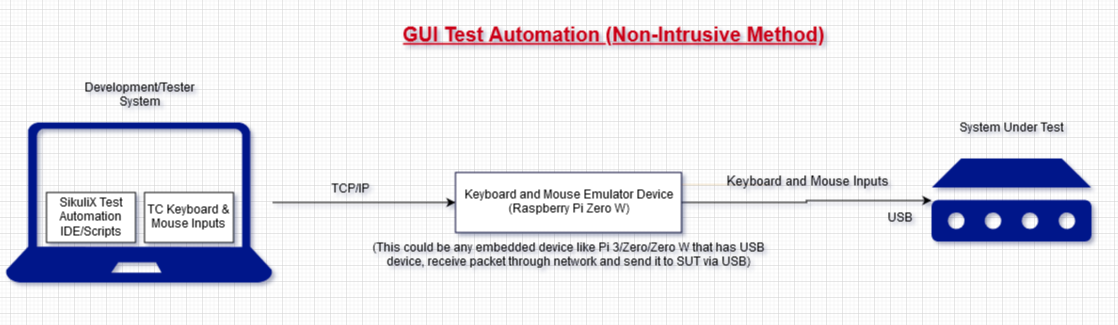
It would be great if SikuliX sends key types and mouse clicks in the script to remote system using network packets. People can use Raspberry Pi Zero as USB HID to their SUT like this.
Imagine a low powered boards have GUI console and does not have remote/RDP support for testing its GUI remotely and we cannot install SikuliX in the systems.
Adding Remote functions in SikuliX like Remote.type and Remote.clicks would help in such scenarios and enhance the SikuliX usages.
Attaching the work flow diagram.

@vasanth1986 Are you willing to contribute to the specifications and do some testing later?

Aren't KVM Switches made for this use case? The modern models allow to open a RDP Session directly to the switch (KVM over IP) and to even see the display output which would anyway help to write tests.

@vasanth1986 Are you willing to contribute to the specifications and do some testing later?
Yeah, Sure. If it helps the world, I will do testing (only).
Aren't KVM Switches made for this use case? The modern models allow to open a RDP Session directly to the switch (KVM over IP) and to even see the display output which would anyway help to write tests.
Procuring a KVM switche makes the project expensive :). Several screenshots of the GUI Console of SUT will be used in test scripts.
Procuring a KVM switche makes the project expensive.
I see. But developing such a solution makes THIS project expensive too :-) Probably not in terms of money, but rather in time spent implementing and maintaining a quite specific feature.
People can use Raspberry Pi Zero as USB HID to their SUT like this.
This looks very interesting indeed. As far as I understand they already have a server running on the RasPi which can receive some events and pass them to the IO devices. This server seems to receive IO commands over a simple socket protocol.
I'm pretty sure that using SikuliX is not the best choice for such a use case. One of SikuliX's key features is to find elements on the screen and perform actions on them. In your use case you can do the find only on static screenshots that you have taken in advance. This means that the elements you want to click have always to be at the exact same position. So you could as well just use the provided InputController from rasp_vusb and do the click this way. Means the simplest solution in your case would be to write a script (bash, bat, powershell, Ruby, Python, ...) and run your test this way. IMHO SikuliX doesn't provide much benefit here.
@RaiMan
Would it probably be an option to implement such a feature as a user extension (as soon as the extension concept is ready)?
Procuring a KVM switche makes the project expensive.
I see. But developing such a solution makes THIS project expensive too :-) Probably not in terms of money, but rather in time spent implementing and maintaining a quite specific feature.
People can use Raspberry Pi Zero as USB HID to their SUT like this.
This looks very interesting indeed. As far as I understand they already have a server running on the RasPi which can receive some events and pass them to the IO devices. This server seems to receive IO commands over a simple socket protocol.
I'm pretty sure that using SikuliX is not the best choice for such a use case. One of SikuliX's key features is to find elements on the screen and perform actions on them. In your use case you can do the find only on static screenshots that you have taken in advance. This means that the elements you want to click have always to be at the exact same position. So you could as well just use the provided InputController from rasp_vusb and do the click this way. Means the simplest solution in your case would be to write a script (bash, bat, powershell, Ruby, Python, ...) and run your test this way. IMHO SikuliX doesn't provide much benefit here.
I try to give some more information on this.
I like to test the GUI Console in non-intrusive method meaning I dont like to give addition load to the SUT for redirecting the GUI via KVM over IP switches. I believe, performance latency will occur on GUI functionality over redirection and also I cannot predict network bandwidth every time. So, I am planned to use a tiny Media Streaming adapter to redirect SUT display via its HDMI port to my development system to create SikuliX test scripts and watch the test status.
What I expect in SikuliX is that, sending key strokes and mouse events send to the USB Server of rasp_vusb which running on Pi Zero via TCP/IP and further the Pi Zero will send to the SUT via USB.
Also I figured out that 'something' defined in Key.java and Mouse.java files in source of SikuliX. There I like to add few more Java classes and functions for sending the key strokes and mouse events to remote system. For this, I need RaiMan's guidance on what are all the source files has to be changed.
Thanks for all your comments.
non-intrusive method meaning I dont like to give addition load to the SUT for redirecting the GUI via KVM over IP switches
I don't see why using a KVM switch would put additional load on the SUT. I mean you just plugin a HDMI cable (which emulates the monitor) and a USB Cable (for mouse and keyboard). For the SUT there should be no difference if it's connected to a real monitor / mouse / keyboard or to a KVM switch.
What I expect in SikuliX is that, sending key strokes and mouse events send to the USB Server of rasp_vusb which running on Pi Zero via TCP/IP and further the Pi Zero will send to the SUT via USB.
Completely clear. This means you do not want to click on found pattern images (like it is usually done in SikuliX) but rather only on x,y coordinates? Otherwise you would also need a way to feed screenshots of the SUT to SikuliX.
There I like to add few more Java classes and functions for sending the key strokes and mouse events to remote system.
You basically need to implement the org.sikuli.script.support.IScreen and the org.sikuli.script.support.IRobot interfaces with implementations for rasp_vusb (e.g. RaspVUSBScreen and RaspVUSBRobot). This way, your classes could be used seamlessly within SikuliX. It would be especially nice if you could also implement the captureScreen function of IRobot to take screenshots from your media streaming adapter. Then it would also be possible to click on the already mentioned pattern images and doing wait and finds on the SUT screen. In the end your implementation could be used somewhat like this:
IScreen screen = new RaspVUSBScreen("<ip>", <port>)
screen.click("pattern.png")
screen.wait("otherPattern.png").doubleClick()
...
Internally, your implementation would use your RaspVUSBRobot to communicate with the USB Server on the RasPI.
We are always happy to support you with additional guidance while you implement this feature.
