

 RafaelGB
[Bug]: Column is not read from frontmatter
Contact Details
No response
What happened?
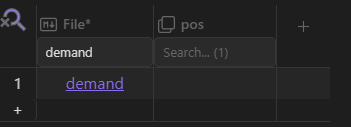
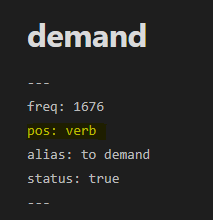
After restarting Obsidian the column I used to sort the files became empty. The key-value pair is still in the files though. The column doesn't even show in option, but I can add it manually.
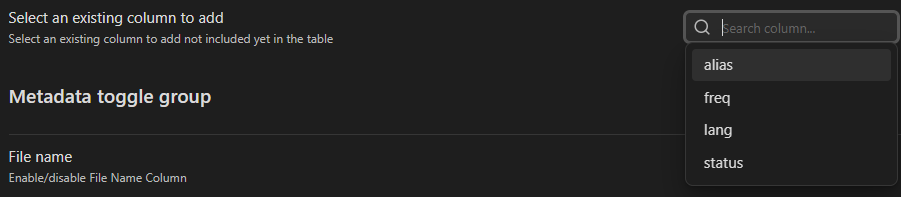
What did not help:
- Deleting the column and adding again
- Deleting the database and re-creating again
- De-installing the plugins
- Deleting .obsidian folder
What did help:
- Copying my vault from Google Drive storage to local copy. But that's not an option for me in the long run.
What platform were you using?
Desktop
Version of the plugin
3.4.0
Relevant log output
No response
Are you using the latest version of the plugin in your Obsidian vault?
- [X] I have verified that I am on the latest version
Are you check if there is a similar issue?
- [X] I have verified that there are not similar issues

Things got even weirder when I deleted the folder on Google Drive and copied the backed local version instead. The column is still empty, I can add the label I want manually in the table, the correct property gets changed in the note, but if I re-open the table, the column is empty again.
The same happened to all the tables in the vault BTW, only column 'pos' being affected.
Bulk search and replace of 'pos' to something else partially fixes the problem (some rows get the values shown, some don't, I cannot observe a pattern in which is which), but then replacing it back to 'pos' makes column become empty again.
Update: deleting everything from AppData > Roaming > obsidian fixed it for me, but only temporarily. After moving one file between folders, it broke again.
hello @feophan , we will find the problem for sure =) Dbfolder is using dataview engine to find those columns, we will discard first problems with the query used. Which source type are you using?
