

 RafaelGB
[Bug]: nested tags (in the form tag1/tag2) created in cells with "Tag" format won't show up in the pop-up menu
Contact Details
No response
What happened?
even though one can create nested tags here, which also shows up properly in the tag pane of the system, it won't show up in the pop-up menu when we enter new tags in the same column. For example, the "sdf/gg" was created within one of the cells, but this tag won't show up when I type sdf in the same column. As shown below:
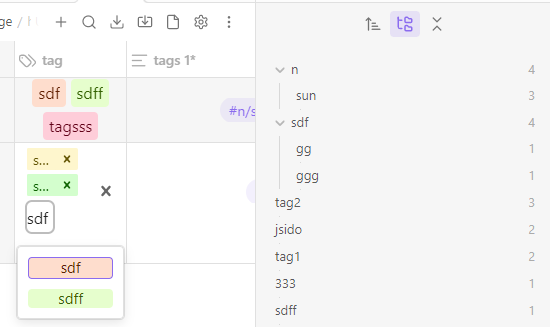
I guess this means that the tag list of the database and that of the system are treated differently in ob. I'm not sure if this is done on purpose. If so, it may be worth considering offering the user the option to show only those from the database or all of those in the system. #847 is a related feature request from me, which might be implemented simultaneously while fixing this bug.
What platform were you using?
Desktop
Version of the plugin
3.3.2
Relevant log output
No response
Are you using the latest version of the plugin in your Obsidian vault?
- [X] I have verified that I am on the latest version
Are you check if there is a similar issue?
- [X] I have verified that there are not similar issues

maybe the type of column needs a rebraning. With tag, the data type refers to the possibility of including a list of options in the same cell, but to apply it to Obsidian tags . To apply them there are 2 ways:
in case of using frontmatter call your column simply tags
in case of using inline you need the # before. for example #myTag

What I mean is,
- firstly, those tags created outside db folder won't pop up in the db-folder tag columns, which is ok, but it would be better if there is an option for the user to choose how it behaves
- for those nested tags created in a db-folder column, even though it will show in the tag pane of the system, it won't show up in the drop-down menu of db-folder tag columns.