

 RSS-Bridge
Image scaling in Twitter is not working anymore
Describe the bug
Before, Twitter embedded pictures with tags about their size, like:
example.jpg:thumb
example.jpg:orig
Some RSS readers were not able to handle that correctly, that's why @LogMANOriginal introduced the option disable image scaling back in 2018, as mentioned in this thread.
The problem was fixed by this commit.
However, it seems that Twitter changed the naming scheme to:
example.jpg?name=thumb
example.jpg?name=orig
This introduces the problem that pictures and videos are not shown anymore when disable image scaling is active (broken link).
To Reproduce
- Subscribe to a Twitter user with
disable image scalingis activated (checkbox). - Have a look at the Atom feed: Embedded media (images and videos) are not shown, there are broken links instead.
This bevaiour is the same when disable image scaling is not activated. So this function is not working anymore, because Twitter changed the name scheme.
Expected behavior
When using disable image scaling, the feed should load with the orig pictures embedded as it was before, when the fix was applied in 2018.
Desktop (please complete the following information):
- OS: Linux Mint
- Browser: Firefox
- Version: 97.0
Smartphone (please complete the following information):
- Device: Fairphone 3
- OS: Android 10
- App: TinyTinyRSS
RSS-Bridge:
- Running on Docker
- Tag: latest
I would be really happy if you could have a look at this issue and maybe change the bridge to meet the current beviour of Twitter.


The "Disable image scaling" option is definitely working correctly in TwitterV2Bridge. However, it appears to be a non-functional option in TwitterBridge.

The noimgscaling parameter isnt picked up anywhere in the twitterbridge. @arnd-s said that filters werent done yet in the new bridge, so that could be the first thing they could add.

Sorry for the late reply!
Yes, this is still an issue in TwitterBridge. But thanks for the hint to TwitterV2Bridge; I will set it up and check it.
I checked it and for me "Disable image scaling" has no effect both in TwitterBridge and TwitterV2Bridge.
This leads to broken image links both in Atom and MRSS feeds (picture 1, Firefox). Also this is why the TinyTiny-RSS-app shows no media in Twitter feeds (picture 2).
Picture1 (TwitterV2Bridge)

Picture2 (TwitterV2Bridge)
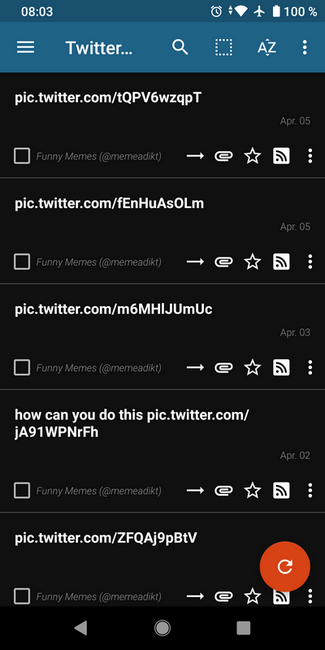
Any help is very appreciated!
@ontheair81 I've made a change to my TwitterV2Bridge PR #2612 . Please try that and let me know if it helps. I can't test this myself, as I use a feed reader that has no problem with ?name= at the end of media URLs.
@quickwick Thank you very much for your effort! I see that "?name=" is now removed in the media links. Still the image links are broken, both in the app and in the webbrowser - honestly no idea why.
If there is any information I can provide, please let me know!
@ontheair81 At this point it seems more likely it's an issue in TT-RSS, not something I can solve in the bridge. Are image links working for other (non-rss-bridge-based) feeds? I found this thread on the tt-rss support site: https://community.tt-rss.org/t/solved-media-display-according-to-browsers/5178/4
There were a few suggestions in there. Make sure you're on an up-to-date version of TT-RSS. Make sure "Use less traffic" is not checked. Make sure "Do not embed media" is not checked.
In at least one other support thread, Firefox is mentioned as being problematic with TT-RSS, though that doesn't explain the problem also occurring in the TT-RSS mobile app.
Edit: Is your TT-RSS set to do any caching/proxying of images? I've read that's an option, and can sometimes cause an issue with media.
If your TT-RSS is successfully showing media in a non-rss-bridge-based feed, please provide a link to that feed, so we can compare the XML formatting and see what, if anything, is different between how media is presented in the working feed and the rss-bridge feed.
Thanks for your support! I don't use "Use less traffic", media caching is disabled.
Make sure "Do not embed media" is not checked.
Checked it, made no difference.
My TT-RSS is pretty up-to-date. I am using it around a decade now, with more or less 60 feeds (native, non-RSS-Bridge) and image links are working in all of these feeds.
To provide an example, I suggest the feed of Heise IT news with images included: https://www.heise.de/newsticker/heise-atom.xml
The working image in the feed of Heise looks like this:
<a href="https://www.heise.de/hintergrund/Auslegungssache-59-Privacy-Harbour-oder-Safe-Shield-6659952.html?wt_mc=rss.red.ho.ho.atom.beitrag.beitrag" target="_blank">
<img src="https://www.heise.de/scale/geometry/450/q80//imgs/18/3/4/4/5/9/8/1/pas59_teas.jpg-8077ca2c34a93d30.jpeg" class="webfeedsFeaturedVisual" alt="">
</a>
The non-working image created by TwitterV2Bridge looks like this:
<a href="https://pbs.twimg.com/media/FPuJ3JEXEAIjwHX.jpg" target="_blank">
<img style="align:top; max-width:558px; border:1px solid black;" referrerpolicy="no-referrer" src="https://pbs.twimg.com/media/FPuJ3JEXEAIjwHX.jpg">
</a>
To illustrate the effect better, please allow to show another screenshots from the app.
This is the list view of a feed with missing media (Twitter), and working media (all other native RSS):
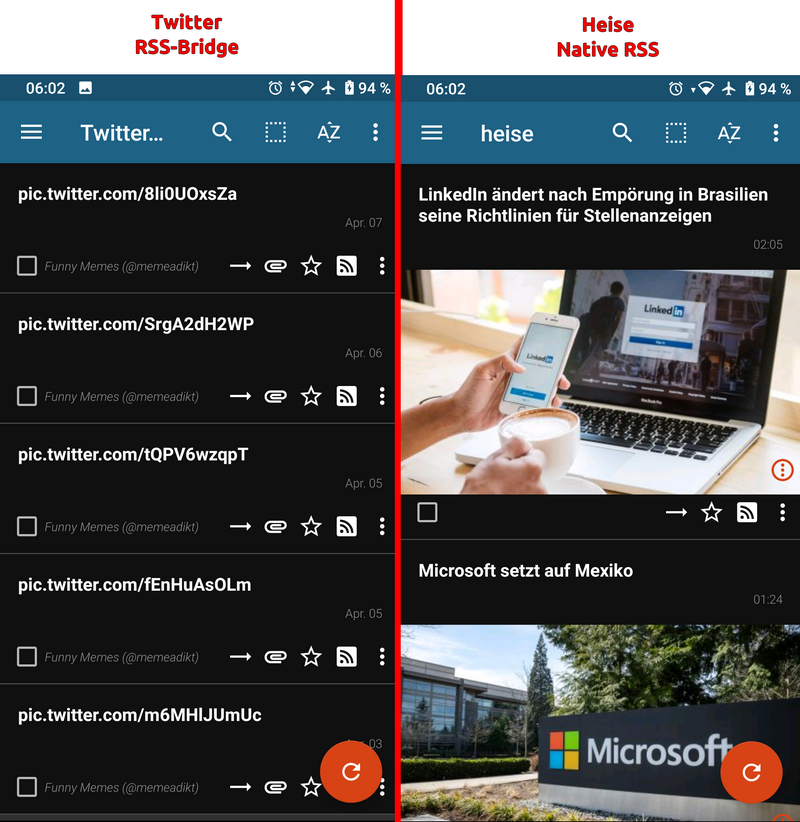
And here is the article view of Twitter and native feeds, both of them are working:
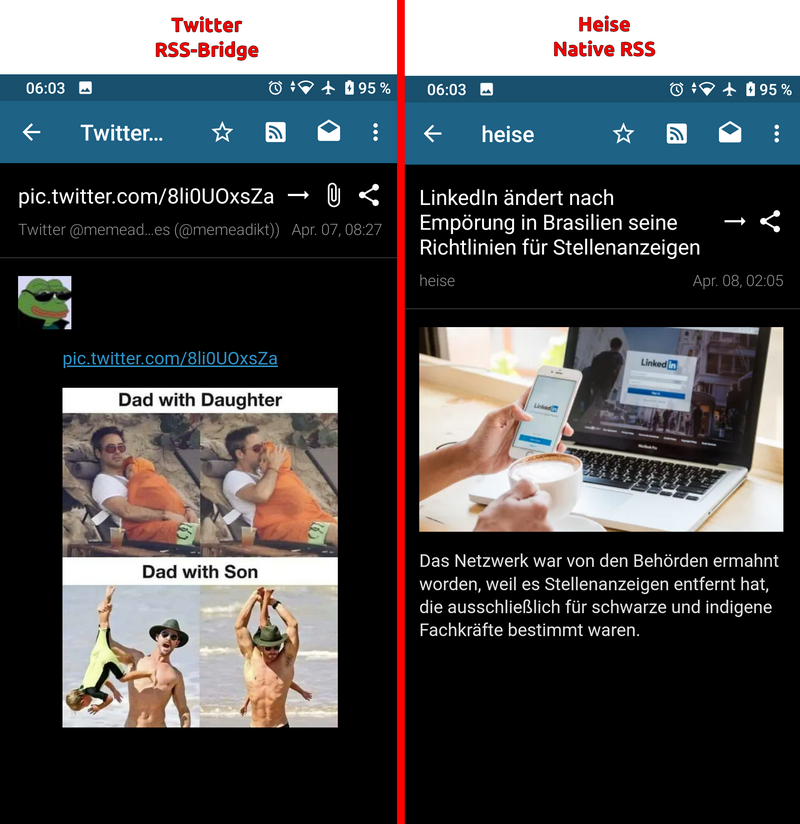
Again, thank you very much for your support!
Ok, some very interesting stuff here. Thank you for all the details. So the Twitter rss-bridge feeds are showing pictures correctly in TT-RSS in article view, the problem is limited to TT-RSS in list view? This makes me think even more it's a TT-RSS bug, but I'm willing to keep poking at this with you.
Is this problem occurring with any other rss-bridge Bridges besides the Twitter bridge(s)?
If the problem is specific to the Twitter bridge(s), I'm wondering if it's the style property of the img tags causing the problem. That's definitely being applied by the Twitter bridge, not by rss-bridge. It's from a part of the code I inherited, so I'm not sure exactly of it's intended purpose.
A next step is that you can try removing those specific bits from your local TwitterV2Bridge.php and see if it makes a difference. Lines 467, 517 and 530.
For the record, i'm using tt-rss with twitterbrigde (1.1) and images are working.
I'm using lastest commit on master branch from git repo for tt-rss. I'm also using ttrss-reader app on android. Both are working
My settings in tt-rss are Always display image attachments => off Do not embed media => off Cache media => some off, others on (so has no effect on the problem)
Have you taken a look in your browser console, if there are some kind of error messages ? Have you tried to open the link to the graphic directly in your browser ? If so, what error message do you get ?
EDIT: I have planned to try the new twitterbridge (V2) in the next days.

@arnd-s
Sorry, I guess I was not clear enough. When mentioning the broken image link in Firefox, I am not talking about the web gui of tt-rss, but about reading the URL of rss bridge in the browser
(like: https://rssbridge.mydomain.de/?action=display&bridge=TwitterV2&context=By+username&u=memeadikt&filter=&norep=on&noretweet=on&nopinned=on&maxresults=&imgonly=on&noimgscaling=on&format=Mrss)
using the firefox addon "Feed Preview" (as firefox alone is not able to render RSS feeds).
I did that because I wanted to inspect the link, which is not possible in the Android app. Sorry if this caused confusion.
Have you tried to open the link to the graphic directly in your browser ? If so, what error message do you get ?
The link to the graphic is working.
So to make it clear: Viewing an article works great with pictures, both in the web gui of tt-rss and in the Android app of tt-rss. Just when using the list view (which is only available in the Android app) there are no images displayed.
@quickwick
So the Twitter rss-bridge feeds are showing pictures correctly in TT-RSS in article view, the problem is limited to TT-RSS in list view?
Yes, exactly.
Is this problem occurring with any other rss-bridge Bridges besides the Twitter bridge(s)?
The Twitter bridge was the only one I was using, but now I additionally checked two other bridges: AnimeUltimeBridge: Works, with pictures in list view. PinterestBridge: Works, with pictures in list view.
So it seems to be limited to the Twitter Bridge - although I don't know why it is working for @arnd-s, but not for me.
A next step is that you can try removing those specific bits from your local TwitterV2Bridge.php and see if it makes a difference. Lines 467, 517 and 530.
Tried it, sadly it is still the same.
Okay. I was able to reproduce it now. It has nothing to do with tt-rss...
I added the "Feed Preview" to my firefox browser and when i open the rss feed with it, images are not shown. I took a look into the browser console log see screenshot

Translated from german: The resource at "..." was blocked because tracking protection is enabled.
https://developer.mozilla.org/en-US/docs/web/privacy/tracking_protection
For my rss server, i disabled the tracking protection (so the tt-rss web-application is working). But when using the addon, the tracking procetion is still on and images are getting blocked.
UPDATE: If i disable global tracking protection inside firefox settings, images are working
I see, it makes sense that tracking protection is causing the broken image links in firefox. Thank you for pointing this out!
Still it is strange that my tt-rss-app is not showing pictures in both Twitter bridges. I checked it on three different phones:
- 2 phones with Android 10 and latest security patches
- Ancient Android 7, outdated
Especially interesting is the fact, that the app shows pictures in other bridges for me but not in TwitterBridge or TwitterV2Bridge. As other bridges are working, I guess there should be nothing wrong with my phones.
I understand that this is hard to troubleshoot and I am running out of ideas at the moment. Will keep you updated if I find out more!
My guess is, that the android app is using an external webengine on the phone for the list view. I know some apps on my phone, which are using the firefox or chome app (or a component) to display some content. So this could be the same reason. You can try to look if your default web browser on your phone has also some settings for blocking tracker like the desktop version of firefox
I'm a bit late to testing the V2 bridge, but does '?name=thumb'; need to be added to the second option? This changes the behaviour from the previous Twitter bridge, in that we now only get a low quality thumb for the display image if we also want the original image included in the enclosure.
I would much prefer if the display image is always the standard image, and noimgscaling just changes the enclosure size (to maintain compatibility with those clients mentioned above):
if ($this->getInput('noimgscaling')) {
	$image = $media->url;
	$display_image = $media->url;
} else{
	$image = $media->url . '?name=orig';
	$display_image = $media->url;
}

I'm a bit late to testing the V2 bridge, but does
'?name=thumb';need to be added to the second option? This changes the behaviour from the previous Twitter bridge, in that we now only get a low quality thumb for the display image if we also want the original image included in the enclosure.
@kinoushe
Using the '?name=thumb'; suffix for the display image was a deliberate choice on my part, to make the feeds load faster and use less data. If you want to see the full image you click, and if you don't then you didn't waste bandwidth loading the giant-sized original.
In retrospect, a better choice might have been a dropdown that allows users to select which image size they want for display and attachment. Twitter offers a lot of different options: tiny, thumb, small, medium, large, orig. There may be others, too. I believe medium is what is returned if you don't specify a suffix. Switching to a dropdown choice now would be a breaking change for existing feeds.
@arnd-s To confirm, you see images in TwitterBridge feeds in TT-RSS, in list view?
@ontheair81 It occurs to me that the first image in a TwitterBridge feed item is actually the Twitter user avatar image and that image is not, and has never been, scaled. It's always been a standard .jpg link with no suffix.
Is there any difference for you if you use the "Hide profile pictures" parameter?
Edit: I see from your first error screenshots, the one with the red arrows, that the avatar image isn't loading either. It's less obvious because instead of showing a broken image icon, it has the alt text "memeadikt". Though is that picture from the TT-RSS web interface, or from Firefox Feed Preview? It seems like arnd-s has already identified a separate issue causing images to not load in Firefox.
Yes, having a choice of image size would be preferred, as adding '?name=thumb' to the display image is also a 'breaking' change for my workflow compared to the previous Twitter bridge.
The 'thumb' image is a square crop at only 150 x 150px - so firstly it's only showing part of the image, and it's noticeably low quality on a high resolution display. My feed reader (Reeder), then takes this small square thumb and enlarges it back to a rectangle in the feed list preview - which means the quality/crop is then even worse.
As for bandwidth, Reeder only downloads the original size enclosure image if viewing the actual feed item, so I don't see it as a waste of bandwidth loading the medium quality preview/display images for the feed list compared to the thumb - especially considering the loss of image and quality otherwise.
If it's not possible to correct the noimgscaling option to the previous behaviour, even at this early stage, would it be possible to add a second setting for the enclosure size or such?
With the release of the V2 bridge it may have been clearer to have two options: 'displaysize', 'enclosuresize'. This way people could mix and match depending on their desired workflow.
Thinking of the other bridges I use however, Reddit and Instagram both only serve up original size images with no concern for bandwidth.
In that regard, maybe noimgscaling should mean using the original size image for both display and enclosure, otherwise medium/standard for both display and enclosure.
if ($this->getInput('noimgscaling')) {
	$image = $media->url;
	$display_image = $media->url;
} else{
	$image = $media->url . '?name=orig';
	$display_image = $media->url . '?name=orig';
}
People can then choose between quality or saving bandwidth/compatibility.
It's a shame we can't use a clearer name for it at this stage. The tooltip also says 'Activate to display original sized images (no thumbnails)', which is not very clear either - as the actual 'original' size enclosure image is also the option that displays the 'thumb'.
I've descended into the madness that is CSS and made some changes to the HTML output in TwitterV2Bridge with PR #2626. I think it looks nicer, and maybe it will also fix problems?
@ontheair81 Please try the updated bridge and see if it makes any difference in TT-RSS list view.
@kinoushe I've taken the suffix off the default display image. Is it now looking/working like you want?
@kinoushe I've taken the suffix off the default display image. Is it now looking/working like you want?
Yes, this is now working as per the original Twitter bridge, with the standard/medium display image and original size as the enclosure. Thanks so much!
@quickwick
@ontheair81 Is there any difference for you if you use the "Hide profile pictures" parameter?
@ontheair81 Please try the updated bridge and see if it makes any difference in TT-RSS list view.
I just pulled the latest version and activated the "Hide profile pictures" parameter. And now the media is not broken anymore in list view!
That's amazing, thank you very much for all your help and support!