

 RPTools
[Feature]: VBL/MBL icon colours matching line/fill colours
Feature Request
Please could the VBL/MBL button icons be colour coded to match the line/fill colours of the various layers?
The Solution you'd like
Currently:
- Wall VBL is displayed dark blue
- Hill VBL is displayed cyan
- Pit VBL is displayed green
- MBL is displayed magenta but the user must remember which colour represents which layer which I think is unintuitive. Currently the buttons at the top of the screen for drawing various VBL and MBL are all monochrome grey/white. Please could these buttons be colour coded to match the line colours of the various layers? (i.e., the "Draw Wall VBL" icon be a dark blue icon on white background, or have a dark blue square around the button, or a dark blue patch somewhere on the icon, or somesuch as per the designer's preference). Also note if issue #1623 were addressed and the colours changed for any reason (in UI design, or by later implementation of a user-defined VBL/MBL colour selection), they would need to be changed simultaneously in the icon and on the map.
Alternatives that you've considered.
Mouse over a VBL/MBL line to bring up a tooltip of what the line is. A 'help' button which provides a reference sheet which matches colours with designated function.
Additional Context
No response

For context, the colours roughly match on 1.12.2 (at least once they buttons are toggled on):
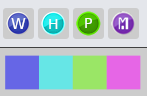
But in 1.13.0-beta.1, the buttons are no longer coloured:
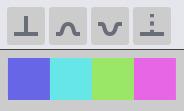
I agree that having the buttons remain coloured would be ideal, at least until we find a better way to represent the *BL areas on the map.

I agree that color coding these would be useful... BUT the potential problem with this is that these new icons were supposed to be color coded in such a way as to eventually be "theme responsive" (i.e. their colors would change to be better suited to the various themes.) So once you hard-code a color outside that paradigm then the response will change.
What if, upon selecting a tool, the HIGHLIGHT behind the icon reflected the color of the VBL?

Right yeah I guess as written my suggestion was that the icon be permanently colour coded as per the v1.12.2 example above, but I'd be very happy with either of these alternatives also:
- There is a colour applied to the button/icon when that option is selected.
- There is a colour applied to the button/icon on mouseover of that button/icon.
I'm no designer, but I mocked up a few possibilities of how that colour could be applied. Not an exhaustive set of options, but just trying to show that whoever is designing the icons could hopefully convey the connection to the displayed VBL/MBL lines/regions in a variety of different ways. I guess clashing colours are never going to look "great" with a theme, but the main point here is for things to be identifiable.
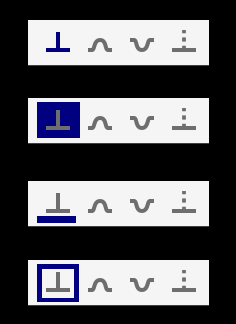
With this inside the SVG
<style>
    #Draw-MBL {fill: purple;}
</style>
we get this
In theory we could use
<style>
    #Draw-MBL {fill: none;}
    #Draw-MBL:hover {fill: purple;}
</style>
But that is using HTML hover events. Not sure how it would go in Swing
