

 RPCS3
RPCS3
Need For Speed: ProStreet BLUS30066 Unknown STOP crashes
Please do not ask for help or report compatibility regressions here, use RPCS3 Discord server or forums instead.
Quick summary
Please briefly describe what is not working correctly.
Game attempts to load into a world, but promptly terminates.
Details
Please describe the problem as accurately as possible.
Starting a career file or even loading into a map immediately crashes the game. RPCS3.log
1. Please attach RPCS3's log.
- Run the game until you find the issue.
- Completely close RPCS3, or move to the next step in case it has crashed.
- Locate RPCS3's log file:
RPCS3.log(It can show up as just RPCS3 and have a notepad icon) orRPCS3.log.gz(It can show up as RPCS3.log and have a zip or rar icon) On Linux it will be in
 ~/.cache/rpcs3/. On Windows it will be near the executable.
- Attach the log:
- Drag and drop your log file into the issue.
- Or upload it to the cloud, such as Dropbox, Mega etc.
2. If you describe graphical issue, please provide an RSX capture and a RenderDoc capture that demonstrate it.
- To create an RSX capture, use Create RSX Capture under Utilities.
Captures will be stored in RPCS3 folder → captures.
- Compress your capture with 7z, Rar etc. And drag and drop it into the issue.
- Or upload it to the cloud, such as Dropbox, Mega etc.
- To create a RenderDoc capture, please refer to RenderDoc's documentation.
3. Please attach screenshots of your problem.
- Enable performance overlay with at least medium level of detail.
You can find it in Emulator tab in Settings.
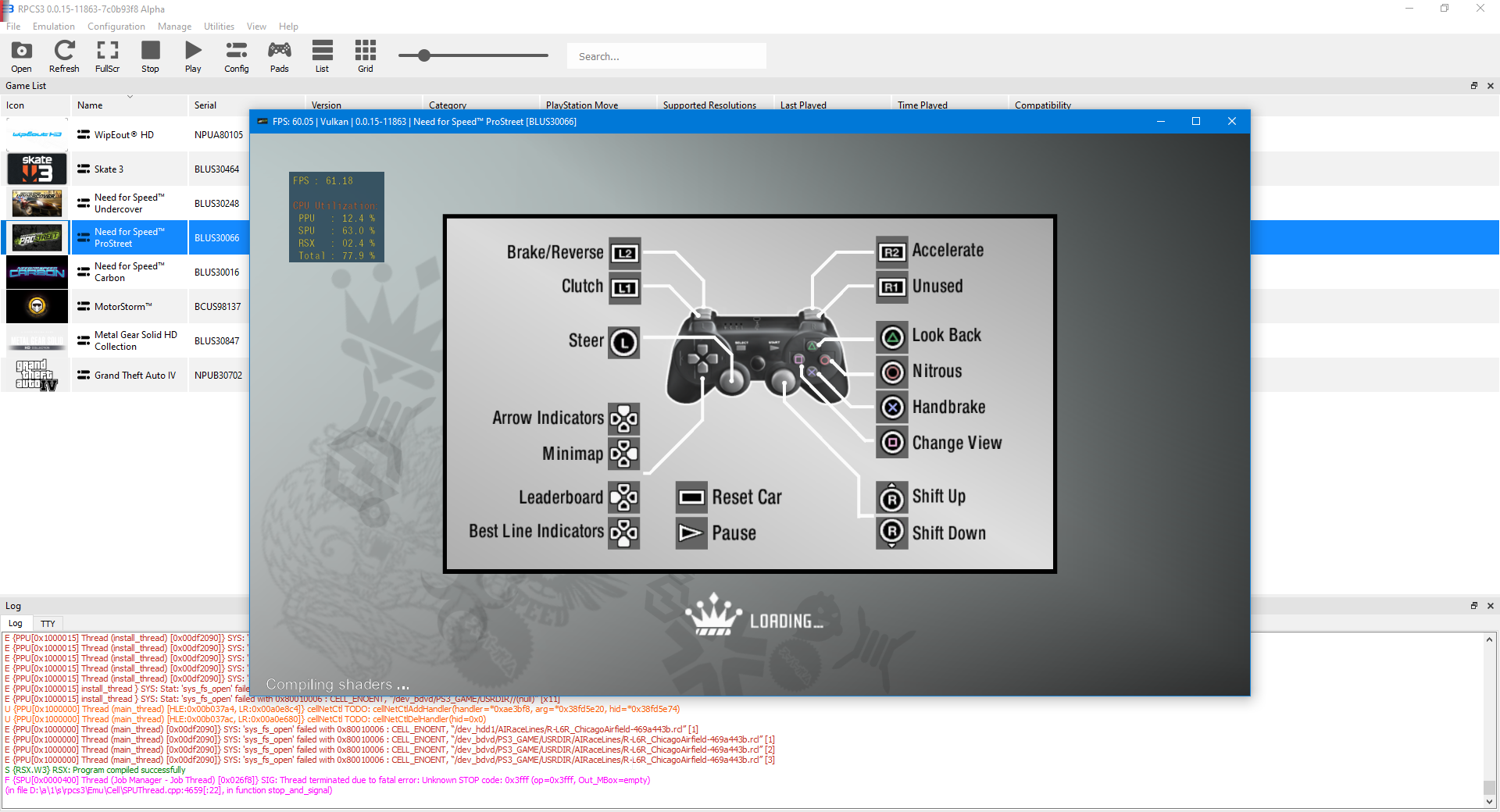
4. Please provide comparison with real PS3.
5. Please provide your system configuration:
- OS: Windows 10
- CPU: AMD Ryzen 5 3600X
- GPU: MSI Radeon 5700XT MECH OC
- Driver version: 21.2.1
- etc.
Please include.
- Anything else you deem to be important

I can get ingame without issue on latest, closing.
 Career mode requires framelimit auto and Safe block size or it will crash btw.

I don't think this issue should be closed, just renamed instead, because while it can go past the loading, it still crashes with the same error later on in gameplay


ASMJIT does nothing to fix the error. accurate xfloat does not help either.

Setting "PPU Thread Count" to 1 in debug tab fixes the random crashing in races.
Was able to finish a few races with this setting.
Log: RPCS3.log.gz


After further testing, I have found out that crashing happens only during certain events even with PPU Thread count set to 1.
Heres a way to reproduce it.
Download my save file, BLUS30066-SAVEDATA.zip and open career mode.
Selecting this race, the grip class event, or any of the time attacks should crash your game.
GRIP EVENT RPCS3.log.gz
However, the drag event works just fine.
DRAG EVENT RPCS3.log.gz
After doing some research, I found out that enabling PPU interpreter (static) fixes the crash, even when loading and during races, but reduces the performance.
Needs information if this works on other users or not. RPCS3.log.gz
I have figured out a better solution on how to fix this "Unknown STOP Crashes" without using PPU interpreter, is by enabling Atomic+Accurate SPU DMA+Accurate Cache Line Stores.
RPCS3.log.gz
Enabling these options may have a performance impact, but its much faster than PPU interpreter.
With these settings I was unable to enter the career, as it would either give me an spu access violation,
or it would just freeze on the loading screen.
Log: RPCS3.log.gz
updating title to reflect current situation, as it looks like it isn't just limited to just track crashes/save loads
For who being interested , my screen plant , bug and crashing eror said Its cannot oppening map and cars file and atempting was cause my Power supply of my computer was not enough strong , my alimentation gone down not long ago i buy a knew one and no problem any more , take more watts like 100 thats its need .

my alimentation gone down not long ago i buy a knew one and no problem any more , take more watts like 100 thats its need .
These issues are not caused by a faulty PSU, but due to the current state of the emulation.

I SOLVED THE PROBLEM In this video, I demonstrate the only way to fix the crash with NFS Pro Street on RPCS3. With the settings I show at the beginning of the video, the game runs flawlessly in any race. The only downside is that the FPS count drops compared to the default settings. https://www.youtube.com/watch?v=Han-Jq3ef7o

