
qwik
 qwik copied to clipboard
 QwikDev
[🐞] Unneccessary prefetched scripts are all counting in Lighthouse and PageSpeed
Which component is affected?
Qwik Runtime
Describe the bug
I'm trying to get a high lighthouse/pagespeed score, and there are a lot of problems that they report which are related to scripts.
I have nothing above the fold. I just have a bunch of texts and HTML elements styled using Tailwind. I have even removed my menu icon for mobile and added a screen-tall division below my hero section to make sure that there is no script whatsoever required for above the fold.
Yet when I load my website, I see a lot of scripts being shown on the Network tab. As I searched their names, I found this line:
    <script type="module">
        document.dispatchEvent(new CustomEvent("qprefetch",{detail:{"bundles":["q-ec256a11.js","q-160ad389.js","q-2e7bf3e0.js","q-6a24878f.js","q-fc65f989.js","q-46c1b641.js","q-8628d751.js","q-98014a2f.js","q-ff5adcb4.js","q-5973ca3f.js","q-af16d7c2.js"]}}))
    </script>
This was related to npm run preview. And when I use npm run build and then serve my website using node server/entry.express.js I see this code too:
const appBundles = [["q-08ffd6c0.js", [3, 7, 9, 38], ["2x5T0jzLsAk", "5OkQdGGyL4A", "Yy6gnsbRWKY"]], ["q-0dcae3c6.js", [7, 19, 38]], ["q-10b39364.js", [7]], ["q-160ad389.js", []], ["q-161aad97.js", [7, 19]], ["q-172cd13a.js", [7, 9, 13, 19, 38], ["PdBZ3iDbPQA"]], ["q-1d05b01b.js", [7]], ["q-1d920454.js", []], ["q-1e7e6950.js", [7, 19], ["yDcyHPF1T2o"]], ["q-243bd65c.js", [7]], ["q-2ce37848.js", [7, 19, 35, 38], ["Ossmb4bjxMg"]], ["q-2da619ef.js", [7, 9, 38]], ["q-358d68f6.js", [7]], ["q-3ea0777e.js", [7, 19]], ["q-439a8f9a.js", [7, 9, 12, 38], ["A1ssYUErBQY", "RCk6LUpoQlU"]], ["q-45aab3b6.js", []], ["q-47452b66.js", [3, 7, 9, 26, 38], ["lWuAeLArgaY", "Lzju0uqPTFo", "MT4d0htQN4o"]], ["q-4a824742.js", [7]], ["q-5227d92e.js", [7, 9, 20, 38]], ["q-552e253f.js", [7], ["1QKKC0NVXEU"]], ["q-560d235e.js", [7]], ["q-565b4350.js", [7, 19], ["02wMImzEAbk", "fX0bDjeJa0E", "RPDJAz33WLA", "TxCFOy819ag"]], ["q-5fabcee5.js", [7, 9, 20, 38]], ["q-6532db9c.js", [7]], ["q-7d659ea4.js", [3, 7, 9, 26, 38], ["NJUuur5nzBE", "VV2g4riGEdk", "zF8k4Nbb9FI"]], ["q-8066be06.js", [7]], ["q-8628d751.js", []], ["q-8e413b83.js", [1, 7, 19, 38], ["H9K60qOuPGA"]], ["q-a27ce943.js", [7, 9, 12, 38]], ["q-ae4d730f.js", [7, 9, 19, 34, 38], ["dKRXGwXw2mQ"]], ["q-b5c0ff21.js", [3, 7, 9, 12, 26, 38], ["4j4plRMj3gE", "7820qma5lxY", "BUa4FGplYBI"]], ["q-bddd59fd.js", [7], ["UGxYUkCVUps"]], ["q-c2e9cded.js", [7, 19], ["AKetNByE5TM", "KnNE9eL0qfc"]], ["q-d6d97ec6.js", [7], ["vrZDxnDuCBU"]], ["q-d6dee33d.js", [7, 19]], ["q-db71af1a.js", [7, 19]], ["q-e530fb79.js", [7]], ["q-f96edf9a.js", [7], ["NyacM5awRMY"]], ["q-fc65f989.js", []], ["q-fc90b43b.js", [4, 7, 9, 19, 38], ["UdIHNtZ13Ow"]]];
Now the problem is that they affect both Lighthose and PageSpeed scores.
I see this problems in the PageSpeed report:
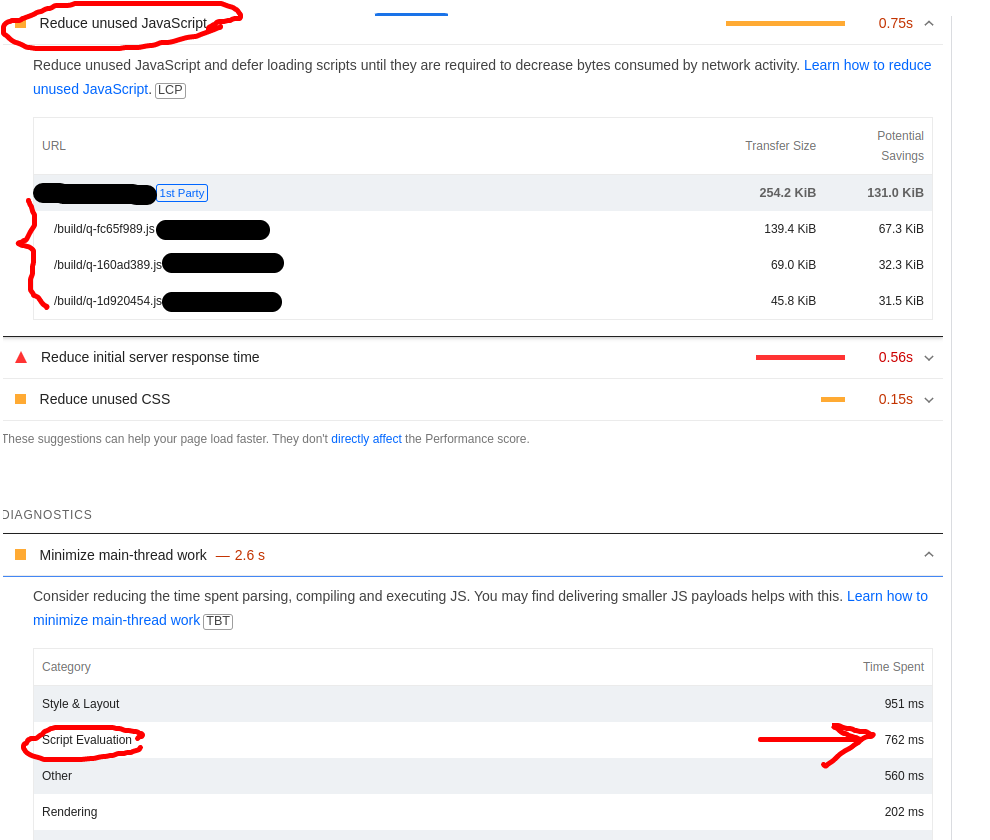
The are both orange warnings and it seems that they both contribute to my rather low score (between 70 and 80).
What should I do? I chose Qwik only because of this reason to get high lighthouse score.
Reproduction
I can't provide reproduction link
Steps to reproduce
No response
System Info
System:
    OS: Linux 5.19 Debian GNU/Linux 11 (bullseye) 11 (bullseye)
    CPU: (4) x64 Intel(R) Core(TM) i5-6500 CPU @ 3.20GHz
    Memory: 10.14 GB / 15.51 GB
    Container: Yes
    Shell: 5.1.4 - /bin/bash
  Binaries:
    Node: 18.16.0 - /usr/local/bin/node
    Yarn: 1.22.19 - /usr/local/bin/yarn
    npm: 9.6.5 - /usr/local/bin/npm
  npmPackages:
    @builder.io/partytown: ^0.8.0 => 0.8.0
    @builder.io/qwik: ^0.103.0 => 0.103.0
    @builder.io/qwik-city: ^0.103.0 => 0.103.0
    @builder.io/qwik-react: ^0.5.0 => 0.5.0
    vite: ^4.3.1 => 4.3.1
Additional Information
No response

Your issue with performance is not related to prefetching scripts in the background. Notice the disclaimer below that section. It's hard to say what is causing it with no information, could be many things including poor design such as massively overusing useVisibleTask$, etc. What certainly doesn't help is the ~600ms latency, hence why that one is colored red.
Like I said though, hard to tell without any information at all, but scripts need to be downloaded at some point, when do you think that should be? Hopefully not when the user wants to use them, otherwise they're waiting, bad experience. But since they're offloaded to the service worker to prefetch, they are ready when needed, and the impact on performance score should be negligible.

This is a known issue, I hope it will be fixed soon. I have halted all development using qwik until this has been resolved. It's Qwik's premise to have 0kB on load, without it you may as well use any other framework.
https://github.com/BuilderIO/qwik/issues/3756

@Dindaleon That issue is not related, that is regarding an increase in a specific bundle size. Qwik is not meant to download 0kB of JS on load and I am not sure where you heard this but it's a misunderstanding. It is supposed to be O(1). It actually loads 1kB inlined in the HTML to begin with (and always has) and only loads other JS when needed, however it will still prefetch scripts for the page in the background so that it is ready in the cache for when it needs to be loaded.
@Dindaleon That issue is not related, that is regarding an increase in a specific bundle size. Qwik is not meant to download 0kB of JS on load and I am not sure where you heard this but it's a misunderstanding. It is supposed to be O(1). It actually loads 1kB inlined in the HTML to begin with (and always has) and only loads other JS when needed, however it will still prefetch scripts for the page in the background so that it is ready in the cache for when it needs to be loaded.
1kB inline sure, no problem! But no 50kB (in three files. Even for a blank page loading unnecessary ~50kB of JS is ridiculous). I have versions of Qwik where I load no javascript at all and I hope future versions will do the same. I have seen youtube videos showing this and it's pretty awesome. I don't understand why it would change. It's the one feature I like most.
@Dindaleon Yes the one bundle size is an open issue but the versions of Qwik which didn't prefetch script bundles in the background on the worker thread were actually broken, that was an issue that was fixed.
There's going to be some JS, but it is very minimal and loaded on demand. If you have scripts in the page they will be prefetched in the background.
Without prefetching, when a user goes to interact with your page, they will need to wait until the scripts are downloaded. This will feel horrible for the UX. This lack of prefetching observed in some previous versions was actually a bug that got fixed.
@Dindaleon Legitimate question, when do you think scripts should be downloaded in the background? Do you think the user should wait ~500ms on a mobile connection for a button click to download the script before the action happens, like opening a hamburger menu for example? Or should the page become active immediately and start prefetching that script in the background right away so that it's ready when the user clicks?
I understand your point and of course i want immediate action when a user clicks something; however, I would like the scripts to be loaded after the first load, not with it (I don't know if that is how it actually is working at the moment). The way you are putting it sound like that, if so, that's good I guess. I do not want to load ~50kB on the first load, nor when a page is practically a blank page.
@jordanw66 I just updated to the latest version and it is beautiful! :heart:
Hey @fmotlagh03, thanks for opening this issue, is it still a valid issue with the latest version of Qwik?

This seems solved. So I'm closing this issue for now, feel free to re-open it if it's still an issue for you.
Same here, @builder.io/qwik": "^1.4.5"
// PostView
import { Resource, component$ } from "@builder.io/qwik";

import { useFetchUrl } from "~/routes/[slug]";

export default component$(() => {
  const PostData = useFetchUrl();

  return (
    <Resource
      value={PostData}
      onPending={() => <div>loading...</div>}
      onRejected={(err: any) => (
        <p>looxi roo {err.status ? err.status : err.message} </p>
      )}
      onResolved={(res) => <pre class="mb-10">{JSON.stringify(res)}</pre>}
    />
  );
});


// [slug]/index.tsx
export const useFetchUrl = routeLoader$(async (requestEvent) => {
  const slug = requestEvent.params.slug;
  const slugRes = await fetch(`http://localhost:3009/api/v1/slugs/${slug}`);
  const slugResJson = await slugRes.json();

  if (slugRes.ok) {
    if (slugResJson.redirect) {
      throw requestEvent.redirect(301, "/" + slugResJson.redirect);
    }

    if (slugResJson.type == "news") {
      const postRes = await fetch(GetPostDetailEndpoint(slug));
      const resJson = await postRes.json();

      if (postRes.ok) {
        return {
          ...resJson,
          content: JSON.parse(resJson.content),
          type: slugResJson.type,
        };
      }

      throw {
        status: postRes.status,
        response: resJson,
      };
    }
    if (slugResJson.type == "category") {
      const postRes = await fetch(GetPostByCategorySlugEndpoint(slug));
      const resJson = await postRes.json();

      if (postRes.ok) {
        return { ...resJson, type: slugResJson.type };
      }

      throw {
        status: postRes.status,
        response: resJson,
      };
    }
  }
  throw {
    status: slugRes.status,
    response: slugResJson,
  };
});

export default component$(() => {
  const data = useFetchUrl();
  return <>{data.value.type === "news" ? <PostView /> : <null />}</>;
});
In index.tsx it oke, but [slug] first load 50kb js

@nhayhoc can you give more details? What is in those 50kb? Why are they being loaded? Do you have useVisibleTask that triggers loading the framework early?
