

 QW-Group
BUG: 3.6 on No HUD rendering, corrupt sprites (AMD Radeon HD 6690M)
Please search for existing issues and check for potential duplicates before filing yours.
ezQuake version: 3.6-alpha3
OS/device including version: OS is Windows 10. The graphics device on this machine is Intel HD Graphics 4600.
Describe the bug See https://github.com/ezQuake/ezquake-source/issues/412

Hi @Pulseczar1
Would be good if we could get to the bottom of this - can you (in ezQuake 3.2.2 is fine):
-
/cfg_save_unchanged 1 -
/cfg_save bug416.cfg - Upload bug416.cfg here
Also can you /vid_gfxinfo in 3.2.2 and take a screenshot of the result please?
Can you also try (using the 3.6 mingw executable to start with), creating the most basic quake directory and test to see if that has the same problem:
./ezquake.exe ./id1/pak0.pak
My suspicion is that it's an issue when building the 2d atlas, but I've tested on Windows 10 laptop I have here using Intel and it doesn't have this problem unfortunately, but it's very old now.
Thanks, meag
Can you also
I used ezquake-glsl-vs-x86.exe, which came from the bottom of this page, to generate bug416.cfg, since the console does accept and act on input even though I can't see any text on it. I took the screenshot using ezQuake 3.2.2. bug416.zip

That's interesting that ezQuake says it's using an ATI/AMD graphics processor. I reopened dxdiag and found that both graphics processors are listed. The Intel one, that I reported before, is on the "Display" tab. The ATI Radeon device is on the "Render" tab. I didn't realize there was a Render tab there, when I checked before. So, it looks like this probably isn't a problem with Intel graphics, but rather, AMD.
Can you also try (using the 3.6 mingw executable to start with), creating the most basic quake directory and test to see if that has the same problem:
./ezquake.exe ./id1/pak0.pak
Okay. Did exactly what you asked.
ezquake-multi-mingw-x32.exe
No console text, "old"-looking escape menu and console background, missing text on escape menu. No HUD in game. Single Player menu not blank, but Options menu is blank. (Seems like large text shows up, but not small text.) In New Game, I have no HUD and no text is displayed on the screen when I die in the lava. Escape menu completely blank in game. Strange graphical connection between lava trail and bullet wall dust particles. Wall dust particles kind of look triangular. See screenshot:

ezquake-std-vs-x86.exe
Crashes with debug assertion error. See screenshot:

ezquake-std-vs-x64.exe Same results and same debug assertion error as ezquake-std-vs-x86.exe.
ezquake-glsl-vs-x86.exe
This looks like ezquake-multi-mingw-x32.exe, except there doesn't appear to be any lights until I move around a little bit. See screenshot:
 After moving around some, the lights turn on. Bullet effect on walls looks like this:

ezquake-glsl-vs-x64.exe Same results as ezquake-glsl-vs-x86.exe.
It's odd that "STD" (is that software renderer?) is crashing on me now, because it didn't do that the first time I tried it, but that was in my normal Quake directory where I was trying it. I just tried ezquake-std-vs-x64.exe with it running in my normal Quake directory, and it did not crash. I noticed I had newer looking menu and conback, as well. So, the old-looking ones are probably due to using nothing but pak0.pak, which you probably knew.
Hi
Thanks for this, it's really interesting & useful. I managed to get integrated graphics on my AMD-cpu but unfortunately using the same config and following same instructions, it's still rendering fine. I'm wondering if
There are some logging options we could try but they're more snapshots, I think the best thing I can do is probably add a crap-ton of logging to the OpenGL calls to a debug build, and then we could take it from there and hopefully narrow it right down.
I'll work on that this weekend. Am really keen to get to the bottom of this.
Thanks again, meag
Just out of curiosity, has anyone else complained about this problem, or am I the only one?
My rather frustrating experience of 3.6 is that someone will report something like this, then go deathly quiet on it and then 6 months go by and whether it's fixed or not is questionable. It would be really good to get to the bottom of this as it's these kind of random reports that keep 3.6 in alpha for such a long time, even though it's the main client version now for a lot of people.
Appreciate debugging isn't much fun when you just want it to be your pastime, but if we could stick with it and get to the bottom of it it would be much appreciated. (Ideally I could replicate the problem here but no luck)
I can't reproduce this on 18553fee50e703ea1ab39189b7baef18ea9a6b6b on Linux (GeForce GTX 1080, NVIDIA 455.28).
I have access to a Windows 10 laptop with an Intel HD 620 IGP, I'll try running ezQuake there later.

Hi there
Sorry for the delay - I broke the rendering on -std in a subtle way while doing this and it took me ages to find.
Can you try downloading the visual studio .zip from latest build and then run:
ezquake-std-vs-x86-debug -r-trace
It should generate files in ./qw/trace/ directory:

As you can see the first one is where all the textures are being loaded (you'll see another couple of big files when loading a map for the first time)
It will also completely destroy your fps as it checks for errors after major API calls, but that's okay for the moment. If you can give this a go and then zip & upload the contents of the trace directory, hopefully some errors are logged and that will give a good indication of what to work on next.
Thanks, meag
Hi, meag.
I downloaded https://github.com/ezQuake/ezquake-source/releases/download/latest/ezquake-latest-windows-vstudio.zip.
I ran ezquake-std-vs-x86-debug, by itself, in the same very basic Quake directory that I used in the last test. I got the same debug assertion error that I got before, when running the STD version. It is at a different line number this time (974).
Next, I ran in Command Prompt: ezquake-std-vs-x86-debug -r-trace
I got the same debug assertion popup. I noticed I have a SysPrintf.log in my Quake directory that is new. I can't open it while ezQuake is still running. I have these files in my qw/trace directory:
frame_2020-11-10_BEFORE_IGNORE_ASSERT.zip
I then click "Ignore" on the debug assertion. ezQuake went to the blank console. I found that it just kept generating TXT files in the trace directory, about one every second. I was up to 45 files, so I figured it was good to go ahead and exit the game and give you what I have. I now realize those are date and time stamps on the files. So, you are generating one file every second. Here are all of the text files in the qw/trace directory after exiting the game: frame_2020-11-10_AFTER_IGNORE_ASSERT.zip
I then restarted the game, after realizing I should record data after loading a New Game. I ignored the assertion and loaded a new game on map, "start". I walked over to the bouncing lava ball and shot my shotgun a few times to generate the weird graphical particle connection between the two. Shot the wall up close with the shotgun, and exited the game. Here are all the log files from this run: frame_2020-11-10_LOADED_NEW_GAME.zip
Here is SysPrintf.log from the Quake directory, if that's of any value to you. It should be of the last run, corresponding with the previous zip ("LOADED_NEW_GAME"): SysPrintf.log
Brilliant, thanks very much for this.
This is working:
Enter:        R_BindVertexArray(hud:images) {
API:            glEnableClientState(GL_VERTEX_ARRAY)
API:            glColorPointer(size 4, type UBYTE, stride 32, ptr 00000018)
API:            glEnableClientState(GL_COLOR_ARRAY)
API:            glClientActiveTexture(target=33984)@D:\a\1\s\gl_state.c,813
API:            glEnableClientState[unit 0](GL_TEXTURE_COORD_ARRAY)
API:            glBindBuffer(target=34963, buffer=2)@D:\a\1\s\gl_buffers.c,474
API:            GL_BindBuffer(hudimage-elements)
Leave:        }
This is yours:
Enter:        R_BindVertexArray(hud:images) {
API:            glBindBuffer(target=34963, buffer=0)@D:\a\1\s\gl_buffers.c,474
API:            GL_UnBindBuffer(element-array)
Leave:        }
because the VAO is not being configured, which is the debug assertion... which explains why you have no hud. What I can't see from the trace is why not, as there should be a check when drawing the hud that should lead to it being created for the first time.
Azure Pipelines seems to be having trouble uploading images to the release tonight, but hopefully it'll be there soon - it's an updated version that hopefully gives more detail (and saves more traces than once per second, so we're not missing anything)
Thanks again, meag
Thanks - apologies again for delay, I had to delete the 'latest' release and re-create it for some reason :(
New versions should be there now, for whenever you're ready
I'm glad to help.
This file won't open on my Ubuntu 18.04.5: https://github.com/ezQuake/ezquake-source/releases/download/latest/ezquake-latest-linux64.zip
The GUI Archive Manager says a generic message: "an error occurred". The unzip utility says:
$ unzip ezquake-latest-linux64.zip
Archive:  ezquake-latest-linux64.zip
  End-of-central-directory signature not found.  Either this file is not
  a zipfile, or it constitutes one disk of a multi-part archive.  In the
  latter case the central directory and zipfile comment will be found on
  the last disk(s) of this archive.
unzip:  cannot find zipfile directory in one of ezquake-latest-linux64.zip or
        ezquake-latest-linux64.zip.zip, and cannot find ezquake-latest-linux64.zip.ZIP, period.
This file opens for me: https://github.com/ezQuake/ezquake-source/archive/latest.tar.gz I will see if I can compile it later. I'm curious to see what it does on my Ubuntu installation.
Thanks for reporting that - I think maybe it's a .tar.gz instead of of a .zip file, I'll get that checked out
If you just want to use latest code, I'd advise you to build from source, then you can always get the very latest with git pull in future.
I haven't tested the tracing in Linux, I think it will still have the problem of writing one frame per second, rather than writing out every frame.
Other things to try:
-
/r_drawflat 1 -
/gl_program_world 0 -
/gl_program_hud 0
Compiling and running on my Ubuntu 18 installation was super easy, thanks to the great instructions. I played on my server on 2fort5r for almost an hour without any problems. However, when the server went to map, z7, I found that when standing in certain positions, the sky would show through walls. At times, the problem would go away. It happens in both the red and blue base. At one point, I had to reload the map to get it to happen again, so that I could take this screenshot of it:

Startup-renderer text on this machine:

Bottom of startup text, showing version of ezQuake:

The screenshot command is being weird, too. It's like it won't write a new screenshot file. It writes the last screenshot you took, instead.
Thanks again.
Have created #426 for the z7 problem as it seems quite different. I didn't have an example map for sky surfaces on instanced bmodels, so that will be something else scored off when it's fixed.
Hi, meag.
I downloaded the current https://github.com/ezQuake/ezquake-source/releases/download/latest/ezquake-latest-windows-vstudio.zip.
I ran in Command Prompt: ezquake-std-vs-x86-debug -r-trace
I got the same debug assertion error that I have been getting. It was still at line 974.
I clicked "Ignore". ezQuake went to the main menu. I checked that the console was still blank. It was. I loaded a New Game and shot the shotgun a few times near lava ball and shot a nearby wall, and exited the game. No HUD and no crosshair was visible. ~ console was empty other than the background. Escape menu would not display at all. Game only pauses and unpauses (without displaying "paused" message) when pressing Escape. I don't think anything was different on this run.
I am getting a lot more "frame" files now. I would guess one per execution frame. Here are the files: frame_2020-11-12.zip
Here is the SysPrintf.log from the Quake directory, corresponding with this run, if that's of any value to you: SysPrintf.log
Other things to try:
/r_drawflat 1
/gl_program_world 0
/gl_program_hud 0
You suggested these commands to me, but I wasn't clear on the context of your suggestion, and when I should try the commands, and what to look for. I also can't see console text in this version of ezQuake. So, I didn't use the commands.
... Okay I'm typing this reply out for the 3rd time now, not sure if github is having a moment or I've managed to lose it twice...
Thanks again - managed to detect what was happening with the debug assertion (the first frame had 4 lines for the mouse cursor but no images, and initialisation was in the image draw rather than the prepare stage), am hoping that in the latest version that has gone away. I've also fixed a non-GLSL hud rendering problem in classic, but don't know if that will actually help out or not as I don't think it should have been an issue.
You could have typed those commands at the console (even though you can't see the console) but if you want you can type them in the command line as well. So some other things to try:
// #423 shows the world rendering textures not being set but r_drawflat working, might be interesting if that works for your situation too
+r_drawflat 1
// this will switch world rendering back to immediate mode
+gl_program_world 0
// this will switch hud rendering back to immediate mode
+gl_program_hud 0
// this will disable generating 2d atlas, so each item is rendered from its own texture
-noatlas
// this will enable a command 'dev_gfxtexturedump' which will read all textures back from opengl and output as .png
-dev -r-debug
That last one in particular would be useful to know, as it would identify if the textures aren't being loaded, or if they are being loaded but not rendered correctly. The output directory should be in your qw folder.
Thanks, meag
... Okay I'm typing this reply out for the 3rd time now, not sure if github is having a moment or I've managed to lose it twice...
That's so frustrating. I usually Ctrl+A, Ctrl+C anything I type more than 5 sentences. Anything I spend over a half hour or so typing gets saved to a text file.
Thanks again - managed to detect what was happening with the debug assertion (the first frame had 4 lines for the mouse cursor but no images, and initialisation was in the image draw rather than the prepare stage), am hoping that in the latest version that has gone away. I've also fixed a non-GLSL hud rendering problem in classic, but don't know if that will actually help out or not as I don't think it should have been an issue.
Tried the latest STD version. Console is blank. Options menu is blank. No HUD, crosshair, or "death message" at the top of the screen. No discernible difference in weird particle effects described before.
// #423 shows the world rendering textures not being set but r_drawflat working, might be interesting if that works for your situation too
+r_drawflat 1
STD doesn't seem to give me a problem with texture drawing. I have weird stuff with only particles, it seems. r_drawflat performs as expected. And particles look the same with that on or off.
// this will switch world rendering back to immediate mode
+gl_program_world 0
No discernible effect.
// this will switch hud rendering back to immediate mode
+gl_program_hud 0
No discernible effect. HUD was still blank, even after vid_restart.
    // this will disable generating 2d atlas, so each item is rendered from its own texture
    -noatlas

This restores my console text. Menus are restored, as well. I still don't have a mouse cursor, but the mouse does work in the menus. HUD, crosshairs, and Escape menu are now working in the game. I still have the same weird particle effects, which I wouldn't expect this to affect.
// this will enable a command 'dev_gfxtexturedump' which will read all textures back from opengl and output as .png
-dev -r-debugThat last one in particular would be useful to know, as it would identify if the textures aren't being loaded, or if they are being loaded but not rendered correctly. The output directory should be in your qw folder.
textures_2020-11-16_12-38-53.zip
This post is going to be about the GLSL latest version. (ezquake-glsl-vs-x86-debug.exe)
Thanks again - managed to detect what was happening with the debug assertion (the first frame had 4 lines for the mouse cursor but no images, and initialisation was in the image draw rather than the prepare stage), am hoping that in the latest version that has gone away. I've also fixed a non-GLSL hud rendering problem in classic, but don't know if that will actually help out or not as I don't think it should have been an issue.
Tried the latest GLSL version. Console is blank. Options menu is blank. Game starts dark. (See screenshot.) No HUD, crosshair, or "death message" at the top of the screen. Moving around causes all the lights to turn on and for the game to look normal.

Particles are worse than in STD version, because they look just as weird, but are also all black. (See screenshot.)

// #423 shows the world rendering textures not being set but r_drawflat working, might be interesting if that works for your situation too
+r_drawflat 1
This makes dark image at startup look like this:

// this will switch world rendering back to immediate mode
+gl_program_world 0
No discernible effect even while dark, even after vid_restart.
// this will switch hud rendering back to immediate mode
+gl_program_hud 0
No discernible effect. HUD was still blank, even after vid_restart.
// this will disable generating 2d atlas, so each item is rendered from its own texture
-noatlas
(Same results as STD version) This restores my console text. Menus are restored, as well. I still don't have a mouse cursor, but the mouse does work in the menus. HUD, crosshairs, and Escape menu are now working in the game. I still have the same weird particle effects, which I wouldn't expect this to affect.
// this will enable a command 'dev_gfxtexturedump' which will read all textures back from opengl and output as .png
-dev -r-debugThat last one in particular would be useful to know, as it would identify if the textures aren't being loaded, or if they are being loaded but not rendered correctly. The output directory should be in your qw folder.
Executed dev_gfxtexturedump while everything was dark at the start of the game.
textures_2020-11-16_13-02-46.zip
// this will disable generating 2d atlas, so each item is rendered from its own texture
-noatlas
This restores my console text. Menus are restored, as well. I still don't have a mouse cursor, but the mouse does work in the menus. HUD, crosshairs, and Escape menu are now working in the game. I still have the same weird particle effects, which I wouldn't expect this to affect.
Brilliant, that really narrows it down then. Can you confirm if you ran dev_gfxtexturedump with -noatlas set? It's completely blank, so if you ran it without passing -noatlas then we've narrowed it down to a few hundred lines of code at least...
Brilliant, that really narrows it down then. Can you confirm if you ran
dev_gfxtexturedumpwith-noatlasset? It's completely blank, so if you ran it without passing-noatlasthen we've narrowed it down to a few hundred lines of code at least...
I did run dev_gfxtexturedump with -noatlas. I used Windows shortcuts to give it startup arguments. And I can see that both of my shortcuts, for STD and GLSL, look like this: *.exe -noatlas -dev -r-debug
When I added -dev -r-debug, I did not remove -noatlas.
Okay that's fine - that -noatlas works is a big step forward anyway. When you get a chance (appreciate you're jumping between linux & windows etc here), can you try running without -noatlas, doing dev_gfxtexturedump again and uploading the contents of 001-cachepics_atlas.png? For instance mine looks like this:
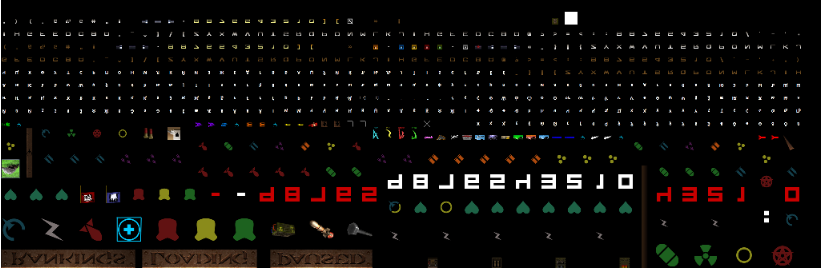
No rush for this - tomorrow I'll add a lot more debugging around the atlas build, and see if we can get to the bottom of it.
Thanks again, meag
STD 001-cachepics_atlas.png:
 I am guessing my glyphs shouldn't be such a tiny part of the image. But maybe the image is so huge to allow for high-resolution glyphs.
Hi - the glyphs would be smaller if loading without 32-bit graphics, don't worry about that. It's actually really interesting that your atlas looks perfectly reasonable, that makes it all the more confusing that it's causing problems :(
I did find that the original charset texture wasn't being deleted after the glyphs were moved onto the atlas though - so now if there are any stray references lying around, we should hopefully see those come up as errors (or maybe something easier to debug).
Can we try again please? classic renderer, -dev -r-trace -r-debug in command line and then dev_gfxtexturedump in console. Can you also try (with tracing enabled) starting a map and shooting a wall please, I'll find that frame and see if it helps with the sprite rendering.
I think there's 3 distinct bugs:
- HUD rendering in classic (what we're spending most time on at the moment)
- Sprite rendering (seems to be both renderers affected)
- World textures in glsl renderer
I think bug3 is perhaps related to #423, although there it's hall of mirrors and you have black walls, so still not exactly the same. :( If I could buy a cheap laptop that reproduced this I would :(
If I could buy a cheap laptop that reproduced this I would :(
Well, I do know a good deal about software development and debugging, as well as the Quake engine. I don't know 3D graphics very much, though, unfortunately.. yet. The rest I'm pretty good with, game development-wise. Unfortunately, I don't have a lot of free time to help you with this. But if you think there is something that would be super useful to have a programmer, that doesn't understand much about 3D graphics, look at for you, or step through with a debugger, that wouldn't take hours to do, l could help in that regard. Are there emulators for renderers that you could use to duplicate the problem on your end, in the same way that there are emulators for smart phones, for development purposes? Also, do you think I should check for video driver updates on the affected computer, and see if that alone will fix these problems?
HUD rendering in classic (what we're spending most time on at the moment)
The HUD is also missing in the GLSL version (as well as console and menu small text, and crosshairs).
I'll probably have the things you asked for tomorrow.
There's a software OpenGL implementation you can try, but it's unlikely to exhibit the bug that occurs on your particular hardware.
Can we try again please? classic renderer,
-dev -r-trace -r-debugin command line and thendev_gfxtexturedumpin console. Can you also try (with tracing enabled) starting a map and shooting a wall please, I'll find that frame and see if it helps with the sprite rendering.
Ran latest ezquake-std-vs-x86-debug.exe with -dev -r-trace -r-debug. Results:
textures_2020-11-18_12-30-31.zip
frame_2020-11-18_12-30-14_0000.zip
Graphically, nothing appeared to be different in this version.
Ok, thanks again. I'm working on version that retrieves OpenGL state from the driver, and compares to our current internal cached view of what the OpenGL state should be. Hopefully this finds & highlights the problem.
I really thought the atlas building was to blame if -noatlas fixes it, but apparently not :(