

 QGEP
QGEP
3D merging and cutting reaches
We have faced an unexpected behaviour due to actual altimetric triggers when merging or cutting reaches.
QGIS is working fine with 3D, geometric values are correctly calculated, interpolated, ...
BUT QGEP though its triggers is pushing NaN values to start and endpoints.
I would suggest if possible that NaN should never erase a numeric value. (Data Loss)
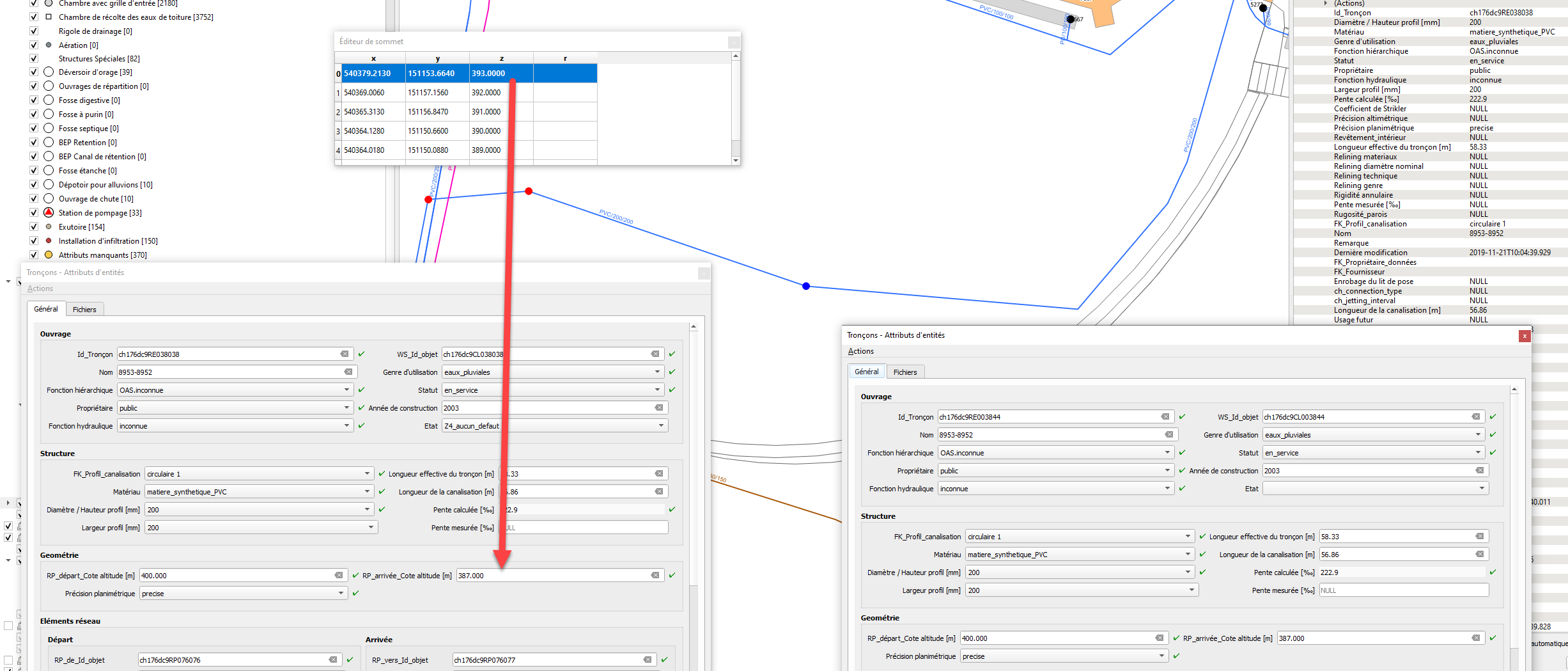
When cutting :
Better general behaviour : If we suppress values in the form, we should get geometric values as new level values instead of the NaN values suggested from the form empty value. Actual workaround : the user has to copy correct reach point from and to level from both entities from the node tool to the form.
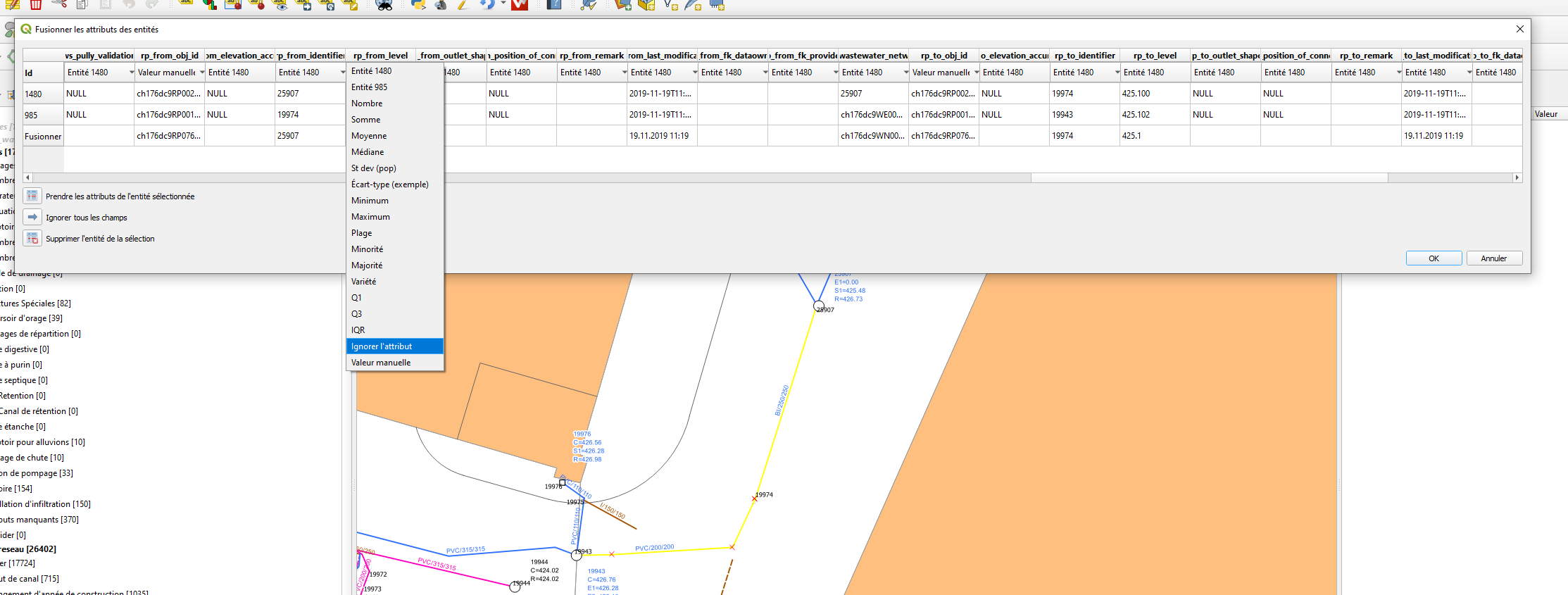
When merging : Actual workaround : the user has to input correct reach point from and to level from both entities. Better general behaviour :he should be able to ignore these values and get 3D geometric values which are rightly calculated from QGIS geometry.

Splitting features
I tried to reproduce the split behavior with QGIS master and 3.10.1 and observe very strange effects.
A simple line with two points with levels 100 and 200
When I split the line I get two lines with correct X and Y, however
- the original line has now goes from 100 to 75
- the new line goes from 100 to 200
I don't know where the value 75 comes from, but my assumption is, that there is something wrong with the interpolation.
I agree, that the levels of the new line should be different from a qgep point of view, but they make sense to me from an implementation point of view. QGIS copies the existing reach with all attributes (including from level and to level) and creates a new line with interpolated values which the triggers will overwrite because attributes take precedence over Z (according to the altitude level handling specification).
I'm unsure why in your tests there are nan values, I assume there is a default value configuration involved (Those in my project are: rp_from_level: if(z(start_point($geometry))='nan', NULL, z(start_point($geometry))) rp_to_level: if(z(end_point($geometry))='nan', NULL, z(end_point($geometry))) ).
The most promising way forward here I see is to implement a split tool specific for QGEP, that handles altitudes as expected (and also handles topology etc.)
Merging features
I merged two features with levels 100 - 200 and 200 - 300. The resulting geometry has levels 100 - 200.
What happens: it preserves all the original vertex values and one set of attributes ("first" feature) and overwrites the last level with the attribute from this "first" feature as per the specification of "attributes take precedence".
Again, the proposed solution is a plugin tool to merge feature. This can also take
Alternatives
The alternative to a plugin tool would be to have highly configurable default values in QGIS (being able to specifically configure the default value for merge and split operations).
Or completely redo the altitude trigger logic in the database and loosening the "attribute takes precedence" specification. Concrete implications for this need to be evaluated. I don't recommend this approach.

Further analysis on the interpolation code has been done, upstream issue opened https://github.com/qgis/QGIS/issues/33489
Since QGIS has been fixed (or at least will be fixed in 3.10.8).
Cutting reach is now quite explicite although a QGEP tool like proposed by @urskaufmann in https://github.com/QGEP/QGEP/issues/527.
A similar QGEP tool for merging reaches could be a good idea too like suggested by @m-kuhn here.
Otherwise we should document and set the user aware to be meticulous when choosing which reach point altitude is prefered when merging.
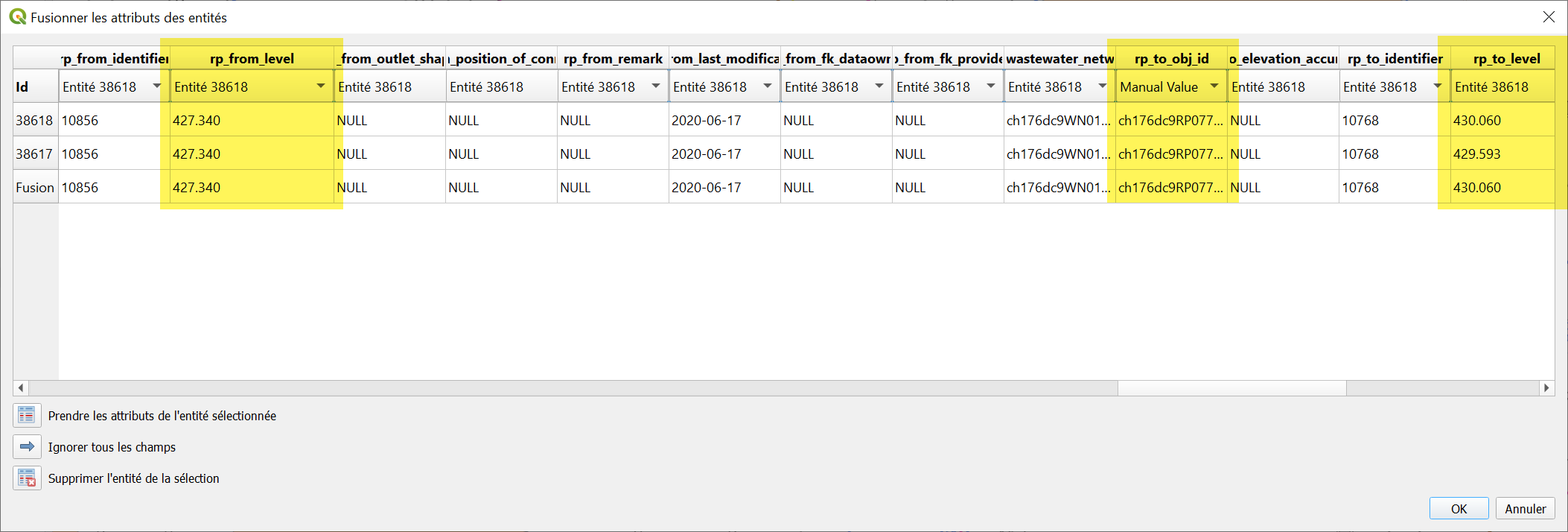
@ponceta @urskaufmann Did you write a short documentation already on how to split a reach with the current QGIS tools already? Here I did not find any details: https://qgep.github.io/docs/user-guide/editing/editing.html#split-a-reach-channel-into-different-reaches

@sjb I have a function that splits a reach by a point, may be it helps you:
`CREATE OR REPLACE FUNCTION public.qgep_od_fn_pipe_split( v_obj_id character varying, v_point character varying DEFAULT ''::character varying, v_srid integer DEFAULT 3844) RETURNS void LANGUAGE 'plpgsql' COST 100 VOLATILE PARALLEL UNSAFE AS $BODY$ DECLARE v_record record; DECLARE v_level numeric; DECLARE v_geom3d geometry; DECLARE v_geom geometry; --it's the new point DECLARE v_geom1 geometry;--first part of new geometry DECLARE v_geom2 geometry;--second part of new geometry DECLARE v_error_stack_geom text; DECLARE v_min numeric; DECLARE v_max numeric; DECLARE v_val numeric; BEGIN -- get the record SELECT * INTO v_record FROM qgep_od.vw_qgep_reach WHERE obj_id = v_obj_id; -- make the linestring as 3d linestring using rp_from_level, rp_to_level SELECT ST_SetPoint( ST_SetPoint( ST_CurveToLine(v_record.progression_geometry),0, ST_MakePoint( ST_X(ST_StartPoint(ST_CurveToLine(v_record.progression_geometry))), ST_Y(ST_StartPoint(ST_CurveToLine(v_record.progression_geometry))), COALESCE(v_record.rp_from_level,0) ) ), ST_NumPoints(ST_CurveToLine(v_record.progression_geometry))-1, ST_MakePoint( ST_X(ST_EndPoint(ST_CurveToLine(v_record.progression_geometry))), ST_Y(ST_EndPoint(ST_CurveToLine(v_record.progression_geometry))), COALESCE(v_record.rp_to_level,0) ) ) INTO v_geom3d;
IF v_point != '' THEN BEGIN SELECT ST_Snap( ST_PointFromText(v_point,v_srid), v_geom3d, ST_Distance(ST_PointFromText(v_point,v_srid), v_geom3d) ) INTO v_geom; SELECT ST_3DClosestPoint(v_geom3d,v_geom) INTO v_geom; RAISE NOTICE '%', ST_astext(v_geom); EXCEPTION WHEN OTHERS THEN GET STACKED DIAGNOSTICS v_error_stack_geom = PG_EXCEPTION_CONTEXT; SELECT ST_Centroid(ST_LineInterpolatePoints(v_geom3d,0.1)) INTO v_geom; SELECT ST_3DClosestPoint(v_geom3d,v_geom) INTO v_geom; RAISE NOTICE '%',v_error_stack_geom; END; ELSE SELECT ST_Centroid(ST_LineInterpolatePoints(v_geom3d,0.1)) INTO v_geom; SELECT ST_3DClosestPoint(v_geom3d,v_geom) INTO v_geom; END IF;
SELECT (ST_Dump( ST_Split( ST_Snap( v_geom3d, ST_3DClosestPoint(v_geom3d,v_geom), 0.00000001 ), ST_3DClosestPoint(v_geom3d,v_geom) ) )).geom INTO v_geom1 LIMIT 1;
SELECT (ST_Dump( ST_Split( ST_Snap( v_geom3d, ST_3DClosestPoint(v_geom3d,v_geom), 0.00000001 ), ST_3DClosestPoint(v_geom3d,v_geom) ) )).geom INTO v_geom2 LIMIT 1 OFFSET 1;
--RAISE NOTICE '%,%',ST_asText(v_geom1),ST_asText(v_geom2);
v_max = sin(ST_Azimuth(ST_EndPoint(v_geom3d),ST_StartPoint(v_geom3d)))(ST_Distance(ST_EndPoint(v_geom3d),ST_StartPoint(v_geom3d))); v_min = 0; v_val = sin(ST_Azimuth(ST_EndPoint(v_geom3d),v_geom))(ST_Distance(ST_EndPoint(v_geom3d),v_geom)); v_level = (v_val/v_max)*(COALESCE(v_record.rp_from_level,0)-COALESCE(v_record.rp_to_level,0))+ COALESCE(v_record.rp_to_level,0);
-- scale/reduce the reach to it''s new dimension UPDATE qgep_od.vw_qgep_reach SET progression_geometry=ST_ForceCurve(v_geom1),rp_to_level=v_level WHERE obj_id=v_obj_id;
-- add a new reach with the same characteristics INSERT INTO qgep_od.vw_qgep_reach( clear_height, material, ch_usage_current, ch_function_hierarchic, ws_status, ws_fk_owner, ch_function_hydraulic, width, coefficient_of_friction, elevation_determination, horizontal_positioning, inside_coating, length_effective, progression_geometry, reliner_material, reliner_nominal_size, relining_construction, relining_kind, ring_stiffness, slope_building_plan, wall_roughness, fk_pipe_profile, remark, last_modification, fk_dataowner, fk_provider, ch_bedding_encasement, ch_connection_type, ch_jetting_interval, ch_pipe_length, ch_usage_planned, ws_accessibility, ws_contract_section, ws_financing, ws_gross_costs, ws_inspection_interval, ws_location_name, ws_records, ws_remark, ws_renovation_necessity, ws_replacement_value, ws_rv_base_year, ws_rv_construction_type, ws_structure_condition, ws_subsidies, ws_year_of_construction, ws_year_of_replacement, ws_last_modification, ws_fk_operator, ws_fk_main_wastewater_node, rp_from_elevation_accuracy, rp_from_level, rp_from_outlet_shape, rp_from_position_of_connection, rp_from_remark, rp_from_last_modification, rp_from_fk_dataowner, rp_from_fk_provider, rp_to_elevation_accuracy, rp_to_level, rp_to_outlet_shape, rp_to_position_of_connection, rp_to_remark, rp_to_last_modification, rp_to_fk_dataowner, rp_to_fk_provider) SELECT clear_height, material, ch_usage_current, ch_function_hierarchic, ws_status, ws_fk_owner, ch_function_hydraulic, width, coefficient_of_friction, elevation_determination, horizontal_positioning, inside_coating, length_effective, ST_ForceCurve(v_geom2), reliner_material, reliner_nominal_size, relining_construction, relining_kind, ring_stiffness, slope_building_plan, wall_roughness, fk_pipe_profile, remark||' ['||v_record.rp_from_identifier||'-'||v_record.rp_to_identifier||']', last_modification, fk_dataowner, fk_provider, ch_bedding_encasement, ch_connection_type, ch_jetting_interval, ch_pipe_length, ch_usage_planned, ws_accessibility, ws_contract_section, ws_financing, ws_gross_costs, ws_inspection_interval, ws_location_name, ws_records, ws_remark||' ['||v_record.rp_from_identifier||'-'||v_record.rp_to_identifier||']', ws_renovation_necessity, ws_replacement_value, ws_rv_base_year, ws_rv_construction_type, ws_structure_condition, ws_subsidies, ws_year_of_construction, ws_year_of_replacement, ws_last_modification, ws_fk_operator, ws_fk_main_wastewater_node, rp_from_elevation_accuracy, v_level, rp_from_outlet_shape, rp_from_position_of_connection, rp_from_remark, rp_from_last_modification, rp_from_fk_dataowner, rp_from_fk_provider, rp_to_elevation_accuracy, v_record.rp_to_level, rp_to_outlet_shape, rp_to_position_of_connection, rp_to_remark, rp_to_last_modification, rp_to_fk_dataowner, rp_to_fk_provider FROM qgep_od.vw_qgep_reach WHERE obj_id=v_obj_id;
PERFORM qgep_network.refresh_network_simple();
END; $BODY$;`

@bogdanvaduva Thanks. Does it also add a wastewater_node inbetween the two new reaches?
@sjib it does, because the main reach is reduce to a new calculated size and a new reach is inserted.
@sjb I forgot to add one thing, the function above splits the reach and add wastewater_node, but it needs user supervision to check start and end wastewater_nodes to see what you get. I did not spent that much time into it because for me it was enough. Take it as an example.
@bogdanvaduva Any hint why I get this Error: ERROR: FEHLER: Syntaxfehler bei »(« LINE 68: ...th(ST_EndPoint(v_geom3d),ST_StartPoint(v_geom3d)))(ST_Distan... ^
Great - the function works now:
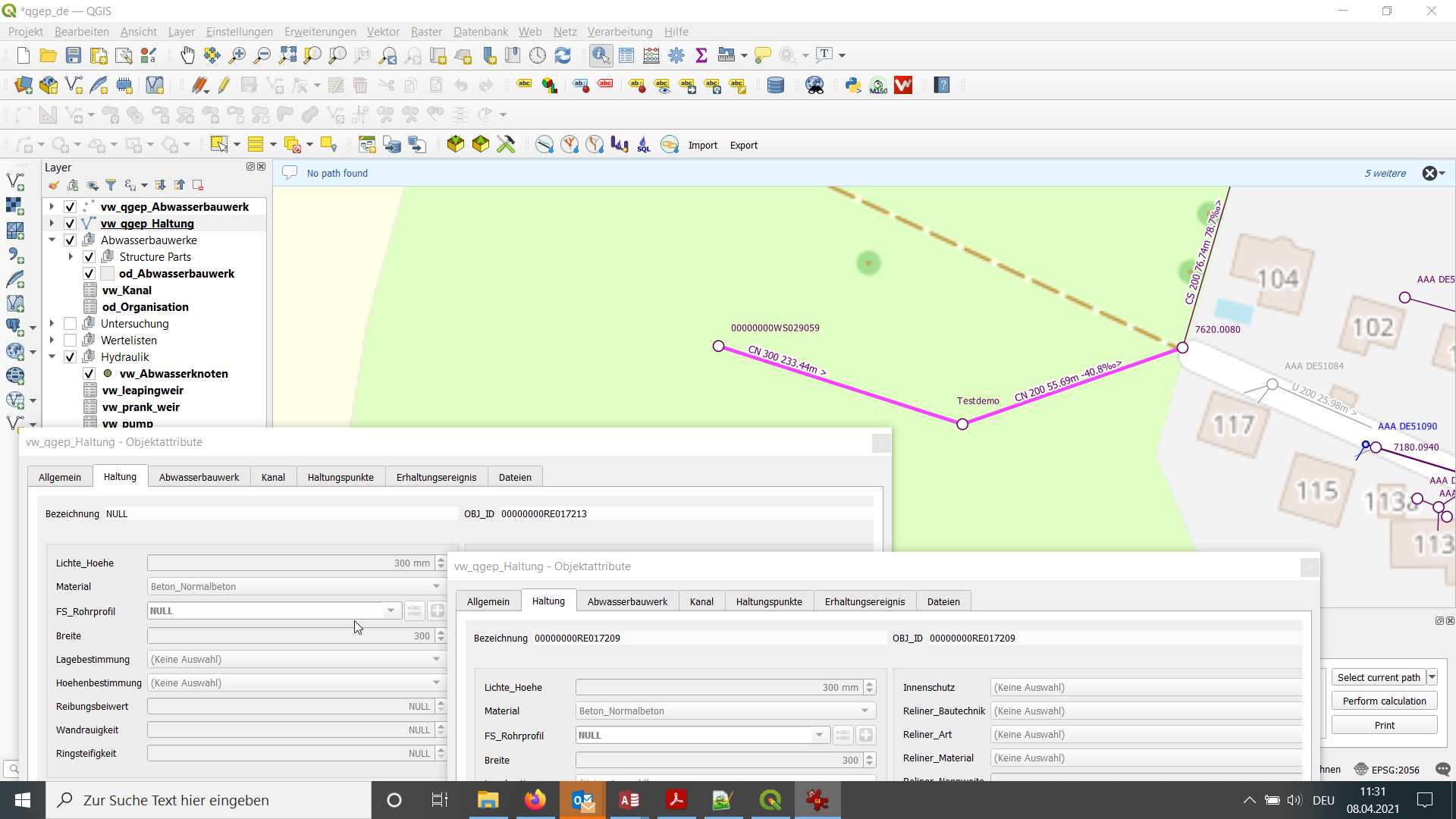
What I do not know is where it splits the reach exactly - in the middle?
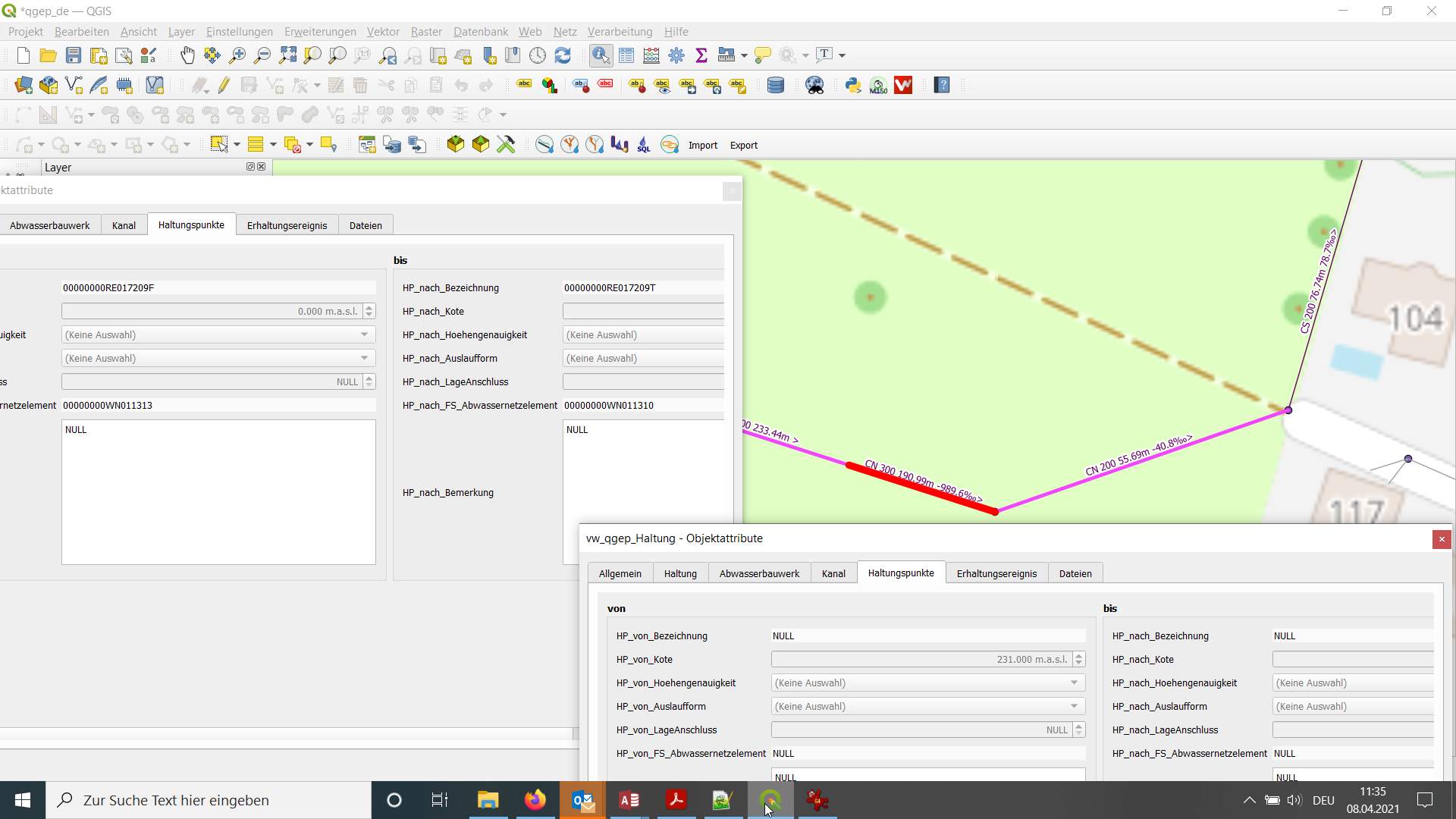 And it looks like the foreignkeys of the new reach from the reach_point.fk_wastewater_network_element are empty.
I also cannot find my new wastewater node "neuerAK" that I thought I created with the command: SELECT qgep_od.fn_pipe_split('00000000RE017209', 'neuerAK');
@sjb fn_pipe_split takes 2 arguments reach id and the point where you want to split the reach. if this point is not specified then the reach is split by centroid. Yes, fk_wastewater_network_element are empty for the reach but the actual nodes are created, that why i said it needs user supervision. In my case I manually update fk_wastewater_network_element values with what I find from the map. To make it automatically it needs to look for the nodes geometries and update reach_point (s)
The second argument (point) should look like POINT(x y) ::text
@bogdanvaduva So if I understand you right v_point character varying DEFAULT ''::character varying would need to be the identifier of an existing wastewater_node to be the locations, where the reach is split? I would therefore first have to create it to be included in the operation of the code. Would the code then make the foreignkeys to that wastewater_node automatically?
Or with your additionial comment I would set the coordinates of the location where I want to split the reach as x,y coordinate as the second argument.
@bogdanvaduva So the call of the function should look like this?
SELECT qgep_od.fn_pipe_split('00000000RE017209', '2748857.76,1264865.75');
Almost right :) SELECT qgep_od.fn_pipe_split('00000000RE017209', 'point (2748857.76,1264865.)’;
V_point it s a point astext. Uou don,t have to create wastewater nodes the insert will do, but the initial and the new reach will have it wastewater nodes mixed up. Here i manually update those nodes with what i see on the map based on nodes geometry.
@bogdanvaduva Great - so we could further develop the code to have those things set automatically correct also. Thanks for the work already done.
Yes, welcome
I’ll try to upgrade the function in the next little while.
@sjib I've updated the function with wastewater_node updates and I've added a new parameter that allows you to add an 'unknown' wastewater_structure in the same point where the reach is split. split.sql.txt
@bogdanvaduva We have formulated in this issue #527 what options a splitting tool for QGEP would have to provide. I have also tried out some things with your code yesterday. Here my version: create_qgep_od.fn_pipe_split_paa.sql.txt
Maybe it would help to set an online meeting to discuss on how to continue on these issues. Would you have time for that in the next days?
@sjib I've seen that you addressed some things that I haven't consider before. Yes we can talk about it next week (monday for example)., Let me know about meeting details.
Some things to consider too:
- How does this deal with objects that are not yet in the database (in the edit session in qgis)? I think @ponceta and maybe others (?) don't use transaction mode.
- How do we deal with default values configured in the QGIS vector layers' attribute widgets
- How would this be triggered from qgis (user interface wise)
- How does this integrate with other qgis specific behavior / configuration like default values for Z etc.
@bogdanvaduva @sjib Thanks for going further on this subject! I follow you closely and it seems very promising.
- To address @m-kuhn comment on object that are not yet in the database, saving (database commit) reach before splitting it can be an option when using qgep tool. (users save features more often when not in transaction mode)
- I agree with @m-kuhn that other 3 points need to be addressed carefully (we use most of the time QGIS native features as much as we can (at least in Pully))
@ponceta @m-kuhn Would it be wise to include you too (or one of you) in a online meeting? Would Monday fit you? If yes do you have an email contact of bogdan and we can arrange the meeting time by e-mail?
I think it would be good to discuss this, yes.
Since I won't be available on Monday and for general consideration prior to the meeting, I'll leave a couple of further thoughts here:
- the inverse operation of merging reaches has an even bigger need for plugin side code (to define which attributes to preserve) and having this functionality partially live on client and on server is not necessarily clean and easy to maintain. Having this done in a different way than splitting also not.
- the pro side of sql is that it can be used from various frontends (e.g. web interfaces, that's I think where @bogdanvaduva is coming from) which is nice in terms of reusability.
- we already have code on the database (e.g. recreating the topology/network tables, or various triggers for derived / cached data) but I think there is a difference to this case here, splitting reaches is an interactive operation that needs a user interface part, is closely tied to interactive geometry and attribute editing and has parameters to pass. This is something we have avoided so far and would be a rather large change in code strategy
- maintenance of the code we need to maintain a python part and an sql part
- shipping updates: if we change this we need to ship new datamodel and new plugin code
Another question:
- If we merge two objects should the new object get a new obj_id or keept the obj_id of one of the old ones? Do we consider this as an process where an old object dies (and would maybe also need to keep it in another status)
- The same question if we split a reach - do we keep the obj_id for one reach or give both new reaches an new obj_id?