

 Pullusb
I got OSX version working
I saw a tutorial on Youtube from iMeshh, he described your addon and looked nice. Though i noticed, nowhere is it described its Windows only. So i got to tinker with the code a bit. I now have a working OSX version. Though i think i can have much better checks for system etc.
I also noticed that your display operator "anim.enable_draw" does not check for the local ffmpeg version or the other path. It only checks if the shutil works. For now ive turned that off. I think its better to make a global var or const and then check whats is being returned.
PS you can also get builds from this site, https://evermeet.cx/ffmpeg/
Another thing which would be nice is when i adjust the color in the prefs or the details, it should redraw. Now i need to press ON a second time. Ill check if can add update attributes to those props, see if that works.
One thing, guess its better to add a short delay when updating the colors. Since it will run all the time, its a bit taxing, it does work however.
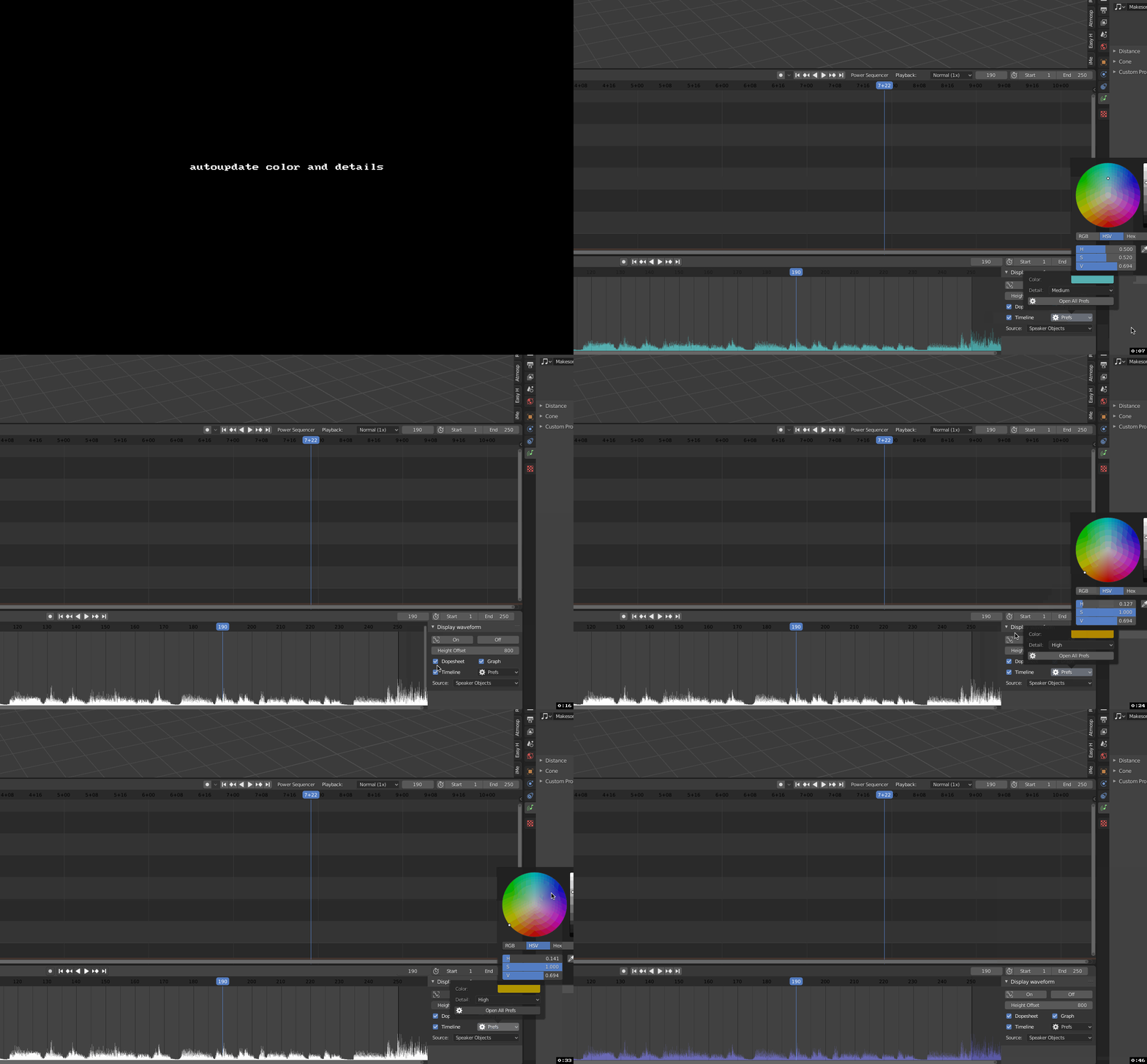
I did notice, sometimes it returns a white color. Seems it cant do very saturated colors, have you see that? In the gif you also see it, when it turns yellow, it returns white

Hi! It's not windows only. At the studio where I work, we are all on Linux and it run smoothly (everyone have ffmpeg in system path).
The problem about the Mac version is simply that I don't have any Apple computer at my disposal to run tests and check where to install stuff, even accessible friends don't have any ahah. I hoped that once Mac users would have set ffmpeg in their PATH, it would behave nicely... I'll see if I can make better cross-platform checks, but if I can't get my hand on a Mac it'll be hard to do real world tests.
About the color turning white. I am aware, it's kind of a known limitation. (It also happens if the values are too dark).
About an update on color properties, I understand very well that permanent update are nice, I would have done it if it was not CPU heavy to rebuild the waveform. In current state I prefer to let this a manual refresh. if there are really long sound it can be really cumbersome for the user, even with delayed changes.
That said, when I get some time, I want to see if I can manage a better approach for the color that would solve both the refresh and the "turn white" issues. But updating this addon is very low priority at the moment.
Thank you for the feedback !

I noticed indeed its also does OSX, noticed that later. Im on a old 10.11.6 system and i get an SSL error. that was know issue. Manual install works just fine.
I also noticed the behavior what you described about the color update attribute. It works, but it slow. I would be better to show a refres button. Basically its the same operator but with a refresh icon. One option could be, add a global enabled function, if its ON, than show a refresh button. That would solve that issue.
EDIT refresh state on the ON button works nicer. Now ill add enabled state to both ON and OFF. This also helps user a lot
@schroef Another Mac user told me he has much pain getting it to work with ffmpeg. but I still don't have any Apple device to test. Would you care to explain what you did to make it work ? Or just plainly send the change you added in code if it's faster for you.
I hope it's not always that difficult for every Mac users !
Sur man, tomorrow at work I'll make. Pull request for my version. It does have some changes, which i mentioned earlier you can neglect those if you want. I find my method a bit nicer
I made a branch with my adjustments. Note! I have not merged your new edits yet. I noticed your new version uses a hardcoded size the make the waveform bigger. I need a number of -500 to get it actually visible in one of the areas.
My branch is here; https://github.com/schroef/sound_waveform_display/tree/OSX-fix-and-Refresh-button
Still would nice if you the waveform would adjust when say you use selected or switch a source. Now nothing changes, unless user hits ON again. I think we could change that behavior, if we use the option of "SHOW" better. Now all the waveforms get the same name. But if we use that menu, we can give it a name depending on what is selected. Therefor, when you have say multiple sources and you have already generated them. You dont need to generate them again, thats a win win situation
Thanks for the share and the suggestions.
Actually, I was mainly referring to the download problem... 😅 because the Mac user told me auto-download did not work (might be the SSL issue you mentioned before I supposed). But in the end it's fine, I don't want to have a further complex code for downloads. I'll just add better download links for manual installation.
Looking at your code allowed to fix some things (like when I forgot to check for Osx/Linux bins in the 'Check ffmpeg' ops !). I'm ok with how things are for the rest (ex: I prefer not to have waveform auto-update, etc.)
The suggestion of keeping multiple images to avoid a rebuild on switch-back is interesting, but at the moment I have lots of other prioritized projects, so I don't know when I'll be making any update on this one.
About the last changes, it was to answer a feature requested by Luciano Muñoz (relative scaling) : #3
The value behave different, but in pref you can revert to the old "fixed" mode (in the old mode, the height tweak is the same, but since it was always high values, I added a x10, instead of 500 it's just 50 now)
Fun fact, today Luciano told me he can't use ffmpeg on Mac M1... I won't help since I don't even know if it's plain impossible or just a difficult installation. But seems the 🍎 keeps getting in the way ahah.
About those DL/install shenanigans:
To avoid all this, it would be super nice to have direct access to blender internal ffmpeg, it's frustrating that everything is there but not usable.
I asked exactly that to blender devs, but I don't see this happening anytime soon, except if other of addon devs suddenly ask for it, like I did ;) . As Sybren told me, all developers have a lot on their plate and this would be very low priority.
FYI, here is a raw copy of my post on blender-coder chat (last November, message permalink does not seem to work...):
Hi there, Following discussions on #animation-module about addons using ffmpeg ( @dr.sybren ), I had a little Q&A with @LazyDodo about the possibles way to access Blender's ffmpeg from scripts. I think it'll be awesome to have the ffmpeg binary shipped along blender! On that note, LazyDodo said: > - shipping the ffmpeg binary isn't possible without some changes, afaik ffmpeg statically links on lin+mac into the blender binary, so it would link all of that again into the ffmpeg binary > that would double ffmpeg's footprint on disk, which isn't great
According to him, there are only a few other options on the table and None of them are trivial: "> - Expose ffmpeg though bpy, but an api will have to be designed and implemented, that be a fair bit of work > - ship some form of ffmpeg python bindings, there's no official ones, and there's quite a few of them out there... so that be a fun choice 🙂depending on their needs we may need to move ffmpeg dyamic and maybe ship the ffmpeg front end..."
A potential 4th option, would it be possible to add a command line argument to blender CLI ? So we would be able to use blender's ffmpeg by calling i.e:
blender --ffmpeg command. This would allow usage with a simple subprocess.run on Blender's binary.
My version does not have the auto update. I tried but disabled it because it was indeed to taxing on the CPU. I only show the ON button text changing to refresh if one of the prrf settings are changed. This gives a user better feedback.
I'm already testing the waveform output for different sources. It works already, yet i need to work on some small issues.
I thought you meant the code would not work on osx, because for me it didn't work. That's why I added that small osx check.
For the download, yeah keep it simple. Just provide them a link to the ffmpeg library. More expanded is nice, but also brings lots of things which can go wrong.
About the relative scaling, is that for when the scene time is short. I noticed the scale also seems to be connected to the scene time. The short a scene, the smaller the waveform shows