

 ProxymanApp
Feature suggestion - Ignore domains list
I'd like to see an ignore list capability, allowing me to mark domains that don't log in Proxyman.
Note that this is different behavior than the current Allow and Block lists. Allow requires me to declare all of the domains I want to see upfront. In many cases, this is okay, but occasionally new domains come up that I have to remember to add. Block list drops requests, which is not something I want to do. I still want these domains (such as apple.com and icloud.com) to send and receive properly, I just don't want to see the traffic. It should also support wildcards, e.g. *.apple.com.
I envision this as another Tools window, with a new entry in the Source List context menu such as Tools > Ignore List...
Thanks!

@crankygeek Thanks for the feature request. I'm planning to support it after the Scripting #557 is done in this week. Sorry for being late, since Scripting is a huge feature 😕
To achieve the same, you can define it in the by-pass list from Network -> Wifi -> Proxies tab -> By-pass list. Those domains won't go through Proxyman 👍
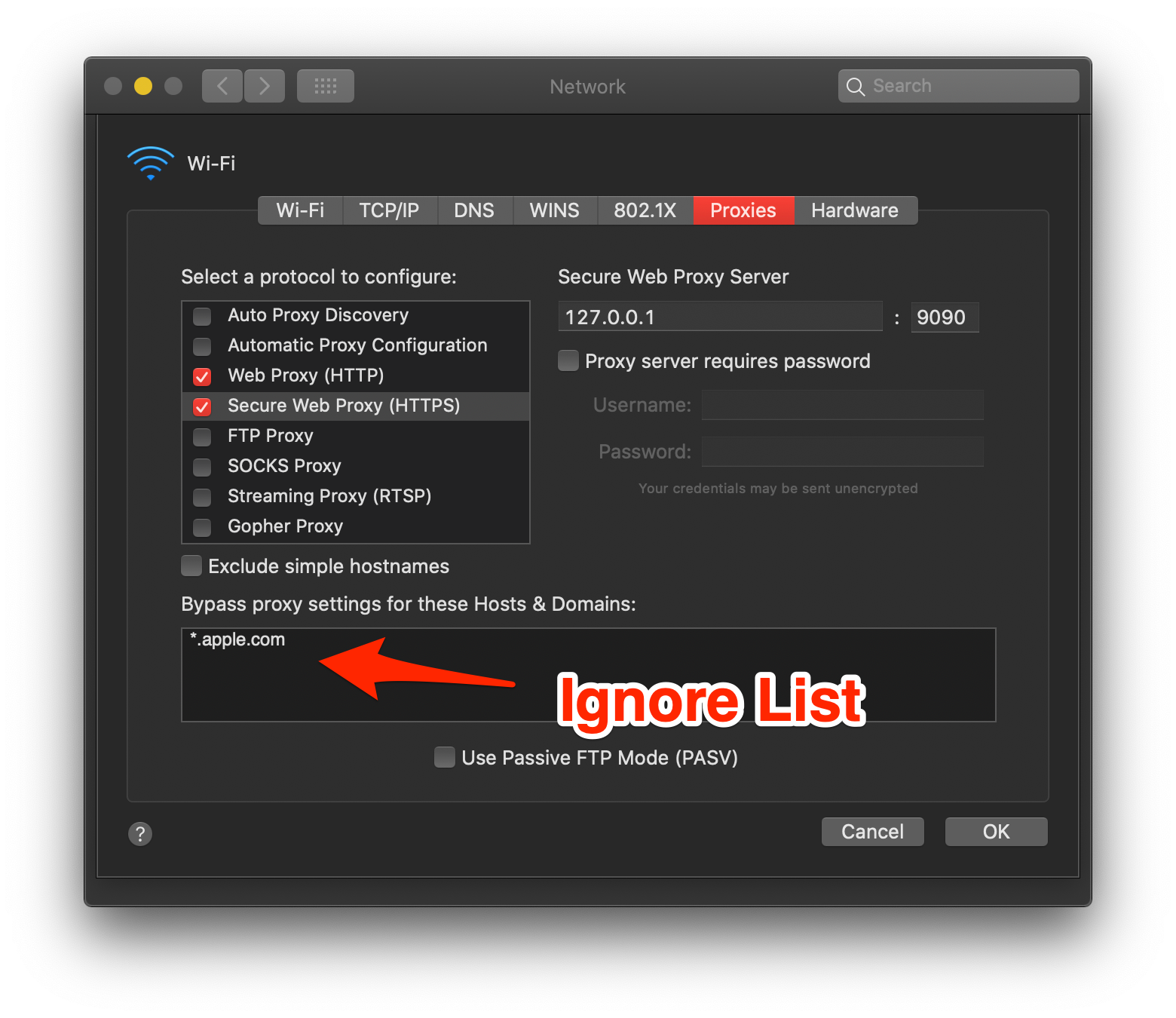

I believe we talked about that system setting before and it doesn’t apply to requests from remote devices, right?
And no worry about the time. It’s a pretty niche request. I’m sure the ROI on scripting support is much higher.
Thanks!
Jack
On Aug 24, 2020, at 6:23 PM, Nghia Tran [email protected] wrote:
@crankygeekhttps://github.com/crankygeek Thanks for the feature request. I'm planning to support it after the Scripting #557https://github.com/ProxymanApp/Proxyman/issues/557 is done in this week. Sorry for being late, since Scripting is a huge feature 😕
To achieve the same, you can define it in the by-pass list from Network -> Wifi -> Proxies tab -> By-pass list. Those domains won't go through Proxyman 👍
[Screen_Shot_2020-08-25_at_08_20_55]https://user-images.githubusercontent.com/5878421/91112007-22c01b00-e6ac-11ea-9abf-860a3d087d73.png
— You are receiving this because you were mentioned. Reply to this email directly, view it on GitHubhttps://github.com/ProxymanApp/Proxyman/issues/594#issuecomment-679447764, or unsubscribehttps://github.com/notifications/unsubscribe-auth/AAMP7BSLJKNRCGPCC427JKDSCMHB7ANCNFSM4QJ5D7JA.
You're correct. I forgot that It doesn't apply to request from Remote Device 😄
I will push this feature forward when the scripting is done. Thanks for staying tuned with me 👍
@NghiaTranUIT
@crankygeek Thanks for the feature request. I'm planning to support it after the Scripting #557 is done in this week. Sorry for being late, since Scripting is a huge feature 😕
To achieve the same, you can define it in the by-pass list from Network -> Wifi -> Proxies tab -> By-pass list. Those domains won't go through Proxyman 👍
Since I was using iCloud to back up the Desktop and Document folders, I found that iCloud uploads on the Mac blocked as soon as I opened Proxyman, and iCloud would not resume uploads even after I quit Proxyman.
So I guessed that Proxyman was proxying the iCloud-related requests, causing these to fail.
According to the your reply, I filled in Ignore proxies for these hosts and domains as follows: *.apple.com,*.icloud.com,*.apple-cloudkit.com,*.cdn-apple.com,*.icloud.com.cn,* .gala.convection.cn,*.icloud-content.com,*.aliyuncs.com
After restarting the Mac and opening Proxyman, iCloud upload will still block.
I'm attaching the setup page after filling in the domain name, please advise me (the comma in the box was originally an English comma, but macOS automatically converted it after filling in OK)


I switched to using the Block List's "Hide, but not Block" action. Example attached. This was added awhile after my initial request. It works really well.
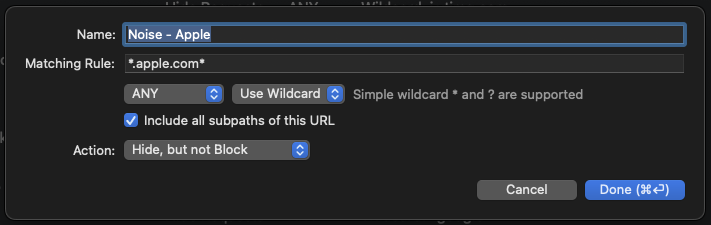
@crankygeek Yeah, same for me. The Hide List is one of my favorite Proxyman features now. I love adding unimportant or non-proxyable domains to it that would just end up dirtying my proxy logs and making them harder to parse. It really speeds up all of my workflows.
@NghiaTranUIT I still think the Hide List should be separate from the Block List feature though. I have 100s of domains in my hide list and zero in my block lists. I don't really see why you would want to regularly block certain domains. Maybe in some scenarios for sure but I just think the Hide List is way more valuable and should be in it's own Proxyman tool.
@rxg9527 if adding those domains to the macOS "Bypass proxy" list still isn't solving your issue you may want to double check which domains you have included in your Proxyman > Tools > SSL Proxying List. Most Apple and iCloud related domains have SSL cert pinning/transparency enabled and aren't proxyable. Some are proxyable but aren't really that valuable for most folks. I'd recommend adding that same list of apple/icloud domains to your Proxyman SSL Exclude List and then make sure there aren't any other related apple/icloud domains still in your SSL Include List. That's usually what has broken various Apple/iCloud features for me in the past.
The Hide list is a great feature but it will only hide the various domains in your proxy log. They will still try to be decrypted if the domains are included in the SSL Include List!

@rxg9527 If you don't mind, please remove all Apple iCloud domains in the Tools Menu -> SSL Proxying List.
Maybe you've added some iCloud domains or used wildcard matching (*), so they are decrypted by Proxyman. Thus, the connection might be failed since it supports SSL Pinning.
Thanks for your suggestion @sleeve. The reason why I don't want to introduce the Hide List Tool in the first place because there are currently a lot of debugging tools 😆
I will collect more requests and evaluate if it's needed.
@sleeve @NghiaTranUIT Thanks for your answers, and sorry for taking so long to give feedback.
I disabled all the tools, including the "SSL Proxying List". The problem still exists.
Then I tried the following steps to find out the difference in traffic handling between Proxyman and Charles.
- With all tools disabled, only
"proxy overridden"is turned on. - Put the test file into iCloud upload directory, check all the requests recorded in Proxyman, and find 2 domains
"cu-cn-north00002.gala.convection.cn","baidu-cn-north-00001.bj north-00001.bj-a.bcebos.com"traffic is rather strange, after searching, found that these are the two upload domain names used byiCloud in mainland China - In Proxyman's records, the scheme of some of the requests in these two domains is
HTTP, the status code is999, the method isPUT, and the duration is 10.01s or 10.02s for both (guessing that it might be a timeout) - Close Proxyman, use Charles, put the test file into the iCloud upload directory, and find that one of the sites
"cu-cn-north00002.gala.convection.cn"will show up on Charles RemoteAddress 10.249.7.65, the status code is403, and the duration is less than 1s.
In the case of Proxyman, the file cannot be uploaded to iCloud in mainland China, but when using Charles, the file can be uploaded.
Do these steps give some further clues? If you need more detailed info, I can email the session file to you.
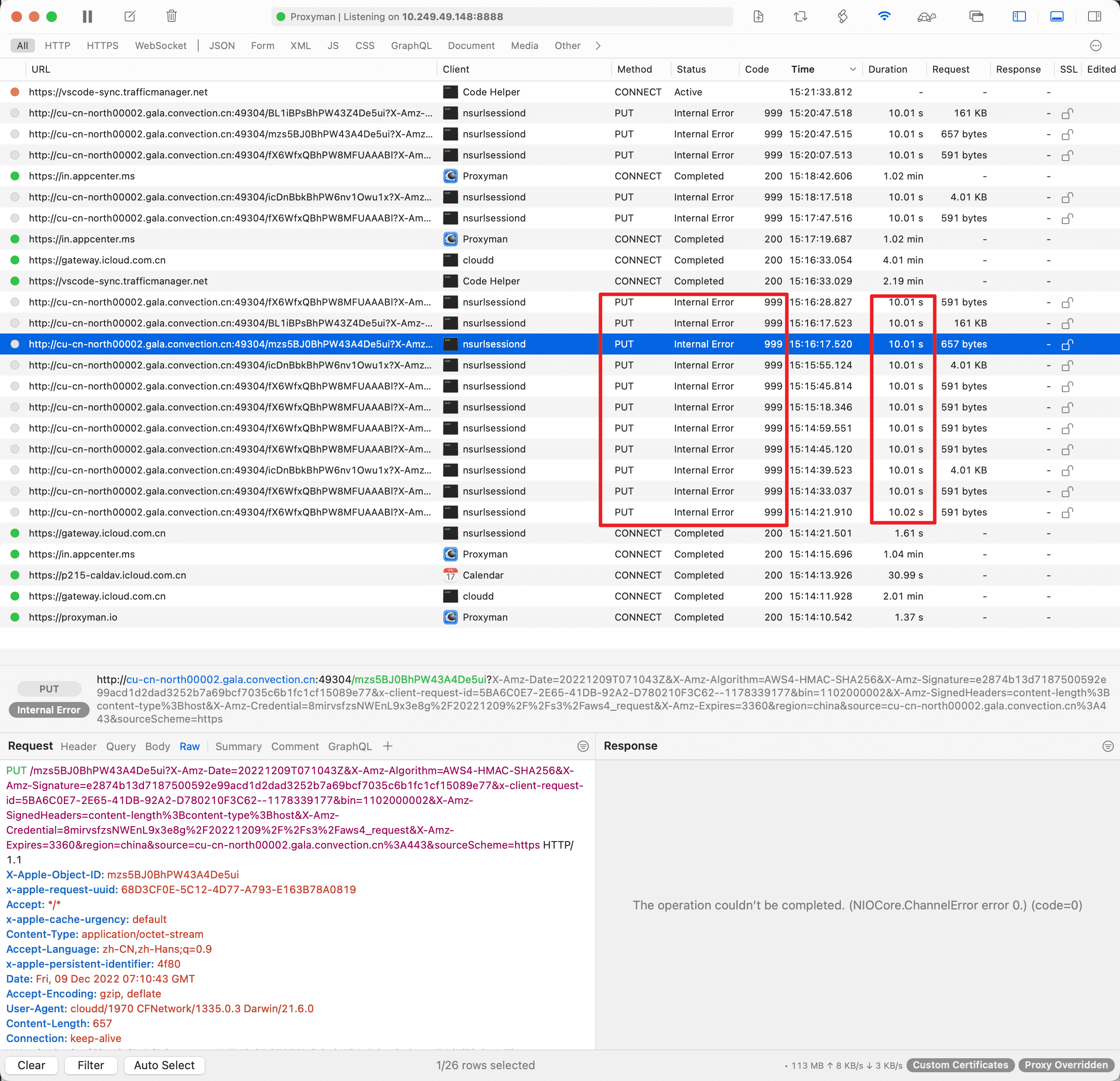

It seems Proxyman could not connect to the server and being timeout (10 seconds).
If it's from your macOS, please update the DNS setting in System Preference -> Network -> Wifi -> Advanced -> DNS
If it's from the iOS devices -> Setting app -> Wifi -> DNS
Provide a better DNS can fix it @rxg9527
@NghiaTranUIT Thx for your patient and quick answers. I feel that what you say is right, I will give it a try.

@tcortega it's already supported. You can find it the Tools Menu -> Proxy Settings -> Bypass Proxy
You can define a list of domains that won't go through Proxyman
@tcortega it's already supported. You can find it the Tools Menu -> Proxy Settings -> Bypass Proxy
You can define a list of domains that won't go through Proxyman
Ah, that's nice, had no idea. One thing I liked about fiddler that no other program had is that I could simply right click a request and add it or it's pattern to this bypass list automatically, so instead of having to open the menu like this, I'd right click the request, like this:
s2a.eu.criteo.net -> *.eu.criteo.net or *.criteo.net
This feature isn't used by many users, so I don't want to add this to the Right Menu Context.
We only add it if it's used more frequently