

 ProxymanApp
[Question] How to toggle programmatically?
Description
I frequently toggle the Proxyman proxy from the Menu manually by unchecking macOS Proxy Overridden item from this menu:
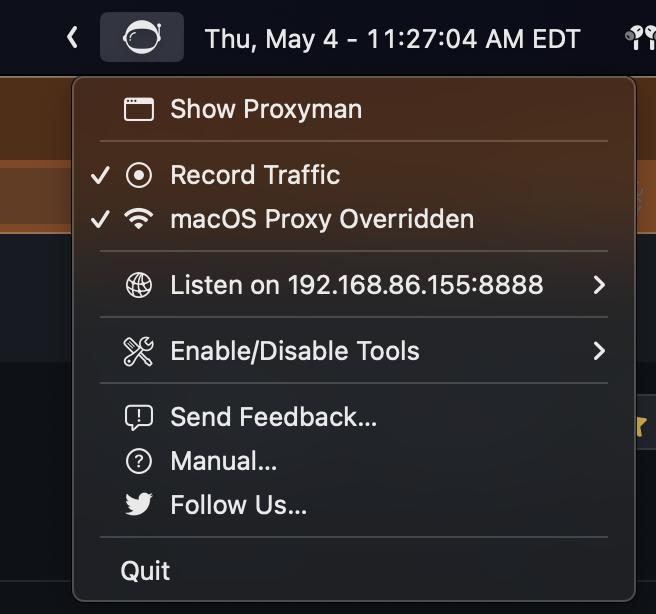
I can toggle the proxy On/Off using networksetup by executing the following:
networksetup -setsecurewebproxystate Wi-Fi on      # turn on the HTTPS proxy
networksetup -setwebproxystate Wi-Fi on            # turn on the HTTP proxy
networksetup -setsocksfirewallproxystate Wi-Fi on  # turn on the SOCKS proxy
It does the job of actually toggling the proxy settings, but the Proxyman app and the Menubar icon do not change according to the updated state.
Is there a better way of talking to Proxyman outside of the UI? Either from the command line or from AppleScript? Ideally, I would use a Siri Shortcut or RayCast extension to talk to Proxyman and assign a keyboard shortcut for that action.
Thanks a bunch! 🙏

Hey, you can manually override/rever the system HTTP Proxy by using networksetup command line. However, unfortunately, Proxyman app doesn't listen to the change of the system.
Currently, Proxyman supports a CLI with basic actions: Export/Import or Activate the license key.
I guess I can write a quick code to help you enable/disable the System Proxy.
For example:
$ /Applications/Proxyman.app/Contents/MacOS/proxyman-cli proxy on
$ /Applications/Proxyman.app/Contents/MacOS/proxyman-cli proxy off
If the app is opening, it can listen to the change from Proxyman's CLI and update the UI.
You can run this command line by Terminal or AppScript as you mention.
Let me know if it works for you, then I can do it 👍

@NghiaTranUIT I was wondering if you were thinking about exposing the current state of the proxy as the networksetup does. If not, nbd, I can use networksetup to query the status.
eg:
$ /Applications/Proxyman.app/Contents/MacOS/proxyman-cli proxy status
off
$ /Applications/Proxyman.app/Contents/MacOS/proxyman-cli proxy on
$ /Applications/Proxyman.app/Contents/MacOS/proxyman-cli proxy status
on
output from networksetup:
$ networksetup -getwebproxy Wi-Fi
Enabled: Yes
Server: 127.0.0.1
Port: 8888
Authenticated Proxy Enabled: 0

$ networksetup -getsecurewebproxy Wi-Fi
Enabled: Yes
Server: 127.0.0.1
Port: 8888
Authenticated Proxy Enabled: 0
@raxityo let's try this Beta build: https://download.proxyman.io/beta/Proxyman_4.7.1_Support_Proxy_CLI.dmg
You can enable/disable the macOS Proxy Overridden:
/Applications/Proxyman.app/Contents/MacOS/proxyman-cli proxy on
/Applications/Proxyman.app/Contents/MacOS/proxyman-cli proxy off
It's hard to support the status because there is no easy way for two-way communication (between the CLI and the main app)
Thanks @NghiaTranUIT! works great!
In case anyone finds it useful, I use this simple script to toggle:
#!/bin/bash

if [[ $(networksetup -getsecurewebproxy Wi-Fi | grep Yes) ]]; then
    /Applications/Proxyman.app/Contents/MacOS/proxyman-cli proxy off
else
    /Applications/Proxyman.app/Contents/MacOS/proxyman-cli proxy on
fi
It can be used in the Shortcuts app, Raycast Extension, or any other productivity tools.

Sorry @JasonBoy and @raxityo, this update doesn't include to the latest build. It's my fault 😢
Please use this Beta build, which is updated from the latest build 4.8.0: https://download.proxyman.io/beta/Proxyman_4.8.0_Fix_missing_proxyman-cli.dmg
@NghiaTranUIT Just curious, any plan in the future that we can toggle/create rules for Map Remote、Map local and other tools from the cli ?so that we can toggle them quickly from Alfred or Raycast 😆
Good idea, but how can you toggle the rule? Like this one 🤔
/Applications/Proxyman.app/Contents/MacOS/proxyman-cli tool map_local toggle <rule_name>
Good idea, but how can you toggle the rule? Like this one 🤔
/Applications/Proxyman.app/Contents/MacOS/proxyman-cli tool map_local toggle <rule_name>
Yeah, something like this 👍 , maybe also plus on or off rule
Would really love to have the ability to toggle specific rules with the CLI. I have to toggle specific map locals/ map remotes as part of my workflow all the time and it would be super nice to be able to just do it via raycast or something like it. 👍

كيف يعمل؟
يقوم Proxyman لنظام التشغيل iOS بإنشاء VPN محلي على أجهزتك، ثم يقوم بتبريك جميع حركة المرور من أجهزة iOS الخاصة بك إلى خادم Man-In-The-Middle المحلي.
ما هي البيانات التي يستخدمها Proxyman؟
بيانات طلب واستجابة HTTP/HTTPS
يلتقط Proxyman بيانات HTTP/HTTPS وفك تشفيرها (بما في ذلك الرؤوس والجسم وعنوان URL والمضيف وما إلى ذلك) لعرضها في نص عادي
- اسم الجهاز
لإنشاء شهادة جذر موقعة ذاتيا. لا يستخدم Proxyman الشهادات التي تم إنشاؤها مسبقا أو المشتركة.
يسجل Proxyman بيانات الطلب/الاستجابة ويخزنها في قاعدة بيانات SQLite المحلية في أجهزة iOS الخاصة بك.
لا يرسل Proxyman بياناتك إلى أي خوادم بعيدة أو أطراف ثالثة.
تظل بياناتك دائما خاصة بك.
- تفعيل Premium Proxyman لنظام التشغيل iOS
إذا كان لديك ترخيص macOS صالح، فيمكنك إلغاء قفل Premium Proxyman لنظام التشغيل iOS. يمكن استرداد مقعد واحد لجهازي iOS.
للتنشيط، يرجى تنزيل Proxyman لنظام التشغيل iOS (AppStore) -> فتح المزيد من علامات التبويب (في شريط علامات التبويب السفلي الأيمن) -> FaceID ورمز المرور -> فتح -> أدخل مفتاح الترخيص الخاص بك.
