

 ProxymanApp
[Question] Map REST API when resource could be a path
Proxyman version?
3.7.0
macOS Version?
12.04
Expected behavior
I would like to do the following map using Map Local (Directory).
- mydomain.com/path/to/resource/resources response: any json, could be a list of resources
- mydomain.com/path/to/resource/resources/item response: any json
Even the mac doesn't allow a folder and file with the same name I tried to create a file as item?param=1 but it didn't work. How can I achieve this behavior?

Proxyman has supported the resource path without the extension. Ref: https://github.com/ProxymanApp/Proxyman/issues/842
Here is a sample config:
- Create a Map Local Rule, URL = "https://mydomain.com"
- Map Directory to
~/Desktop/local_folder
Map Local Resolve path:
https://mydomain.com/path/to/resource/resources-> File:~/Desktop/local_folder/path/to/resource/resources=> The lastresourcepath is a File without extension.https://mydomain.com/path/to/resource/item-> File:~/Desktop/local_folder/path/to/resource/item=>itemis a File without extension.
If it doesn't work, it'd be great if you can share your map local configuration 👍

In your example, you setup two different paths, that works as expected ~/Desktop/local_folder/path/to/resource/resources ~/Desktop/local_folder/path/to/resource/item
But my case is a little bit different: ~/Desktop/local_folder/path/to/resource/resources ~/Desktop/local_folder/path/to/resource/resources/item
But I could solve it using a script:
async function onResponse(context, url, request, response) {
  console.log(response);
  if (request.path == "/path/to/resource/resources") {
    response.bodyFilePath = "~/Desktop/local_folder/path/to/resource/resources.json"
  }

  return response;
}
Which leads me to another question I would like to share this script with my coworkers. But to setup the file path I need to setup relative path beginning in my user folder (~/). So every time my coworkes would like to use the script, they need change the filePath. It could be solved using environment variable. What is the roadmap to add Environment Variable to proxyman? With environment variable I can improve the script like that:
async function onResponse(context, url, request, response) {
  console.log(response);
  if (request.path == "/path/to/resource/resources") {
    response.bodyFilePath = $USER_PATH+"/path/to/resource/resources.json"
  }

  return response;
}
Nice, it can be easily solved by using Scripting.
$USER_PATH is not supported yet. However, ~ is already working. It will expand on the different user names on runtime.
So, the following code will work on your coworker too.
response.bodyFilePath = "~/Desktop/local_folder/path/to/resource/resources.json"
So every time my coworkes would like to use the script, they need change the filePath.
I'm not sure why your coworkers need to change the file path?
I want to put all my mocks in a Github project. Usually every developer creates your own folder to handle his projects.
Let's says that I have project called proxyman-mapper. Inside that project/folder I put the json on this path: "proxyman-mapper/path/to/resource/resources.json". Everybody who wants to use must clone this repository. Someone could have ~/git/proxyman-mapper and the other one could use ~/git/projects/p-mapper. Everybody needs to change the path to your current location and be aware to not commit that change if he wants to commit anything.
With environment variable I can export the script together with this project and my coworkers only need to create a variable that fits their path.
Thanks. I understand your problem @esdrasdl 👍
I will add logic to get the $USER_PATH from env on runtime, and send you a Beta build soon 👍
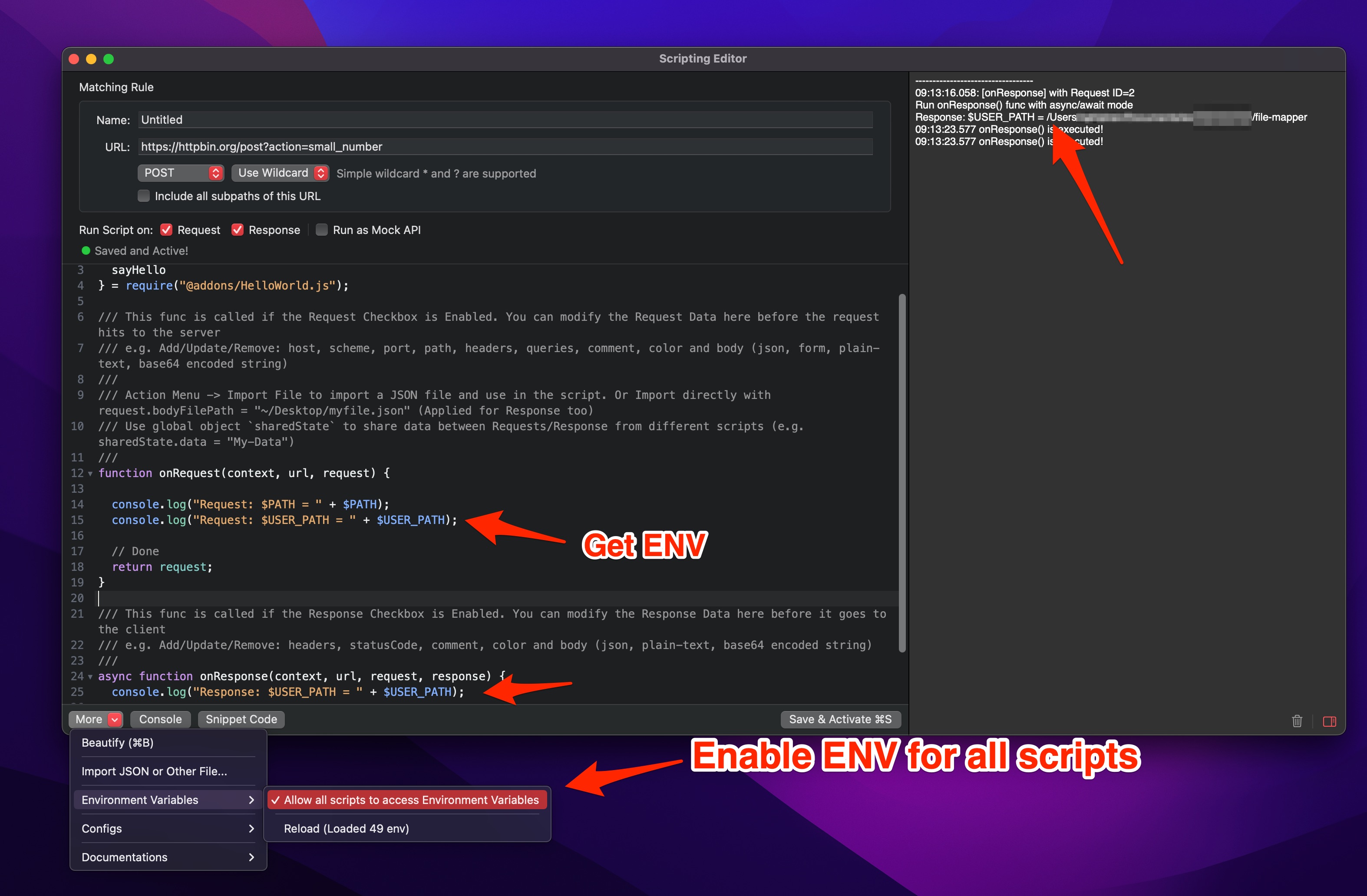
Hey @esdrasdl let's try this beta build: https://proxyman.s3.us-east-2.amazonaws.com/beta/Proxyman_3.7.0_Support_Scripting_with_ENV.dmg
Changelog
- Proxyman now can access system env as we've discussed 👍
- Proxyman will load the system env if it's enabled. It's disabled by default.
- You can define a env on
~/.zshrc: , likeexport USER_PATH=MyPath/proxyman/file-mapper - If you change the env, please reload to get the new value.
Screenshot
Here is a v2 for this feature: https://proxyman.s3.us-east-2.amazonaws.com/beta/Proxyman_3.7.0_Support_ENV_for_scripting_v2.dmg
- Show the correct error message when the ENV is missing.