

 ProxymanApp
Zscaler Client Connector is blocking local macOS Proxy settings from being enabled
This has been an issue for awhile with our company's network configuration where we could never seem to get the local macOS proxy settings to enable correctly when using Proxyman. After a ton of research, I was finally able to track it down to Zscaler Client Connector.
We can still use Proxyman just fine with our physical test devices pointed at the same local proxy server. It's only the local macOS/apps traffic that doesn't work. Charles Proxy works just fine in all scenarios though. I originally thought it might be an issue with the Proxy Helper Tool but it works correctly with Zscaler disabled.
I was able to workaround the issue by running Charles to get the macOS proxy settings to correctly enable and then use the Proxyman External proxy feature to point to the Charles proxy IP and port. That's not really a great long term solution though.
We've reported the issue to Zscaler and they are investigating a fix. I don't think there's anything for you to fix on Proxyman's side but I just wanted to share it here. I'll keep the issue updated if we ever get a fix from them.
Proxyman 3.7.0 macOS 12.5 (21G72)
Steps to reproduce
- Have Zscaler Client Connector running and connected to their service.
- Within Proxyman, select
Proxyman > Tools > Proxy Settings > Override macOS Proxyto attempt to enable the local macOS proxy. - Note that the macOS proxy settings within
Apple Menu > System Preferences... > Network > "Current Network Adapter or Wi-Fi" > Advanced... > Proxiesaren't automatically enabled and configured.
Expected behavior
While running Zscaler Client Connector and attempting to override the macOS proxy settings, the local macOS HTTP/S Proxy settings should be automatically enabled and updated to use the local IP address and port for Proxyman.

Maybe you should use Zscaler Client Connector v1.2.4 since it supports system proxy. Ref: https://help.zscaler.com/z-app/enrolling-zscaler-app-users-when-using-proxy
Note that the macOS proxy settings within Apple Menu > System Preferences... > Network > "Current Network Adapter or Wi-Fi" > Advanced... > Proxies aren't automatically enabled and configured.
It seems the Zscaler Client Connector automatically turns it off. If you don't mind, what happened if you open Proxyman -> Go to Wifi -> Advanced -> Proxies tab and manually enable both HTTP & HTTPS proxy?
Does Zscaler revert it again?

Maybe you should use Zscaler Client Connector v1.2.4 since it supports system proxy. Ref: https://help.zscaler.com/z-app/enrolling-zscaler-app-users-when-using-proxy
Yeah, we're using the latest version (3.6.x something) of Zscaler Client Connector so I think that's an old out-of-date help page.
We can manually check the boxes within the Network Proxies tab to enable the HTTP/S proxies, but after Saving the settings and re-opening the Proxies tab the settings don't actually save and are reverted back to disabled. 😞
I did find a few help pages around some other web debugging proxies, but after chatting with them it sounded like they only currently supported Charles and Fiddler. https://help.zscaler.com/z-app/zscaler-app-charles-proxy-interoperability https://help.zscaler.com/z-app/using-fiddler-zscaler-app
It felt like we got Proxyman on their roadmap though. 😃
I guess that you can change Proxyman port to 8888 ( it's Charles Proxy). Maybe the vpn excludes this charles proxy port.
You can do it in Preference -> Proxy Port
Hi,
When looking into Charles Proxy and enabling the MacOs Proxy, I see my Automatic Proxy Configuration (with pacfile) being disabled. And HTTP and HTTPS proxy being enabled, following the settings from Charles Proxy - External Proxy Settings.
But when performing the same actions with Proxyman (even coping all the same settings; same port, same proxy etc). I just dont see this Automatic Proxy Configuration being overruled. It feels like Proxyman isnt using the right settings/interface on MacOS, or something. :-) How come you are so sure its down to Zscaler? Is it because as what @sleeve is writing, Zscaler made support available specifically for those other tools. Which leads to this conclusion?

FYI @NghiaTranUIT for me its also automatically overwritten. (I even had different network locations, which had those HTTP and HTTPS settings configured)
FYI I changed Charles Proxy port to 8117, to free up 8888 for some NodeJS servers I was spinning up in the past. It doesnt make a difference. I changed Proxyman to 8117 too. Charles works, Proxyman doesnt, simply due to not being able to overwrite Automatic config.
Thanks for your input @calebrepkes. From Zscaler doc, it states that If Charles Proxy is detected, Zscaler Client Connector creates a proxy chain. It means, Zscaler intentionally supports Charles Proxy. They can simply check if the Charles Proxy process is running or not, then stop reverting to the HTTP proxy.
I just dont see this Automatic Proxy Configuration being overruled. It feels like Proxyman isnt using the right settings/interface on MacOS, or something. :-)
❓ Do you provide the PAC File URL on Automatic Proxy Configuration? If no, there is no difference between the ON or OFF.
There is a workaround. I could not test it, please help me @calebrepkes @sleeve
- Open Charles Proxy -> Use port 8888 -> and make it works with Zscaler (Zscaler would detect that Charles is running)
- In Proxy Menu (Charles Proxy) -> Disable macOS Proxy and don't quit Charles.
- Open Proxyman -> Make sure Preference -> Proxy port is 9090.
- Open Wifi Advanced -> Proxies tab -> Enable the HTTP/HTTPS Proxy and change the port text field to 9090.
I suppose that we can trick the VPN that Charles Proxy is still running, and exclude the app.
Aah, I did not read that specific part from Zscaler. That clarifies.
- I cant keep using Charles Proxy, as I dont have a license for it (over 25 users) but I do have purchased the proxyman licenses. ;-).
So license management at my company will complain about it.
- The WiFi - Advanced - Proxy tab, gets overwritten constantly by Zscaler.
So for me that is not an option as workaround, unfortunately.
I like the thought too!
Hereby a screenshot
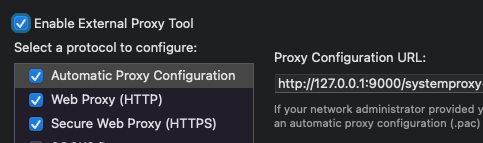
Unfortunately, there is no update. Charles is exclusively supported by Zscaler, so there is no solution to make it works with Proxyman, until it's officially supported 😿
If you don't mind, please open a support ticket on Zscaler channel, they might support it soon 👍
Hey @calebrepkes and @NghiaTranUIT! The Zscaler team has only been able to give us more of short term workaround. It seems to be similar to the method that is outlined in the Fiddler support article.
https://help.zscaler.com/z-app/using-fiddler-zscaler-app
Where you create a minimal custom .pac profile pointing to the Proxyman interface/port and then forwarding it to your normal Zscaler Client Connector .pac file configuration that includes the rest of your normal rules. So with the default Proxyman port of 9090, the initial .pac profile would be something like the following if your Zscaler Client Connector is running on the default 9000 port.
function FindProxyForURL(url, host) {
    return "PROXY 127.0.0.1:9090; PROXY 127.0.0.1:9000;";
}
From initial testing this method seems to mostly work but I would say only as a temporary workaround. By configuring it this way it will basically pump all your local macOS network through Proxyman with or without the Tools > Proxy Settings > Override macOS Proxy setting enabled or disabled. It's a bit more aggressive than we would like as we'd like to have a bit more control over when it's enabled/disabled. Ideally the same way that Charles Proxy functions with Zscaler where it automatically switches over to use the macOS network HTTP/S Proxy settings instead of just using the remote Automatic Proxy config (.pac) file.
We've already ran into multiple issues of having it configured to be always enabled like this. They're mostly minor but they're still annoying. Some sites/services work just fine with Proxyman launched but some fail if Proxyman isn't running. It just adds another annoying step when tying to debug stuff when it's not working. I'd imagine you'll run into similar issues if you also configure it like this, hence why I say it's only a temporary workaround.
Our Zscaler rep has said they've opened an enhancement ticket to add the same full macOS Proxy functionality for Proxyman that Charles Proxy already has. If you (or anyone else facing this same issue) want this issue fixed with an actual proper long term solution, then I'd highly recommend you reaching out to your Zscaler support person and requesting a fix for the following enhancement ticket:
Proxyman interoperability with ZCC (ER-12111)
Let's make it happen! 🙌 😃
Thanks for the awesome news @sleeve 🎉
To fix the annoying, do you think that Proxyman should enable/disable the PAC (If the PAC URL exists) and HTTP/HTTPS Proxy via Tools > Proxy Settings > Override macOS Proxy 🤔 . It also disables if Proxyman is closing too.
If it can solve the problem, I will implement this change.
I'm not sure if that would solve all the issues or really help that much. I still think the best solution would be to wait for Zscaler to create the proper fix.