

 ProxymanApp
Default OS theme is not detected correctly
Proxyman version?
Version 3.4.0 (30400)
macOS Version?
12.2.1
Steps to reproduce
download and open Proxyman for the first time Proxyman opens in dark mode which does not correspond to the OS mode (I have set mine to light), however Proxyman settings claims to be using the default OS theme (see screenshot)
Expected behavior
upon startup the application should correct detect current theme and start in light mode when OS is set to light
Screenshots (optional)
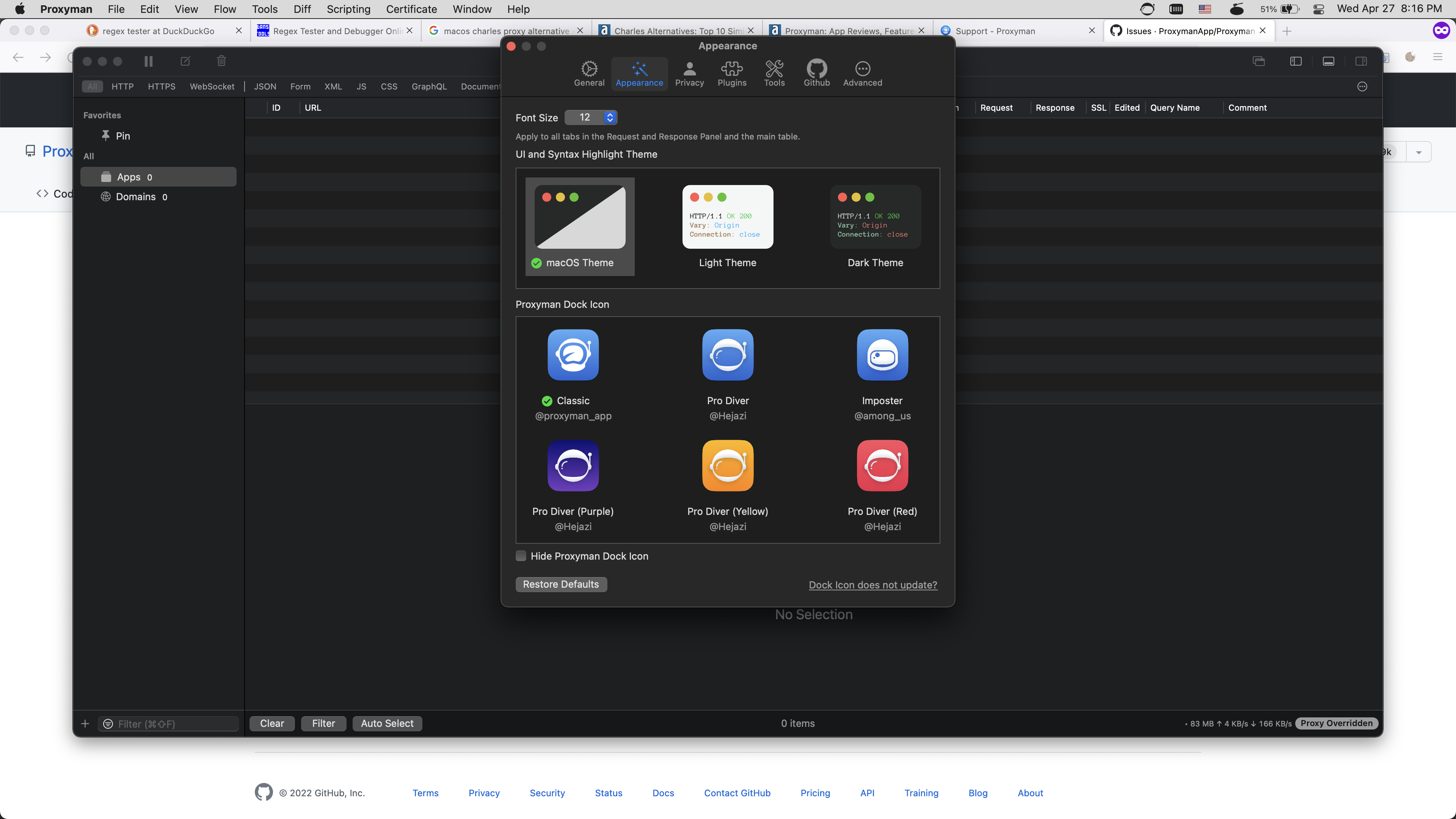

Thanks for letting me know. By default, Proxyman would use the Dark theme.
It's a UI bug, where it points to macOS Theme. It should select Dark Theme 👍
I'm going to fix it now 🙌

Sorry, but I'm unable to reproduce your bug.
Here is how it's done:
- Set Auto Theme or Light Them on System Preference -> Appearance
- Open Proxyman -> Help -> Advanced -> Factory Reset => It reset all config and it likes the "First Time"
- Proxyman restarts with a Dark theme, even though the macOS Theme is Light => It's correct behavior. I intentionally set a Dark Theme by default.
- Proxyman -> Preference -> Appearance -> macOS Theme -> It switches to the Light Theme, which matches the OS.
Tested on macOS 12.3.1
If you are intentionally setting the Dark theme by default then shouldn't the Proxyman preferences show that 'Dark Theme' is selected?
When 'macOS Theme' is selected I expect the Proxyman UI to match the OS theme and it does not on first launch. Thereafter selecting one of the other themes and then changing to 'macOS Theme' correctly changes Proxyman to match the OS.
It seems that the bug is that the default (of 'Dark Theme') is incorrectly shown as 'macOs Theme' in the Preferences on first launch. Once the theme is toggled, the Preferences UI starts to correctly show the actual selected theme.
Tested on macOS 12.6 and Proxyman 3.9.0.

If you are intentionally setting the Dark theme by default then shouldn't the Proxyman preferences show that 'Dark Theme' is selected?
By default, the Dark Theme is selected in Proxyman Preference -> Appearance.
It seems that the bug is that the default (of 'Dark Theme') is incorrectly shown as 'macOs Theme' in the Preferences on first launch. Once the theme is toggled, the Preferences UI starts to correctly show the actual selected theme.
Thanks for the hint. Unfortunately, I'm still unable to reproduce it : /
Let me investigate the bug on the codebase 👍