

 PrismLibrary
[Bug] RegisterTypes can be called multiple times within the lifespan of an Android app
Description
On Android, it is possible for RegisterTypes in App.xaml.cs to be called multiple times within the "lifespan" of the app. This can lead to unexpected behaviours. In the production version of our app, it caused some dependencies to be registered multiple times and we were finding users after several hours of opening the app or after days encountering a crash. This crash occurred after certain services were registered in the container multiple times and multiple registrations continued to exist.
Each time RegisterTypes is called, the previously registered dependencies are still there. For many services, this is fine. Attempting to re-register them either does nothing or replaces the existing registration. For some of our dependencies (see BuildServiceProvider line in the repro) new registrations would be made and the container would grow.
Steps to Reproduce
- Place breakpoint at end of
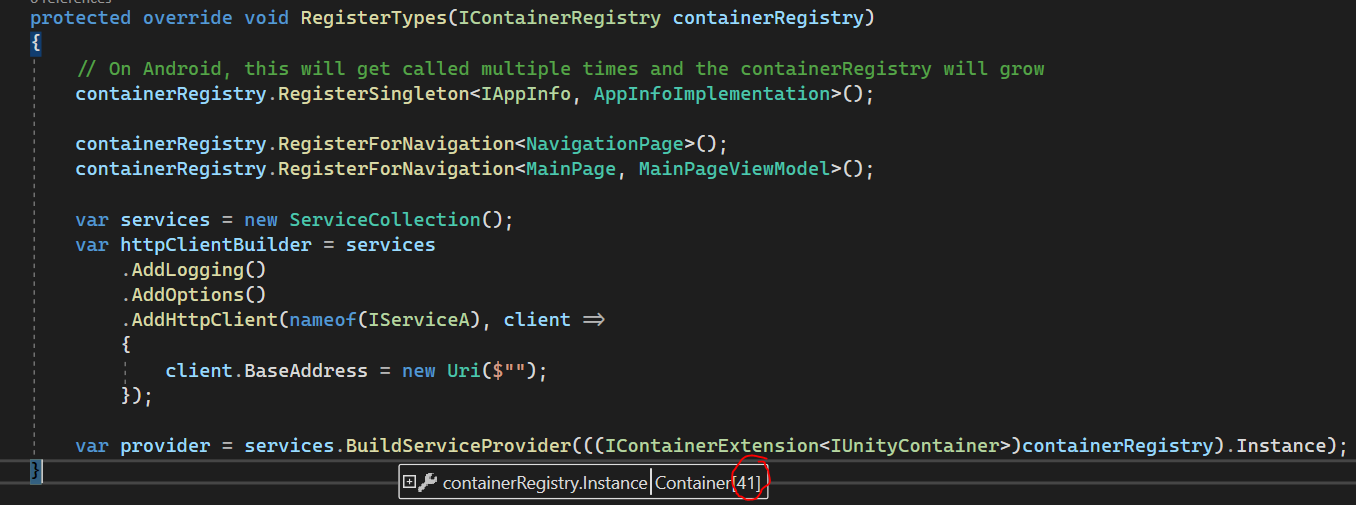
RegisterTypesinApp.xaml.cson Android. Observe total number of services registered (should be 41 in repro project) at end of method. - Wait for the device to load the root page of the app. Press the Android back button. You should be on Android launcher home screen.
- Press the Android recents button and select the app
- Breakpoint in
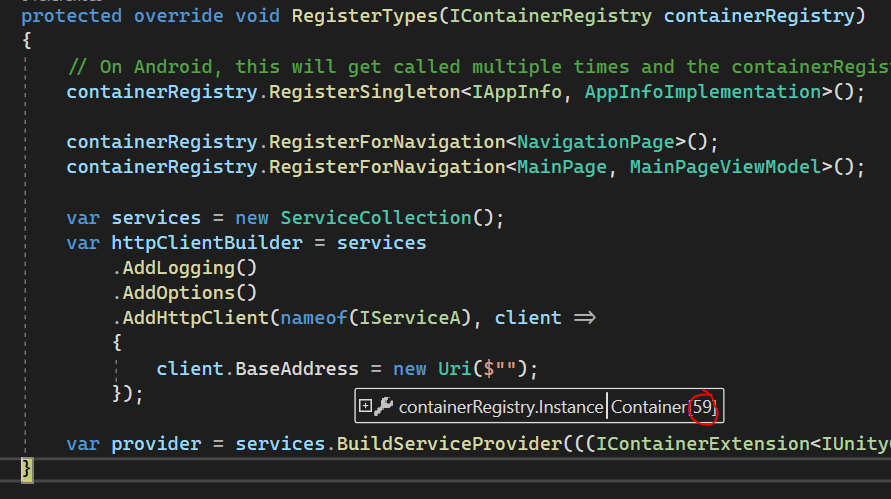
RegisterTypesshould be hit again. This time 59 services will be registered. - Repeat these steps and the container will continue to grow
Expected Behavior
RegisterTypes should only be called once OR containerRegistry should be a blank/fresh/new container. I found it unexpected that this could be called multiple times and keep previously registered services in the container.
Actual Behavior
RegisterTypes is called multiple times. A significant portion of our users encountered a crash because of this issue (requires the repro steps above 10~ times for our particular app) so I would guess there other ways RegisterTypes can be triggered other than the back button method. We have worked around the issue by checking if one of our types IsRegistered, if it is we don't continue registering anything else.
See also this recent StackOverflow link: https://stackoverflow.com/questions/68617006/prism-forms-di-how-to-avoid-multiple-singleton-instances
Basic Information
- Version with issue: 8.1.97
- Last known good version: N/A
- Xamarin.Forms version: 5.0.0.2083
- IDE: Visual Studio 2019 16.10.3
Screenshots
After app launch
Second time
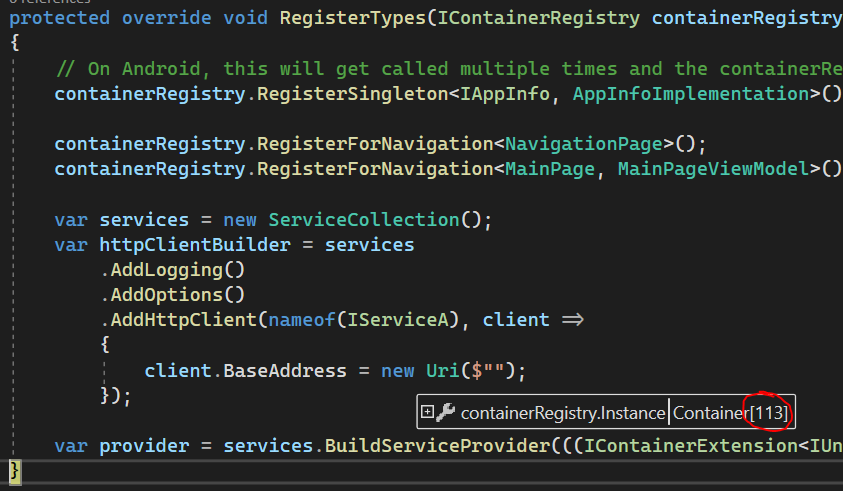
Five times
Reproduction Link

That's weird. The only time RegisterTypes gets called in if the ctor of the App gets called. If the ctor of the app gets called then a new Container should be created each time. Thanks for reporting this. We'll look into it.

@BurkusCat can you update your MainActivity as follows and let me know if it resolves your issue...
LoadApplication(App.Current ?? new App());

@dansiegel @brianlagunas ~~Confirmed this resolves the issue we were seeing. Thanks for getting back so quick. Do you think its a Unity Issue?~~
Rechecked this morning and still seeing it in the PrismRegisterTypes.zip from this repo

@dansiegel I updated the code in the production app + repro project but it doesn't resolve the issue:
LoadApplication(App.Current ?? new App(new AndroidInitializer()));
App.Current is always null so it always uses new App(new AndroidInitializer().
For now, you'll need to call ContainerLocator.ResetContainer() just before you load the application.
ContainerLocator.ResetContainer();
LoadApplication(new App(new AndroidInitializer()));
for reference on this issue... the "solution" proposed by @brianlagunas will work for anyone who is using Prism and has no backgrounding concerns whether with your own framework or with something like Shiny. To work around the issue a better solution that will solve the issue all around is to do what Prism will be doing internally moving forward.
public class App : PrismApp
{
    private static bool FirstRun = true;

    protected override void OnInitialized()
    {
        FirstRun = false;
    }

    protected override void RegisterTypes(IContainerRegistry containerRegistry)
    {
        if(!FirstRun) return;

        // register your services
    }

    protected override void RegisterRequiredTypes(IContainerRegistry containerRegistry)
    {
        if(!FirstRun) return;
        base.RegistrRequiredTypes(containerRegistry);
    }

    protected override void ConfigureModuleCatalog(IModuleCatalog moduleCatalog)
    {
        if(!FirstRun) return;
        // Register any modules
    }
}
Thanks @dansiegel
Noticed this issue when toggling dark mode in the Android settings. The suggested solution worked a treat.

@brianlagunas ,@dansiegel isn't the root cause of this related to 12050. This defect has been with the forms team for quite a while without any update.

Looks like it. The PR is almost ready to merge, Dan just has a few tests failing and needs to figure out why, but he's on vacation.
Is it possible to create App instance only once and use it all the time?
if(FirstRun)
  _app = new App(new AndroidInitializer());
LoadApplication(_app);
Or may it lead to unexpected behavior?

This issue has been automatically marked as stale because it has not had recent activity. It will be closed if no further activity occurs. Thank you for your contributions.
![stale[bot] avatar](https://avatars.githubusercontent.com/in/1724?v=4 "Published by a pub.dev verified publisher")
Wow, I was struggling with this issue for quite a while. In our situation, we had a MainActivity with LaunchMode=SingleTop (like many other apps; nothing unusual). When we switched the system language, the current MainActivity was destroyed (OnDestroy) and a new MainActivity is created (OnCreate).
In our case, the workaround was to reset the DI container when OnDestroy was called.
protected override void OnDestroy()
{
    App.Current.Destroy();
    base.OnDestroy();
}
In our App.xaml.cs we added a Destroy method which does following: With GetContainer() we get the DryIoC container and on this, we run Dispose(). Disposing the DI container runs Dispose on all IDisposable services (events unsubscribed, resources released, etc). ContainerLocator.ResetContainer() is the workaround which forces to create a new DI container whenever a new Xamarin Forms App is created (this is very important, because we cannot reuse a disposed DI container!)
public void Destroy()
{
    var container = Container.GetContainer();
    container.Dispose();

    ContainerLocator.ResetContainer();
}
This looks like a widespread problem but many apps (at least those I've seen so far) don't seem to care about it.
My question to you guys:
- Will there be a fix in Prism for Xamarin.Forms available any time soon? I would kindly appreciate it.
- What happens with the changes in PR #2567 ? Will they ever be merged to master and released in a NuGet package?

I have not had time to work on this and the changes in the PR resulted in breaking a number of tests. A fix will be merged for the next release but I cannot give you an exact time. Frankly I had hoped to get one out a few months ago. If it's more urgent to you and you have the bandwidth we do take PRs
For those still using Xamarin.Forms who are hitting this issue please be sure to use Shiny.Framework which has the fix for this.