

 PrideChung
Shadows on icons
I tried added shadow on my UIButton's NSAttributedString and it gets clipped no matter what I try. I looked through the issues and repo and it looks like there used to be shadow support via an attribute. I can't find this in the current codebase. Is there any way to do shadows on NSAttributedString font icons?
I was using standard NSAttributedString NSShadow stuff, by the way.

I don't quit understand about how your shadow get clipped. If the shadow go beyound the button's bounds, of course it would get clipped. The old shadow drawing API it's for iOS5, but since FAK dropped support of iOS5 and embrace NSAttributedString, it supports shadow naturally, so the old API was removed entirely.
Here's how to add shadow to a UIButton:
FAKFontAwesome *twitterIcon = [FAKFontAwesome twitterIconWithSize:20];
[twitterIcon addAttribute:NSForegroundColorAttributeName value:[UIColor colorWithRed:58/255.0 green:215/255.0 blue:255/255.0 alpha:1.0]];
NSShadow *shadow = [NSShadow new];
shadow.shadowColor = [UIColor blackColor];
shadow.shadowOffset = CGSizeMake(2, 2);
shadow.shadowBlurRadius = 1;
[twitterIcon addAttribute:NSShadowAttributeName value:shadow];
NSMutableAttributedString *twitterMas = [[twitterIcon attributedString] mutableCopy];

Thanks for the quick reply!
Here is my code
    CGRect rect = CGRectMake(100,self.view.bounds.size.height-100,100,100);
    self.trashButton = [[UIButton alloc]initWithFrame:rect];
    self.trashButton.backgroundColor = [UIColor greenColor];
    [self.trashButton setFont:[FAKFontAwesome iconFontWithSize:105]];
    [self.trashButton setClipsToBounds:NO];

    NSShadow *shadow = [[NSShadow alloc] init];
    shadow.shadowColor = [UIColor blueColor];
    shadow.shadowBlurRadius = 20.0;
    shadow.shadowOffset = CGSizeMake(0.0, 0.0);
    FAKFontAwesome *trash = [FAKFontAwesome trashOIconWithSize:65];
    [trash setAttributes:@{
                           NSForegroundColorAttributeName: [UIColor redColor],
                           NSShadowAttributeName: shadow
                           }];
     [self.trashButton setAttributedTitle:[trash attributedString] forState:UIControlStateNormal];
Results in this scenario (green is the background of the UIButton - plenty of space. The font color is red, the shadow is blue) . Pretty clearly the shadow is getting clipped:
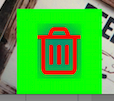
What kind of effect you want to achieve? shadowBlurRadius = 20.0 isn't a reasonable value to me, that shadow must be much bigger than the trash button. There're some paddings left because UIButton won't use all the empty spaces to draw it's title string, so the shadow get clipped. If you want more control on drawing, you can turn that icon into an image by calling -[trash imageWithSize:]
It's a reasonable value because the font size is 64. I'm trying to get the trash bucket to "glow" when you drag something over it. I could do an image but shadowing on images is a lot different (worse) than on text because of the difficulty in detecting where to draw a shadow.
When you call -[FAKIcon imageWithSize:] on a FAKIcon instance, it's shadow will be drawn onto the image as well.