

 Preston-Landers
the performance is very very bad on windows platform
1、concurrent-log-handler performance test code is
import logging
import time

import concurrent_log_handler

logger = logging.getLogger("MyExample")
logger.setLevel(logging.DEBUG)  # optional to set this level here

handler = concurrent_log_handler.ConcurrentTimedRotatingFileHandler(
    filename="/pythonlogs/logger_fj.log", mode="a", maxBytes=1000 * 1000 * 100, backupCount=6,when='d',
)
# handler.namer = log_file_namer
logger.addHandler(handler)
logger.setLevel(logging.DEBUG)

print(time.strftime('%Y_%m_%d %H:%M:%S'))
for i in range(10000):
    logger.info(f'abcdefgfgbfgddhfgdhjfgjfghkjhkggj {i}')
print(time.strftime('%Y_%m_%d %H:%M:%S'))
nb_log rely concurrent-log-handler, because concurrent-log-handler is multiprocess safe rotate file handler,but the performance is very very bad.
write 10,000 log,the test code cost 2 minutes ,on windwos it is too slow.

it cost 8 seconds to write 100,000 log on linux,linux is faster than win. but only write 1,2500 evey seconds on linux ,it is also bad performance on linux.
2、logging.FileHandler performence
handler = logging.FileHandler(
    filename="/pythonlogs/logger_fj.log", mode="a",
)

logger.addHandler(handler)
logger.setLevel(logging.DEBUG)

print(time.strftime('%Y_%m_%d %H:%M:%S'))
for i in range(100000):
    logger.info(f'abcdefgfgbfgddhfgdhjfgjfghkjhkggj {i}')
print(time.strftime('%Y_%m_%d %H:%M:%S'))
logging.FileHandler only cost 1 secoinds to write 100,000 msg.
3、 i kown to ensure multi-process safe for roate file ,will expense python performence and the file lock waste system performence, but can you prove concurrent-log-handler a little?
i hope to ensure multi-process safe for roate file, write 10,000 msg one second on win,30000 msg one second on linux ,could you improve the performance?
4、Can you consider batch writing every 0.1 seconds for improve the performance?

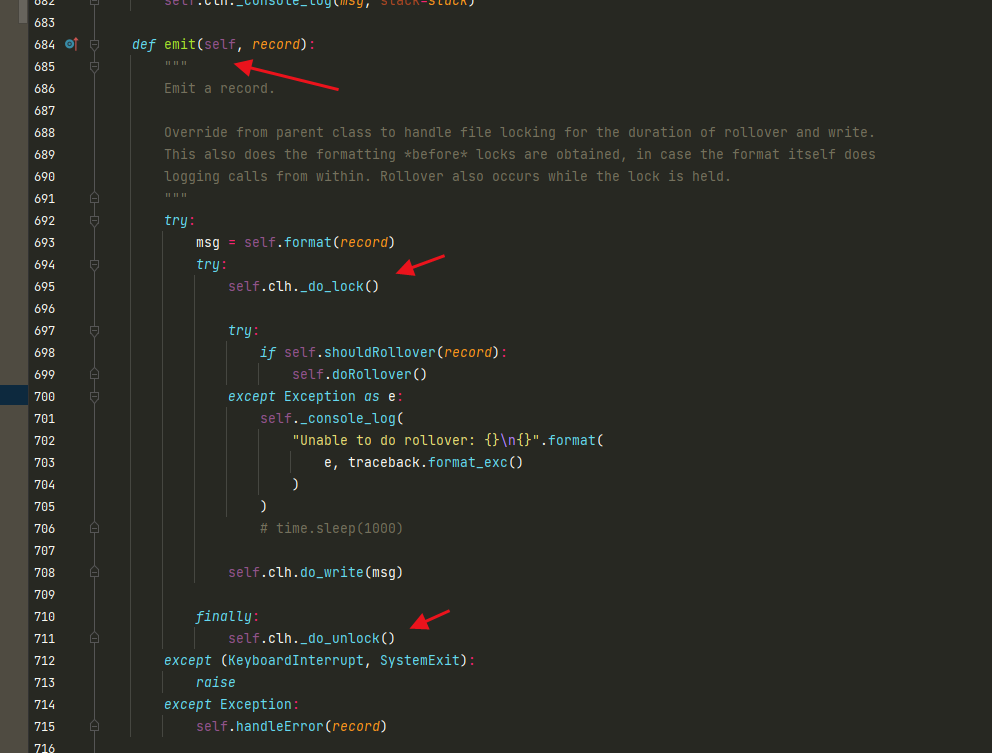
it is too heavy for emit a msg,file lock performance is very bad on win,file lock performance is also not good on linux
it is too heavy for emit a msg,file lock performance is very bad on win,file lock performance is also not good on linux
why not consider batch write, reduce the frequency of file lock
I would be happy to review any pull requests that improve performance. Batching log messages might be viable as long as it's optional. You probably also want a timeout to ensure queued requests don't get too stale.
This library depends on portalocker to achieve the file locking (on both Linux and Windows). You could look into if there's a faster alternative or find a way to speed that up.
There is an async queue handler that would help free up the primary thread to not wait synchronously for each logging to complete, but that wouldn't help much with overall logging throughput if lock contention or overhead is an issue.
Fundamentally, if logging throughput is a primary concern, you are probably better served by another solution like a centralized (or cloud) network logging server.

nb_log_file_handler.NbLogFileHandler is 100 times faster than concurrent_log_handler.ConcurrentRotatingFileHandler on windwos.
https://github.com/ydf0509/nb_log_file_handler
concurrent_log_handler.ConcurrentRotatingFileHandler
import multiprocessing
import logging
import time
from concurrent_log_handler import ConcurrentRotatingFileHandler

logger = logging.getLogger('hello')

fh = ConcurrentRotatingFileHandler('xx2.log',maxBytes=1000*1000,backupCount=3)

logger.addHandler(fh)
# logger.addHandler(logging.StreamHandler())
logger.setLevel(logging.DEBUG)


def f():
    for i in range(10000):
        logger.info(f'{i}aaaaa'*20)

if __name__ == '__main__':
    t1 = time.time()
    ps = []
    for  j in range(10):
        p = multiprocessing.Process(target=f)
        ps.append(p)
        p.start()
    for p in ps:
        p.join()
    print(time.time()-t1)
nb_log_file_handler.NbLogFileHandler
import multiprocessing
import logging
import time
from nb_log_file_handler import NbLogFileHandler

logger = logging.getLogger('hello')

fh = NbLogFileHandler(file_name='xx3.log',log_path='./',max_bytes=1000*1000,back_count=3)

logger.addHandler(fh)
# logger.addHandler(logging.StreamHandler())
logger.setLevel(logging.DEBUG)


def f():
    for i in range(10000):
        logger.info(f'{i}aaaaa'*20)

if __name__ == '__main__':
    t1 = time.time()
    ps = []
    for  j in range(10):
        p = multiprocessing.Process(target=f)
        ps.append(p)
        p.start()
    for p in ps:
        p.join()
    print(time.time()-t1)
Hi, thanks for the update. I took a quick look at your code. I could be mistaken here, but it seems like it uses threading.RLock to control access to the file. As far as I understand, that will only be respected by different threads under the same process. It will not provide locking across multiple processes on the same host, or with multiple hosts using a shared network filesystem. So maybe these cover different use cases.
nb_log_file_handler.NbLogFileHandler always use a new file name when rotate,so it dose not have the problem rotate error when use multi proecss
If the decision to rotate is made without having a true exclusive lock you could run into concurrency issues that way. That said, if that code is more suitable for your use cases then I'm glad you have an alternative.