

 PrestaShop
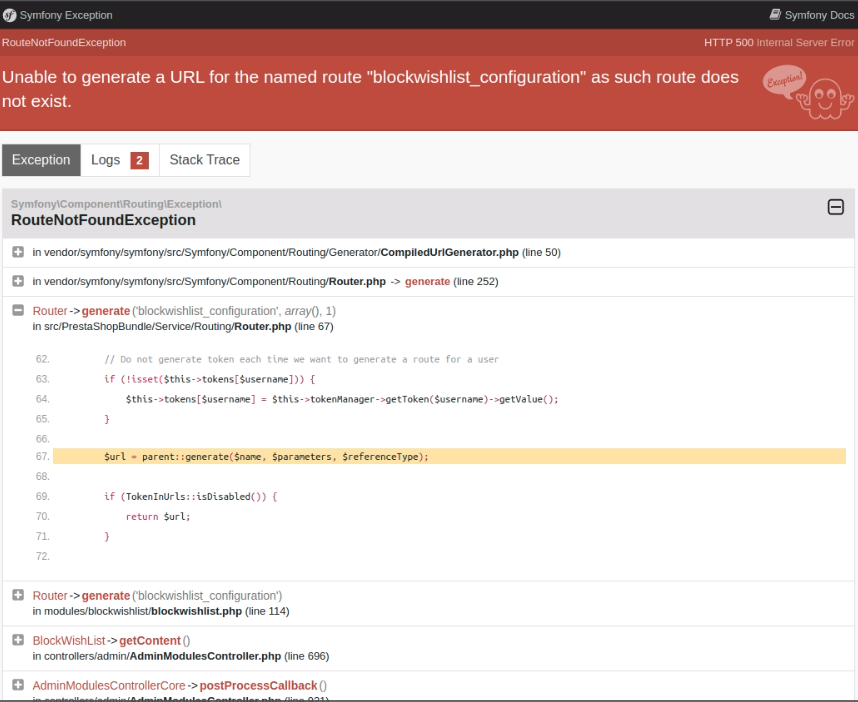
An exception is displayed when Installing the blockwishlist module and executing another BO page at the same time
Prerequisites
- [X] I understand and accept the project's code of conduct
- [X] I have already searched in existing issues and found no previous report of this bug.
Describe the bug and add screenshots
An exception is displayed when Installing the blockwishlist module and executing another BO page at the same time
Expected behavior
Wording:
- Case 1: Upload a module
After pressing the 'upload a module' button, a modal is displayed.
Title: 'Are you sure you want to upload this module?' Admin.Modules.Notification
'First things first: put your store in maintenance mode. And if several people have access to the back office, warn your team that no action should be taken on the store during the process.' Admin.Modules.Notification Exit buttons:
'Go to maintenance page' Admin.Actions 'Upload anyway' Admin.Actions
- Case 2: Upgrade a module
After pressing the 'upgrade a module' button, a modal is displayed.
Title: 'Are you sure you want to upgrade this module?' Admin.Modules.Notification
'First things first: put your store in maintenance mode. And if several people have access to the back office, warn your team that no action should be taken on the store during the process.' Admin.Modules.Notification
Exit buttons:
'Go to maintenance page' Admin.Actions 'Upgrade anyway' Admin.Actions
- Case 3: Install a module
After pressing the 'install a module' button, a modal is displayed.
Title: 'Are you sure you want to install this module?' Admin.Modules.Notification
'First things first: put your store in maintenance mode. And if several people have access to the back office, warn your team that no action should be taken on the store during the process.' Admin.Modules.Notification Exit buttons:
'Go to maintenance page' Admin.Actions 'Install anyway' Admin.Actions
No response
Steps to reproduce
- Install the develop branch
- Go to BO > Modules > Module manager page
- Uninstall the old version of the module blockwishlist v2.0.1 with removing the folder
- Install the release and during the install => open another page from BO in another tab
- An exception is displayed
- Click on configure of the module => exception
- All the BO is NOK now
I attached a screen record
https://user-images.githubusercontent.com/16067358/163567496-2c83b052-a5e0-4cc7-b172-708f44d34b15.mp4
I checked develop + v2.0.1 => ok
https://user-images.githubusercontent.com/16067358/163567512-f6654d2f-8f87-4063-b152-f2e84bcc746e.mp4
I checked 178x + v2.1.0 => ok
PrestaShop version(s) where the bug happened
develop
PHP version(s) where the bug happened
8.0
If your bug is related to a module, specify its name and its version
wishlist v2.1.0

We can't fix this issue, it requires big changes on the core to catch that an upgrade is performing. But we can enhance the wording to warn the merchant not to do stuff in BO while upgrading a module.
@Julievrz :)

@MatShir I'm not sure that it requires that much of a change, it looks like a cache issue. Also, even if the merchant doesn't do anything in the BO, if he has a tab open, as there is ajax request performed regularly without user action, this issue can happen.

@matks suggested it will require a lot of changes, but maybe you have an idea in mind for quickwin ?
@atomiix I told Mateus that this is a global issue that would need deeper work 😄 .
For me the global issue is "when someone performs a system-impating action (like upgrade the Core, upgrade a module, install a module, change the theme), other users using BO or FO might encounter weird behaviors".
For example if we upgrade a module, the upgrade requires a new SQL table to be created and the code is loaded just before the SQL creation 🤷 I expect it will crash.
The global solution for me would be that, when someone performs a system-impating action, we present every other user a simple "Upgrade in process! stand by" page to any other user, just to make sure they dont corrupt the data.

@MatShir We should modify the existing modal's body message as follow:
'To avoid any cache issues during the upgrade:
- Put your store in maintenance mode
- Do not open any other back-office pages during the upgrade'
in Admin.Modules.Notification
So the final wording would be:
Title: 'Are you sure you want to upgrade this module?' Admin.Modules.Notification
'To avoid any cache issues during the upgrade:
- Put your store in maintenance mode
- Do not open any other back-office pages during the upgrade' Admin.Modules.Notification
Exit buttons:
'Go to maintenance page' Admin.Actions 'Upgrade anyway' Admin.Actions

@khouloudbelguith is this reproducible every time? I tried several times but the module install itself to fast I think and I got no exception.
https://user-images.githubusercontent.com/2168836/166727317-66e05ae5-d19a-4159-869d-9c39172a2828.mov
Hi @atomiix,
I tried to install the module via the upload button I manage to reproduce the issue with develop branch I attached a screen record
https://user-images.githubusercontent.com/16067358/166741620-951e54f2-bdf3-461a-ad63-15b23d1346ed.mp4
Thanks!
Hello,
I reproduced the same issue on 8.0.x branch using these steps :
Thanks to @khouloudbelguith to specify the related issue
- BO > Module manager > Uninstall the current version of
blockwishlistmodule - Install the
blockwishlistmodule v2.0.1 - Upgrade the module to blockwishlisht v2.1.0 when click on
upload a moduleusing a .zip of the module - When the installation is completed, click on
Configure - See error > An exception related to
blockwishlistmodule is displayed
https://user-images.githubusercontent.com/92912932/175337620-d0f5400a-9aa9-4ccc-b484-389c79c24d4d.mp4
Thank You!

Hi @khouloudbelguith @HanaRebaiQA ! Just a 2 quick questions about the expected beahvior.
-
If user clicks "Upload a module" button, a dropzone modal appears. As soon as you select a file is instantly loading (uploading). My question is : do we want the confirmation text and buttons to appear before selecting a file or right between selection and the start of the upload ?
-
if user finds the module in the search result and click "install" button, we want a confirmation modal to appear showing exactly => `Title: 'Are you sure you want to upgrade this module?' Admin.Modules.Notification
'To avoid any cache issues during the upgrade:
Put your store in maintenance mode Do not open any other back-office pages during the upgrade' Admin.Modules.Notification Exit buttons:
'Go to maintenance page' Admin.Actions 'Install anyway' Admin.Actions`
Am i getting it right ?

- Before, so after the 'upgrade anyway' it should open the dropzone modal
- It would be perfect, but I don't know where you can press 'install' after a search.
But I'm wondering the wording for the title should it be more like 'Are you sure you want to upload this module?' and for the CTA 'Upload anyway' ? @Julievrz WDYT?
- Before, so after the 'upgrade anyway' it should open the dropzone modal
- It would be perfect, but I don't know where you can press 'install' after a search.
There :) If i click install, installation instantly starts. Maybe we just need a confirmation modal with the warning text in between ?:)
PR started but not finished yet https://github.com/PrestaShop/PrestaShop/pull/29308
Work has continued on this ticket, PR is still https://github.com/PrestaShop/PrestaShop/pull/29308 @mflasquin added commits on it
Hi, we (edition) faced a (possible) similar issue with shops that had to update multiple modules at once. A 500 error raised and, looking into logs turned out that methods declared in cached files were beeing called, and not found. Some modules are calling a cache:clear at the end of installation, so we thought some cached files were beeing required before fresh cache had been generated.
We looked at the way Symfony generates cache, specifically for the current container, and noticed a flock is beeing applied during cache generation.
We then thought we could use this flock as a semaphore to prevent accessing BO while cache is beeing generated
We came considering the code below, directly inside admin-dev/index.php (before kernel->handle of course) :
$appKernelFileLockFilePath = _PS_CACHE_DIR_ . 'appAppKernelProdContainer.php.lock';

$fp = fopen($appKernelFileLockFilePath, "w");

if (flock($fp, \LOCK_EX)) {

    // If we reach here, cache is fresh
    // Or
    // Cache was running and we waited for its completion
    flock($fp, \LOCK_UN);
    fclose($fp);
}
else {

    // We should never come here
    fclose($fp);
}
the locked file's filename may be retrieved a better way of course (even if Symfony's kernel doesn't seem to expose it), and requests could be filtered to prevent pictures, for exemple, to wait, but, we would be interested in having your opinion : does this approch seem relevant to you ? and, if it does, could this be a conceivable / mergeable fix ?
Thanks in advance
