

 PredatH0r
Panasonic-TX-58GXW704_hotel.pwd-export_no svl.db-file
Hello together, after the hotel.pwd export on a usb stick the hotel_setup folder contains NO svl.db file, only a "eepdata.bin" and some other files, all not readable by chansort. Anyone familiar with this issue? Anyone knows a workaround?
Regards Jan

Dear all,
same here - exported the files to an usb stick but just get an error trying to open the file eepdata.bin.
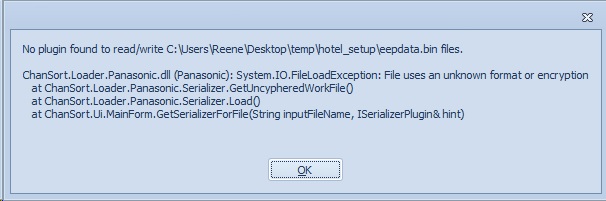
I attached the exported files also to this post. Any ideas? hotel_setup.zip
Regards Rene

Different TV models export different types of channel lists. ChanSort only supports the "svl.db" and "svl.bin" format, others are not supported.
In Rene's case there are 3 files that all contain channel data and I don't know how exactly they relate to each other. The channel_list.bin file is compressed/cyphered in some way and I can't tell what it contains exactly. The "channel_list.xml" is readable but seem to contain only rudimentary information, referencing the internal channel data via an "SvlId". However, it might be sufficient to just edit that .xml file for reordering channels. Could you give it a try, open that file with a text editor (notepad or notepad++) and edit the first 2 lines, and set ChannelNumber="2" on the first line (Das Erste) and ChannelNumber="1" (ZDF HD), load it back into the TV and check if the 2 channels now swapped places? If that works, I can try and add support for this .xml list in ChanSort.
Also, what TV model did create these files?

Different TV models export different types of channel lists. ChanSort only supports the "svl.db" and "svl.bin" format, others are not supported.
In Rene's case there are 3 files that all contain channel data and I don't know how exactly they relate to each other. The channel_list.bin file is compressed/cyphered in some way and I can't tell what it contains exactly. The "channel_list.xml" is readable but seem to contain only rudimentary information, referencing the internal channel data via an "SvlId". However, it might be sufficient to just edit that .xml file for reordering channels. Could you give it a try, open that file with a text editor (notepad or notepad++) and edit the first 2 lines, and set ChannelNumber="2" on the first line (Das Erste) and ChannelNumber="1" (ZDF HD), load it back into the TV and check if the 2 channels now swapped places? If that works, I can try and add support for this .xml list in ChanSort.
Also, what TV model did create these files?
Sorry for the late answer. The device is the new TV of my mother-in-law and we have been there only last weekend again.
I tested to change the channels in the xml list and imported it again onto the TV but nothing happend. Unfortunately it doesn´t work this way.
The TV model is exactly the one in the headline: Panasonic TX-58GXW704 . Shouldn´t be anything special. It´s just an current Panasonic model.
But the sorting of the list of the 300 TV channels I found via the automatic search run is a pain. There is a favorit list but it may only contain 7 channels. To change the order there is only the way to hide a channel or to swap its posiotion with another one. To swap all the encrypted HD channels and sky channels you have to swap it by a channel you want to have at the start you have to zapp through hundereds of channels and can only see just 8 every page.
Hi There, I have same issue here with recent 2019 Panasonic TV Model TX-50GX700E. There is missing Usual (svl.bin Export) Item in Menu "Setup / Other Settings / Channel List Transfer". So I've tried old method with hotel.pwd but can't manage channel list anyhow. Setting and Sorting hundreds of DVB-S channels is nightmare. I've contacted Panasonic support too just to inform them that Export to "traditional" svl.bin file is not possible in 2019 lineup.
Thanks for help or any idea anyhow. M.
