
powerlevel9k
 powerlevel9k copied to clipboard
 Powerlevel9k
Pyenv segment significantly slows down zsh
Describe Your Issue
Adding pyenv to a segment lags the prompt ~1 sec. on macOS.
POWERLEVEL9K_LEFT_PROMPT_ELEMENTS=(context dir vcs pyenv)
is the elements that I use on left prompt.
Have you tried to debug or fix it?
Removing pyenv from the left prompt fixes the issue.
Environment Information
This information will help us understand your configuration.
- zsh version: zsh 5.6.2
- zplug 2.4.2
- zplug
- P9k v0.6.6
- iTerm2 Build 3.2.20180825 on macOS 10.14

Thanks for the report @Zeta611 . I'm afraid, we can't do anything about that, unless we find a better way to retrieve the environment string, which we get by invoking pyenv. Do you know a better way?
Edit:
The segment invokes pyenv three times:
pyenv version-file-read ${root}/versionpyenv version-namepyenv rootMaybe there is a command to get all infos at once.
At least getting the root directory could be replaced by using upsearch, if there is a way to identify a python root directory..

If cat is faster than invoking pyenv version-name, reading from file .python-version maybe an alternative. Then
pyenv version-file-read ${pyenv_root}/version)
can also be replaced with cat ${pyenv_root}/version.
I'm not sure if this approach would work for everyone's environment, though.
I tried to reproduce it on Linux using P9K tag v0.6.6, zsh 5.6.2 in tilix and could barely notice the difference:
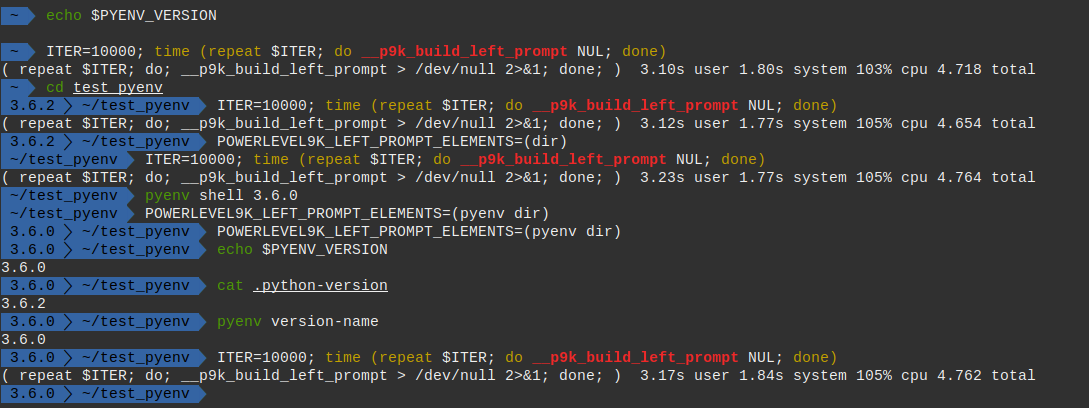


@Zeta611, can you provide more details to how you use pyenv? How did you install it? brew, manually? Which python versions are installed and did you use any flags to compile them? Does it happen with all versions? Does it only happen if activated? Only if version is set by file or only if version is set by environment variable? Do you use multiple versions at the same time?
I have never used used pyenv before, so I'm not very familiar with it. Right now it look to me like it uses $PYENV_VERSION, otherwise the file .python-version. Also pyenv version-file-read ${pyenv_root}/version is pretty much instantaneous having no output at all (probably doing something wrong). Some for pyenv version_name
TL;DR: I can't reproduce it on Linux with very similar zsh and p9k version

@Syphdias My bad—the huge lag was due to my zsh setting of lazily loading pyenv. However, pyenv segment still lags my prompt five times more than without it. Also, repeating it 1000 takes:
( repeat 1000; do; __p9k_build_left_prompt > /dev/null 2>&1; done; ) 52.14s user 57.27s system 89% cpu 2:02.36 total
But I see that it is incomparably faster—more than 200 times—in your prompt!
EDIT: I installed pyenv with homebrew, and I installed 2.7.15, 3.7.0, pypy2.7-6.0.0, pypy3.5-6.0.0. I also use virtualenv with pyenv. The log in the above is for the one when local pyenv is not set. Similar results occur with local pyenv set. Without pyenv:
( repeat 1000; do; __p9k_build_left_prompt > /dev/null 2>&1; done; ) 9.48s user 9.96s system 85% cpu 22.676 total
@Zeta611 - Thanks for the testing, and @Syphdias, thank you for trying to reproduce!
Okay, it sounds like we might have a macOS-specific issue, or perhaps an installation-specific issue. @dritter - Do you happen to use Pyenv?
If it's inherent to running this on macOS, like @dritter said, I don't know that there is much we can do. My fear with using the .pyenv_version file is that we will get session-specific versions wrong, unless that's fundamentally not how pyenv is used?

@bhilburn I'm speculating a bit since I don't know pyenv that well, so take it with a grain of salt. .pyenv_version in not the only way to get the version.
- Environment variable
PYENV_VERSIONExample:
 ❱ pyenv version
2.7.15 (set by PYENV_VERSION environment variable)
- from file
.python-version(even if multiple directories up, so would needupsearchI suppose)
 ❱ pyenv version
3.5.3 (set by /home/user/test_pyenv/.python-version)
- from global file, that is dependent on the
$PYENV_ROOT(same aspyenv root?) (for me:/home/user/.pyenvlike suggested by the install guide, not sure where brew places it).systemis the version without pyenv enabled. Currently this seems to get ignored.
 ❱ pyenv version
system (set by /home/user/.pyenv/version)
3.6.0 (set by /home/user/.pyenv/version)
2.7.15 (set by /home/user/.pyenv/version)
Source: https://github.com/pyenv/pyenv#choosing-the-python-version
Through a bit of playing around I found this syntax to be valid:
 ❱ cat .python-version; echo '##';pyenv version
3.5.3

3.6.0:3.6.1

3.6.2:3.6.3
##
3.5.3 (set by /home/user/test_pyenv/.python-version)
3.6.0 (set by /home/user/test_pyenv/.python-version)
3.6.1 (set by /home/user/test_pyenv/.python-version)
3.6.2 (set by /home/user/test_pyenv/.python-version)
3.6.3 (set by /home/user/test_pyenv/.python-version)
@Zeta611 I have little experience with profiling zsh, but could you try the following commands to find out what exactly take the most time: zmodload zsh/zprof (done once to enable the command), __p9k_build_left_prompt; zprof (for getting an overview what takes up how much time). Sadly I could get it to only show stuff that is happening inside prompt_pyenv which would be way more usefull. Maybe you can find a way
@Zeta611 If you are still using Powerlevel9k, could you check if performance issues can be reproduced with Powerlevel10k?
