
vscode-powershell
 vscode-powershell copied to clipboard
 PowerShell
Problems appear only when file is highlighted
Prerequisites
- [X] I have written a descriptive issue title.
- [X] I have searched all open and closed issues to ensure it has not already been reported.
- [X] I have read the troubleshooting guide.
- [X] I am sure this issue is with the extension itself and does not reproduce in a standalone PowerShell instance.
- [X] I have verified that I am using the latest version of Visual Studio Code and the PowerShell extension.
- [X] If this is a security issue, I have read the security issue reporting guidance.
Summary
I think that the last preview release that had broken PSScriptAnalyzer exposed a different problem that I've not noticed before. The problems reported by it are sometimes shown when the file is highlighted and disappear once you move out of the file (notice the problem window and highlights on the right). In some cases, it highlights it forever tho.

PowerShell Version
Name                           Value
----                           -----
PSVersion                      5.1.22000.832
PSEdition                      Desktop
PSCompatibleVersions           {1.0, 2.0, 3.0, 4.0...}
BuildVersion                   10.0.22000.832
CLRVersion                     4.0.30319.42000
WSManStackVersion              3.0
PSRemotingProtocolVersion      2.3
SerializationVersion           1.1.0.1
Visual Studio Code Version
1.70.0
da76f93349a72022ca4670c1b84860304616aaa2
x64
Extension Version
[email protected]
[email protected]
[email protected]
[email protected]
Steps to Reproduce
Jump around files with problems in them
Visuals
No response
Logs
No response

It only shows for open files, not related to focus. Double click on two files so both editors are open at the same time. This is by design since PowerShell isn't a project like c# etc, but loose files.
Edit: Didn't notice the one that was stuck in problems. Sure they're not open somewhere?

Well, the behavior isn't as you describe it - here are problems loaded from even different file which isn't even available in the session ;)

What more is that I would prefer to see all problems across all files, but I guess this would be a problem performance wise unless this is in place: https://github.com/PowerShell/vscode-powershell/issues/3884
And in this I've closed all files:
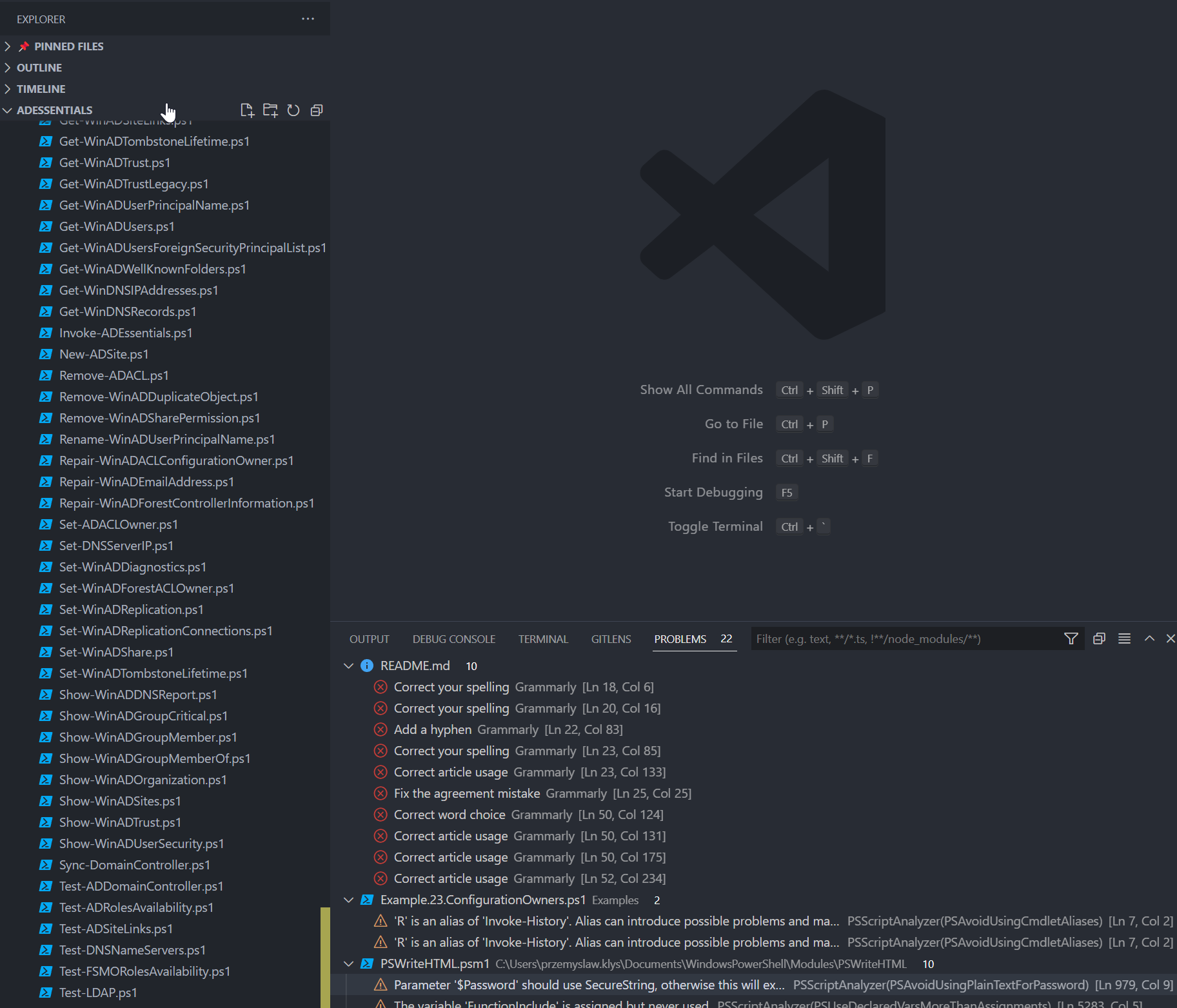
And the Example23 was one of the last files I actually closed and explicitly left it with an error, and then README showed up in problems.
It's not at all consistent.
Hey @PrzemyslawKlys and @fflaten can I ask for a summary of what the current behavior seems to be, and what you think it should be? I.e. what is it I'm trying to fix 😅 Thanks both!

@andschwa We have conflicting views with @fflaten 😂 so you would need to implement switch that can be toggled between those two.
Basically what happens is that when the script has errors, or has warnings it normally displays it within code pane, but as shown on screenshot in the file list view the file with problems is highlighted as well (in my screen it's either orange or red). Currently it seems that the "problems/warnings" is supposed to show on listview only when you are looking at specific file (or I guess should show warnings for also all opened files within code) and when you move out, close them, the coloring on files should disappear.
For most part - this happens, but as shown on the gif not all the time (for whatever reason).
This is where our views are different:
- @fflaten wants the behavior to be consistent in a way that problems/warnings are only shown for "open" files - I would say this is current behavior but just not consistent enough
- I want to see all files highlighted that have problems or warnings (with the exception of folders/files that are excluded using search.exclude feature that you showed me once). While I understand that PowerShell is not c# I work on modules or even unrelated files, but if there are warning I should fix them
Of course that brings me to another issue of hard to configure PSScriptAnalyzer which uses script based configuration instead of standard GUI/JSON config - but that's another problem/demand from me :-p
@PrzemyslawKlys We don't necessarily disagree. My previous comment was about how I remembered the code being (intended behavior). I'm still not able to reproduce it as problems get cleared consistently when I close files. So what you're seeing is a bug imo.
As a separate feature request Personally I'd like to see PSSA results for every file in a workspace without opening them while working on a module. Some workspaces are pretty large and the PSSA-integration has been (still is?) slow, so workspace vs open files would still have to be configurable. For workspaces with collections of unrelated scripts I'd probably also configure it for "open files only".
If all the analyzer background-jobs would further delay the already slow formatter (compete for the same pipeline), then I'd generally downvote this until something like hosted PSSA implementation or even PSSA v2 (ETA still unknown 🙁) is ready which I'd hope would improve the performance issues a lot.
You can exclude certain folders from being analyzed at all - in the short time.
That's helpful! Thank you for the clarifications. Since @SeeminglyScience already coded in a setting powershell.analyzeOpenDocumentsOnly (originally intended for counting references, but those are now lightning quick as far as my testing has gone) I'm going to suggest I just piggy back on that setting. By default analyze all files (in a queued background task so it doesn't hamper anything else, if possible), and if that's set to true, then only analyze open files. My thought is that if a file has been analyzed, then those problems should appear regardless if it's open or closed. I believe this is what C# is doing. I don't see why they should be cleared out if the file is closed since you can filter the problems pane.
Sounds good.
I don't see why they should be cleared out if the file is closed since you can filter the problems pane.
Well, there is #3048. Pester tests can generate a lot of analyzer alerts because of ex "unused variables" created in BeforeAll meant to be used in the following It-tests. I need search to work, while ignoring analyzer warnings for tst/**