
vscode-powershell
 vscode-powershell copied to clipboard
 PowerShell
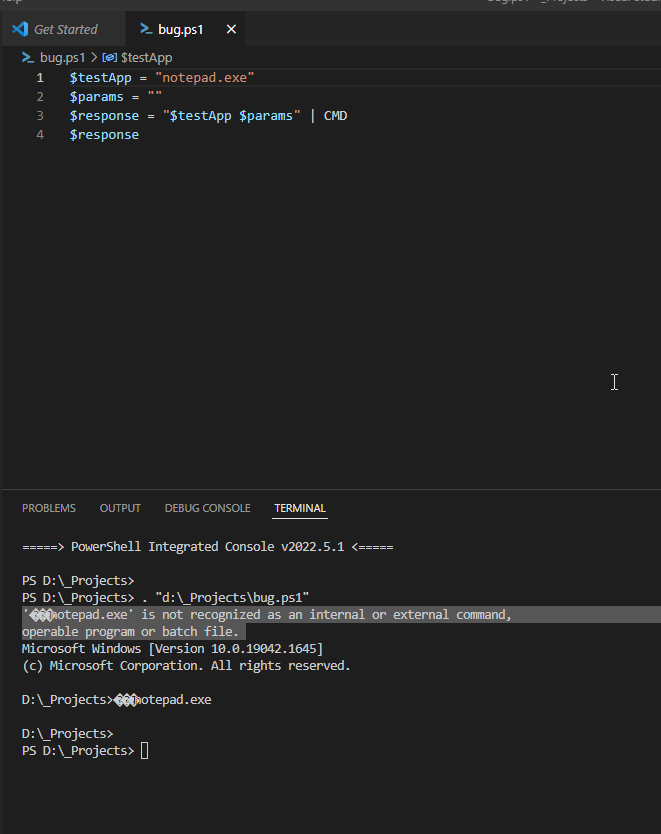
When trying to call an application from PowerShell Code, Code adds ��� to the string sent to CMD
Prerequisites
- [X] I have written a descriptive issue title.
- [X] I have searched all issues to ensure it has not already been reported.
- [X] I have read the troubleshooting guide.
- [X] I am sure this issue is with the extension itself and does not reproduce in a standalone PowerShell instance.
- [X] I have verified that I am using the latest version of Visual Studio Code and the PowerShell extension.
- [X] If this is a security issue, I have read the security issue reporting guidance.
Summary
I am trying to call a test application from PowerShell and then parse the input. The way I am calling the test application is with following snippet. This works as is in PowerShell ISE. The error is that the text that is sent to cmd has three added characters added to the front of the string (���).
$testApp = "notepad.exe" $params = "" $response = "$testApp $params" | CMD $response
Terminal $params = "" $response = "$testApp $params" | CMD $response } '���notepad.exe' is not recognized as an internal or external command, operable program or batch file. Microsoft Windows [Version 10.0.19042.1645] (c) Microsoft Corporation. All rights reserved.
D:_Projects>���notepad.exe
PowerShell Version
PS D:\_Projects\HD\SandK\Configuration> $PSVersionTable

Name                           Value
----                           -----
PSVersion                      5.1.19041.1645
PSEdition                      Desktop
PSCompatibleVersions           {1.0, 2.0, 3.0, 4.0...}
BuildVersion                   10.0.19041.1645
CLRVersion                     4.0.30319.42000
WSManStackVersion              3.0
PSRemotingProtocolVersion      2.3
SerializationVersion           1.1.0.1
Visual Studio Code Version
PS D:\_Projects\HD\SandK\Configuration> code --version
1.67.1
da15b6fd3ef856477bf6f4fb29ba1b7af717770d
x64
Extension Version
PS D:\_Projects\HD\SandK\Configuration> code --list-extensions --show-versions | select-string PowerShell

[email protected]
Steps to Reproduce
Run this code fragment. When ran from PowerShell ISE, notepad will open. From VS Code, the error is given: '���notepad.exe' is not recognized as an internal or external command, operable program or batch file.
Visuals
Logs
No response

This works fine in PS7, 5.1 has a lot of known unicode issues. This looks like a legit bug tho because it works fine in 5.1 terminal regular.
I know this is a contrived example you presented but you really shouldn't be using stdin for this, using the call operator & or start-process is the better approach.

@jasonmohyla no worries, and congratulations on opening your first issue on GitHub!
Hey @jasonmohyla does this still repro with PowerShell 5.1? I remember we fixed some encoding issue with running external commands, wondering if that fixed this too.
