
vscode-powershell
 vscode-powershell copied to clipboard
 PowerShell
Scripts using PNP.PowerShell do not work in VSCode
Prerequisites
- [X] I have written a descriptive issue title.
- [X] I have searched all issues to ensure it has not already been reported.
- [X] I have read the troubleshooting guide.
- [X] I have verified that I am using the latest version of Visual Studio Code and the PowerShell extension.
Summary
I've installed PNP.PowerShell-Module Version 1.7.0. When working within a normal PowerShell, all CMDLets work fine - for example running "Get-PBPListItem" returns the expected items.
When I work in VSCode with installed PowerShell Extension (v 2021.8.0), ALL PNP-PowerShell CMDLets throw an exception (TargetInvocationException).
This used to work perfect earlier ....
PowerShell Version
Name                           Value
----                           -----
PSVersion                      5.1.19041.1023
PSEdition                      Desktop
PSCompatibleVersions           {1.0, 2.0, 3.0, 4.0...}
BuildVersion                   10.0.19041.1023
CLRVersion                     4.0.30319.42000
WSManStackVersion              3.0
PSRemotingProtocolVersion      2.3
SerializationVersion           1.1.0.1
Visual Studio Code Version
1.59.0
379476f0e13988d90fab105c5c19e7abc8b1dea8
x64
Extension Version
[email protected]
[email protected]
[email protected]
Steps to Reproduce
- Install PNP.PowerShell module
- run a CMDLet like Get-PNListItem in a regular powershell window -> working !
- run a CMDLet like Get-PNListItem in a vscode powershell window -> TargetInvocationException
Visuals

Logs
No response

Can you provide the output of $error[0] | fl * -force after the error occurs?

 $error[0] | fl * -force


writeErrorStream      : True
PSMessageDetails      :
Exception             : System.Reflection.TargetInvocationException: Ein Aufrufziel hat einen Ausnahmefehler verursacht. ---> System.MissingMethodException:
                        Methode nicht gefunden: "Int32 System.Text.Encodings.Web.TextEncoder.FindFirstCharacterToEncodeUtf8(System.ReadOnlySpan`1<Byte>)".
                           bei System.Text.Json.JsonWriterHelper.NeedsEscaping(ReadOnlySpan`1 value, JavaScriptEncoder encoder)
                           bei System.Text.Json.JsonEncodedText.EncodeHelper(ReadOnlySpan`1 utf8Value, JavaScriptEncoder encoder)
                           bei System.Text.Json.JsonPropertyInfo.DeterminePropertyName()
                           bei System.Text.Json.JsonPropertyInfo.GetPolicies()
                           bei System.Text.Json.JsonClassInfo.CreateProperty(Type declaredPropertyType, Type runtimePropertyType, Type
                        implementedPropertyType, PropertyInfo propertyInfo, Type parentClassType, JsonConverter converter, JsonSerializerOptions options)
                           bei System.Text.Json.JsonClassInfo.AddProperty(Type propertyType, PropertyInfo propertyInfo, Type classType, JsonSerializerOptions
                        options)
                           bei System.Text.Json.JsonClassInfo..ctor(Type type, JsonSerializerOptions options)
                           bei System.Text.Json.JsonSerializerOptions.GetOrAddClass(Type classType)
                           bei System.Text.Json.JsonSerializer.ReadCore(Type returnType, JsonSerializerOptions options, Utf8JsonReader& reader)
                           bei System.Text.Json.JsonSerializer.Deserialize(String json, Type returnType, JsonSerializerOptions options)
                           bei System.Text.Json.JsonSerializer.Deserialize[TValue](String json, JsonSerializerOptions options)
                           bei PnP.Framework.Utilities.TokenHelper.GetMetadataDocument(String realm)
                           bei PnP.Framework.Utilities.TokenHelper.GetStsUrl(String realm)
                           bei PnP.Framework.Utilities.TokenHelper.GetAppOnlyAccessToken(String targetPrincipalName, String targetHost, String targetRealm)
                           bei PnP.Framework.Utilities.ACSTokenGenerator.GetToken(Uri siteUrl)
                           bei PnP.Framework.AuthenticationManager.<>c__DisplayClass75_0.<GetAccessTokenContext>b__0(Object sender, WebRequestEventArgs args)
                           bei Microsoft.SharePoint.Client.ClientRuntimeContext.OnExecutingWebRequest(WebRequestEventArgs args)
                           --- Ende der internen Ausnahmestapelüberwachung ---
                           bei System.RuntimeMethodHandle.InvokeMethod(Object target, Object[] arguments, Signature sig, Boolean constructor)
                           bei System.Reflection.RuntimeMethodInfo.UnsafeInvokeInternal(Object obj, Object[] parameters, Object[] arguments)
                           bei System.Reflection.RuntimeMethodInfo.Invoke(Object obj, BindingFlags invokeAttr, Binder binder, Object[] parameters,
                        CultureInfo culture)
                           bei Microsoft.SharePoint.Client.ClientContextExtensions.<>c__DisplayClass10_0.<Clone>b__0(Object oSender, WebRequestEventArgs
                        webRequestEventArgs)
                           bei System.EventHandler`1.Invoke(Object sender, TEventArgs e)
                           bei Microsoft.SharePoint.Client.ClientRuntimeContext.OnExecutingWebRequest(WebRequestEventArgs args)
                           bei Microsoft.SharePoint.Client.ClientContext.GetWebRequestExecutor()
                           bei Microsoft.SharePoint.Client.ClientContext.<GetFormDigestInfoPrivateAsync>d__37.MoveNext()
                        --- Ende der Stapelüberwachung vom vorhergehenden Ort, an dem die Ausnahme ausgelöst wurde ---
                           bei System.Runtime.ExceptionServices.ExceptionDispatchInfo.Throw()
                           bei System.Runtime.CompilerServices.TaskAwaiter.HandleNonSuccessAndDebuggerNotification(Task task)
                           bei Microsoft.SharePoint.Client.ClientContext.<EnsureFormDigestAsync>d__36.MoveNext()
                        --- Ende der Stapelüberwachung vom vorhergehenden Ort, an dem die Ausnahme ausgelöst wurde ---
                           bei System.Runtime.ExceptionServices.ExceptionDispatchInfo.Throw()
                           bei System.Runtime.CompilerServices.TaskAwaiter.HandleNonSuccessAndDebuggerNotification(Task task)
                           bei Microsoft.SharePoint.Client.ClientContext.<ExecuteQueryAsync>d__28.MoveNext()
                        --- Ende der Stapelüberwachung vom vorhergehenden Ort, an dem die Ausnahme ausgelöst wurde ---
                           bei System.Runtime.ExceptionServices.ExceptionDispatchInfo.Throw()
                           bei Microsoft.SharePoint.Client.ClientContextExtensions.<ExecuteQueryImplementation>d__6.MoveNext()
                        --- Ende der Stapelüberwachung vom vorhergehenden Ort, an dem die Ausnahme ausgelöst wurde ---
                           bei System.Runtime.ExceptionServices.ExceptionDispatchInfo.Throw()
                           bei System.Runtime.CompilerServices.TaskAwaiter.HandleNonSuccessAndDebuggerNotification(Task task)
                           bei Microsoft.SharePoint.Client.ClientContextExtensions.ExecuteQueryRetry(ClientRuntimeContext clientContext, Int32 retryCount,
                        String userAgent)
                           bei PnP.PowerShell.Commands.PnPWebCmdlet.GetWeb()
                           bei PnP.PowerShell.Commands.Lists.GetListItem.ExecuteCmdlet()
                           bei PnP.PowerShell.Commands.PnPSharePointCmdlet.ProcessRecord()
TargetObject          :
CategoryInfo          : WriteError: (:) [Get-PnPListItem], TargetInvocationException
FullyQualifiedErrorId : EXCEPTION,PnP.PowerShell.Commands.Lists.GetListItem
ErrorDetails          : Ein Aufrufziel hat einen Ausnahmefehler verursacht.
InvocationInfo        : System.Management.Automation.InvocationInfo
ScriptStackTrace      : bei <ScriptBlock>, <Keine Datei>: Zeile 1
PipelineIterationInfo : {0, 1}
Can you confirm that $PSVersion from the integrated console session itself? I'm wondering if maybe you're in PowerShell 7 there...(I mean, it should still work, but it would help narrow things down).
@rjmholt Look at the accepted answer in https://docs.microsoft.com/en-us/answers/questions/302548/jsonserializer-throws-exception-in-xamarinios.html, very curious.

This is the result of $PSVersionTable in PowerShell Integrated Console of vscode:
Name Value
PSVersion 5.1.19041.1023 PSEdition Desktop PSCompatibleVersions {1.0, 2.0, 3.0, 4.0...} BuildVersion 10.0.19041.1023 CLRVersion 4.0.30319.42000 WSManStackVersion 3.0 PSRemotingProtocolVersion 2.3 SerializationVersion 1.1.0.1
I have removed module "PNP.PowerShell" in Version 1.7.0 and installed this module in version 1.5.0. The error went away. Then I updated module "PNP.PowerShell" back to Version 1.7.0 - the error was there again. This can be reproduced.
Conclusion: The problem must have something to do with module PNP.PowerShell Version 1.7.0.
But strange anyway: The exception is only thrown when running CMDLets in VSCode-PowerShell.
I will post an issue in PNP.PowerShell.
Going to reopen the issue here since it's quite possible this is at least partially an issue in PSES
Just for reference, the module sources: https://github.com/pnp/powershell
@Tom-CK Can you check if this works with PowerShell 7? We have a theory right now...
Hey @erwinvanhunen, this bug appears between 1.5.0 and 1.7.0, and we think it was the introduction of your own ALC that may have caused this unfortunate interaction. PSES's assembly load logic when running with Windows PowerShell (so full .NET) does not check for the assembly version, it only resolves by name, and we think that's the issue. Since PSES has its own resolve assembly event, the one in https://github.com/pnp/powershell/commit/fd65170777e0c2bb61cb29325c64b73c2f8047a9#diff-05a628297ec69a1e93f2c84d148c6fac638d6499eda9b04d32a914b628fbe660 isn't being fired. We fear that a lot might break if we change our assembly loader to start checking for name + version. 🧐
It looks like PnP also does some dependency wrangling and registers their own assembly resolve event, but neither of us checks the required assembly version.
I've had a go implementing that. Give the extension here a try and let me know what happens.
I loaded the zip, disabled the original powershell extension and it did not fix the issue for me. My issue might be different because so far I am only having issues using the "Teams" commands. The SharePoint commands I have used so far have not caused me any issue.
PS> code --list-extensions --show-versions | Select-String powershell
[email protected]
[email protected]

PS> connect-pnponline -Url "https://m365x167780.sharepoint.com/sites/<site>"
-interactive
PS> Get-PnPTeamsTeam
PS>
The return should have been a list of 20-30 sites, I get nothing in the integrated console.

My issue might be different because so far I am only having issues using the "Teams" commands. The SharePoint commands I have used so far have not caused me any issue.
Well, that's good to know. 🤔
The return should have been a list of 20-30 sites, I get nothing in the integrated console.
Ok that's much stranger than getting an exception, and harder to debug unfortunately
The return should have been a list of 20-30 sites, I get nothing in the integrated console.
Ok that's much stranger than getting an exception, and harder to debug unfortunately
Here is the error when I try to target a specific site as this actually gives an error.
PS> Connect-PnPOnline -url "https://<tenant>.sharepoint.com/teams/TLTestTeam" -Interactive
PS> Get-PnPTeamsTeam -Identity "TLTestTeam"

Get-PnPTeamsTeam : Team not found
At C:\Users\tleduc\OneDrive - City of Kelowna\SharePoint Online\scripts\test2.ps1:2 char:1
+ Get-PnPTeamsTeam -Identity "TLTestTeam"
+ ~~~~~~~~~~~~~~~~~~~~~~~~~~~~~~~~~~~~~~~
    + CategoryInfo          : ObjectNotFound: (:) [Get-PnPTeamsTeam], PSArgumentException
    + FullyQualifiedErrorId : PnP.PowerShell.Commands.Graph.GetTeamsTeam

PS> $error[0] | fl * -force
writeErrorStream      : True
PSMessageDetails      :
Exception             : System.Management.Automation.PSArgumentException: Team not found
TargetObject          :
CategoryInfo          : ObjectNotFound: (:) [Get-PnPTeamsTeam], PSArgumentException
FullyQualifiedErrorId : PnP.PowerShell.Commands.Graph.GetTeamsTeam
ErrorDetails          :
InvocationInfo        : System.Management.Automation.InvocationInfo
ScriptStackTrace      : at <ScriptBlock>, C:\Users\tleduc\OneDrive - City of Kelowna\SharePoint Online\scripts\test2.ps1: line 2
PipelineIterationInfo : {0, 1}
Sorry for my late reply, I was on holidays for some days:
Please remind:
- the error is thrown only when working VSCode-PowerShell. It it not thrown when using regular PowerShell.
- after installing package PNP.PowerShell in Version 1.5.0 everything worked fine. Went back to 1.7.0 the error was thrown in VSCode PowerShell-Extension only.
Sorry for my late reply, I was on holidays for some days:
Please remind:
- the error is thrown only when working VSCode-PowerShell. It it not thrown when using regular PowerShell.
- after installing package PNP.PowerShell in Version 1.5.0 everything worked fine. Went back to 1.7.0 the error was thrown in VSCode PowerShell-Extension only.
For me the error only exists in the "Powershell Integrated Console" terminal, switching terminals to "Powershell" I can run the commands and they work.

Yes 1.5.0 is the last working version for this issue.
@Tom-CK Can you try the dev build of the extension that Rob provided in this comment? https://github.com/PowerShell/vscode-powershell/issues/3510#issuecomment-904983972
Your issue seems to be around the assembly loading, which we're trying to test.
@TobyLeduc the "PowerShell Integrated Console" is the extension's console, so that makes sense. The "powershell" terminal is just a hosted PowerShell terminal inside VS Code, it's not linked to the extension at all. So that does imply the issue is some incompatibility between PNP.PowerShell 1.7.0 and the extension itself.
@TobyLeduc for that error you posted, what's the result of $error[0].Exception | fl * -force?
@TobyLeduc for that error you posted, what's the result of
$error[0].Exception | fl * -force?
PS> $error[0].Exception | fl * -force
ErrorRecord    : Team not found
Message        : Team not found
ParamName      :
Data           : {}
InnerException :
TargetSite     :
StackTrace     :
HelpLink       :
Source         :
HResult        : -2147024809
@TobyLeduc Could there be some missing state that you're relying on? Because that error looks legitimate, that the command executed but the team was not found.
@TobyLeduc Could there be some missing state that you're relying on? Because that error looks legitimate, that the command executed but the team was not found.
I don't think so. Even if I just request all teams I get zero results and no errors, yet I know there are about 100 teams in the tenant. It only appears to be an issue when using the integrated console and pnp.powershell > 1.5
Connect-PnPOnline -url "https://<tenant>.sharepoint.com" -Interactive
Get-PnPTeamsTeam
I have even tried the same two lines on a different system (server 2012r2) with a first time install of vscode/pnp.powershell. I have also switched to a Contoso test tenant to rule out potential issues with our tenant.
Ok, I definitely thinks its an issue with both PSES and PNP.PowerShell using their own Assembly Load Contexts.
I'm unable to login: Connect-PnPOnline -Url "https://xxxx.sharepoint.com/sites/IT-InfrastrukturundSupport" -Credentials (Get-Credential) -CreateDrive -DriveName "SPO"
Connect-PnPOnline: Could not load file or assembly 'System.IdentityModel.Tokens.Jwt, Version=6.11.1.0, Culture=neutral, PublicKeyToken=31bf3856ad364e35'. Could not find or load a specific file. (0x80131621)
$error[0].Exception | fl * -force
Message : Could not load file or assembly 'System.IdentityModel.Tokens.Jwt, Version=6.11.1.0, Culture=neutral, PublicKeyToken=31bf3856ad364e35'. Could not find or load a specific file. (0x80131621)
FileName : System.IdentityModel.Tokens.Jwt, Version=6.11.1.0, Culture=neutral, PublicKeyToken=31bf3856ad364e35
FusionLog :
TargetSite : PnP.PowerShell.Commands.Base.PnPConnection CreateWithCredentials(System.Management.Automation.Cmdlet, System.Uri, System.Management.Automation.PSCredential, Boolean, System.String,
PnP.Framework.AzureEnvironment, System.String, System.String, Boolean, PnP.PowerShell.Commands.Enums.InitializationType)
StackTrace : at PnP.PowerShell.Commands.Base.PnPConnection.CreateWithCredentials(Cmdlet cmdlet, Uri url, PSCredential credentials, Boolean currentCredentials, String tenantAdminUrl, AzureEnvironment
azureEnvironment, String clientId, String redirectUrl, Boolean onPrem, InitializationType initializationType)
at PnP.PowerShell.Commands.Base.ConnectOnline.ConnectCredentials(PSCredential credentials, InitializationType initializationType) in
c:\PnPPowerShell\src\Commands\Base\ConnectOnline.cs:line 512
at PnP.PowerShell.Commands.Base.ConnectOnline.Connect(CancellationToken& cancellationToken) in c:\PnPPowerShell\src\Commands\Base\ConnectOnline.cs:line 258
at PnP.PowerShell.Commands.Base.ConnectOnline.ProcessRecord() in c:\PnPPowerShell\src\Commands\Base\ConnectOnline.cs:line 208
at System.Management.Automation.CommandProcessor.ProcessRecord()
Data : {TimeStampUtc}
InnerException : System.IO.FileLoadException: Could not load file or assembly 'System.IdentityModel.Tokens.Jwt, Version=6.11.1.0, Culture=neutral, PublicKeyToken=31bf3856ad364e35'.
at System.Runtime.Loader.AssemblyLoadContext.LoadFromPath(IntPtr ptrNativeAssemblyLoadContext, String ilPath, String niPath, ObjectHandleOnStack retAssembly)
at System.Runtime.Loader.AssemblyLoadContext.LoadFromAssemblyPath(String assemblyPath)
at System.Reflection.Assembly.LoadFrom(String assemblyFile)
at System.Reflection.Assembly.LoadFromResolveHandler(Object sender, ResolveEventArgs args)
at System.Runtime.Loader.AssemblyLoadContext.InvokeResolveEvent(ResolveEventHandler eventHandler, RuntimeAssembly assembly, String name)
HelpLink :
Source : PnP.PowerShell
HResult : -2146232799
There is no issue with Windows Powershell (aka 5.1) or Powershell 7.1!

Same issue with PnP.Powershell 1.5.0 WARNING: A newer version of PnP PowerShell is available: 1.7.0.
Use 'Update-Module -Name PnP.PowerShell ' to update. Use 'Get-PnPChangeLog -Release 1.7.0' to list changes.
You can turn this check off by setting the 'PNPPOWERSHELL_UPDATECHECK' environment variable to 'Off'.
Connect-PnPOnline: Could not load file or assembly 'System.IdentityModel.Tokens.Jwt, Version=6.8.0.0, Culture=neutral, PublicKeyToken=31bf3856ad364e35'. Could not find or load a specific file. (0x80131621)
$error[0].Exception | fl * -force
Message : Could not load file or assembly 'System.IdentityModel.Tokens.Jwt, Version=6.8.0.0, Culture=neutral, PublicKeyToken=31bf3856ad364e35'. Could not find or load a specific file. (0x80131621)
FileName : System.IdentityModel.Tokens.Jwt, Version=6.8.0.0, Culture=neutral, PublicKeyToken=31bf3856ad364e35
FusionLog :
TargetSite : PnP.PowerShell.Commands.Base.PnPConnection CreateWithCredentials(System.Management.Automation.Cmdlet, System.Uri, System.Management.Automation.PSCredential, Boolean, System.String,
PnP.Framework.AzureEnvironment, System.String, System.String, Boolean, PnP.PowerShell.Commands.Enums.InitializationType)
StackTrace : at PnP.PowerShell.Commands.Base.PnPConnection.CreateWithCredentials(Cmdlet cmdlet, Uri url, PSCredential credentials, Boolean currentCredentials, String tenantAdminUrl, AzureEnvironment
azureEnvironment, String clientId, String redirectUrl, Boolean onPrem, InitializationType initializationType)
at PnP.PowerShell.Commands.Base.ConnectOnline.ConnectCredentials(PSCredential credentials, InitializationType initializationType) in
c:\PnPPowerShell\src\Commands\Base\ConnectOnline.cs:line 502
at PnP.PowerShell.Commands.Base.ConnectOnline.Connect(CancellationToken& cancellationToken) in c:\PnPPowerShell\src\Commands\Base\ConnectOnline.cs:line 257
at PnP.PowerShell.Commands.Base.ConnectOnline.ProcessRecord() in c:\PnPPowerShell\src\Commands\Base\ConnectOnline.cs:line 207
at System.Management.Automation.CommandProcessor.ProcessRecord()
Data : {TimeStampUtc}
InnerException : System.IO.FileLoadException: Could not load file or assembly 'System.IdentityModel.Tokens.Jwt, Version=6.8.0.0, Culture=neutral, PublicKeyToken=31bf3856ad364e35'.
at System.Runtime.Loader.AssemblyLoadContext.LoadFromPath(IntPtr ptrNativeAssemblyLoadContext, String ilPath, String niPath, ObjectHandleOnStack retAssembly)
at System.Runtime.Loader.AssemblyLoadContext.LoadFromAssemblyPath(String assemblyPath)
at System.Reflection.Assembly.LoadFrom(String assemblyFile)
at System.Reflection.Assembly.LoadFromResolveHandler(Object sender, ResolveEventArgs args)
at System.Runtime.Loader.AssemblyLoadContext.InvokeResolveEvent(ResolveEventHandler eventHandler, RuntimeAssembly assembly, String name)
HelpLink :
Source : PnP.PowerShell
HResult : -2146232799
@rjmholt after following up your answer in the PowerShell Discord Server I created a "not-so" minimal repro example. https://github.com/lucahost/PSES-ALC-Repro as mentioned in the .\Run.ps1 script, running this with PowerShell 5.1 should work where running it with PSES will result in Errors If I can provide anything more or something is not working I'm here to assist.
If you attach VisualStudio to the PowerShell Process (Set a Breakpoint before Import-Module) and go to Debug -> Windows -> Modules, you'll see from where the Assemblies are loaded.

@KoenZomers and @gautamdsheth are you two also looking at this? It seems to have been introduced when a custom ALC with a resolver was added to PNP.PowerShell, and it's not expecting another ALC (the one in Editor Services) to exist and possibly resolve dependencies. But we're still not entirely sure.
Not entirely sure here what I would need to do but I cannot reproduce this on my end.
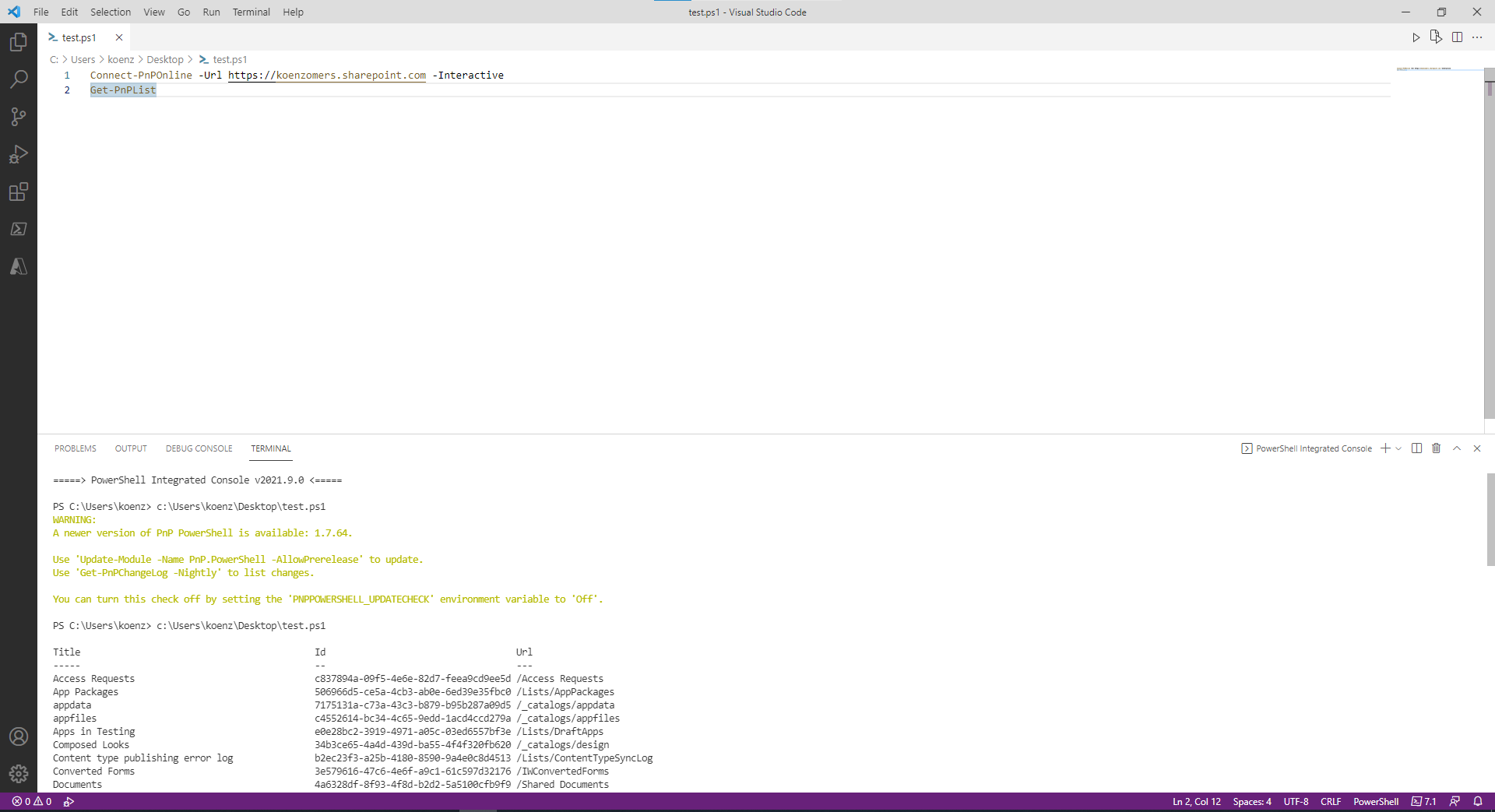
What do I need to do differently to reproduce the issue?

@KoenZomers We've managed to narrow it down to reproducing with 1.7.0 and above, but not with 1.5.0. Which version did you test there?